Examples
These examples demonstrate some of CQLi's chess database search capabilities, including PGN tag operations, positional pattern matching, speculative move processing, and directing matching games to multiple output files. For simpler introductory queries, see the Quick Start guide.
To run the examples below, place the query text into a file with a .cql extension, e.g. test.cql
and run:
cqli -i input.pgn -o output.pgn test.cql
to read games from input.pgn and write games matching the query in test.cql
to output.pgn. cqli should be replaced with the name of the executable file,
e.g. cqli.exe.
Some of the example queries contain the line:
cql(silent)
(or the option -silent) which is used to used to prevent CQLi from adding a comment ({CQL}) at
the matching position of every game and also suppresses a comment at the start of every game containing the original game number.
This is typically the desired behavior when the sole purpose of the query is to extract a set of games or update game
meta-information as opposed to identifying key positions. This option may be removed to preserve these comments.
Working with PGN Tags: Setting, Removing, and Querying Metadata
Setting Tags
The settag filter can be used to set the value of a PGN tag, updating the value of the provided
tag if it already exists in the game and creating it if it does not. For example, to populate a tag named
PlyCount with the number of plies in the game, the following query may be used:
cql(silent)
terminal
settag("PlyCount" str(ply))
The terminal filter only matches terminal positions (those for which there are no moves recorded)
which causes the rest of the query to only be evaluated for the last position of each game. The ply
filter yields the number of half-moves played to get to the current position (starting at zero for the initial
position, 1 after White's first move, 2 after Black's first move, etc) and the str filter converts
this number to a string (the settag filters expects two string arguments).
Removing Tags
Tags can be removed from a game with the removetag filter which takes a single string argument.
For example, to remove the PlyCount tag from any games that contain it, use the query:
cql(silent)
initial
removetag("PlyCount")
The presence of the initial filter simply prevents the removetag filter from
being evaluated for every position in the game which would cause the query to run slower (but not change
the result). Note that the removetag filter always matches the position so the result of
employing the above query on a PGN file is that all of the games will be present in the output file with
all instances of the PlyCount tag removed.
Multiple removetag filters may be used to remove multiple tags.
Querying Tags
The value of a tag can be obtained using the tag filter which takes a string containing the
name of the tag to inspect and returns a string containing the current game's tag value or None
if the tag does not exist. For example, to find games where the Result tag either does not
exist or does not contain a value value, the following query may be used:
dictionary str --> int (sum) D

initial
not tag "Result" ~~ "^(1-0|0-1|1/2-1/2|[*])$"
D[tag "Result"] += 1
The first line declares a dictionary named D with string keys and number values.
The (sum) part specifies how to merge the values of duplicate dictionary keys across threads at the end of processing.
The line after the initial filter extracts the value of the Result tag and determines if
it is a valid value (one of 1-0, 0-1, 1/2-1/2, or *) using a regular
expression. The not filter negates the next filter so the query matches only when the Result tag
has an invalid value. The next line adds the invalid Result value to dictionary D as a key,
if it does not already exist, and then increments the value of the key.
Running this on a database containing over 3 million games from TWIC finds 37 games with invalid Result tags.
The values of these tags can be seen with running CQLi with the option --showdictionaries which will dump
the keys and values for all dictionaries used in the query. This produced the following output:
Persistent variable 'D': Dictionary with 9 entries:
(+)-(-): 1
+/-: 10
-: 5
-/+: 7
0-0: 9
00-1: 1
1-0 ff: 2
1-O: 1
1/2 1/2: 1
Populate ECO and Opening tags
Overview
CQLi can be used to populate ECO and Opening information using the opening data curated by Niklas Fiekas and used by lichess.org to for games played on their site.
First, download the chess openings database from github.com/lichess-org/chess-openings and then run make all to generate the file dist/all.tsv.
Copy the query below (replacing MyECO and MyOpening in the last 3 lines
with the desired tag names) into a file named eco.cql and run the command:
cqli -i input.pgn -o output.pgn -nosort -silent eco.cql
where input.pgn is the name of the input file and output.pgn
is the name of the output file.
The -nosort option will cause CQLi to write processed games
immediately to the output file instead of storing them all in memory until processing is finished
which could result in memory exhaustion for very large PGN files. The -silent option
prevents match comments from being added to every game.
Query
cql(silent)
dictionary (min) $eco_dict
dictionary (min) $opening_dict

function loadEcoFile($filename) {
    while ((readfile $filename) ~~ "^(.*?)\t(.*?)\t(.*?)\t(.*?)\t(.*)$") {
        $eco = \1
        $opening = \2
        $fen = \5
        $fen ~~ "^(.*? .*? .*?) "
        $partial_fen = \1
        $eco_dict[$partial_fen] = $eco
        $opening_dict[$partial_fen] = $opening
    }
}

cqlbegin {
    $eco_dir = "chess-openings/dist/"
    loadEcoFile($eco_dir + "all.tsv")
}

fen ~~ "^(.*? .*? .*?) "
$partial_fen = \1
if ($eco_dict[$partial_fen]) {
    settag("MyECO" $eco_dict[$partial_fen])
    settag("MyOpening" $opening_dict[$partial_fen])
}
Explanation
The loadEcoFile function reads the tab-delimited opening data from the specified
file. The all.tsv file contains ECO codes and opening names along with the common set of moves used
to reach these positions and a partial FEN string. The data from these files are used to populate two dictionaries,
$eco_dict and $opening_dict, whose keys are the first three fields of a FEN string
(which contain piece placement, side to move, and castling rights) and whose
values are the corresponding ECO code and opening name, respectively. The cqlbegin filter is
used to ensure that these files are processed one time (per thread) before the first game is analyzed.
The $eco_dir variable specifies the directory where the all.tsv file is located and
should be updated as necessary.
The logic contained in the last 6 lines is what is executed for every position in each game, starting with the initial position.
The lines:
fen ~~ "^(.*? .*? .*?) "
$partial_fen = \1
employ the fen filter to provide a FEN string corresponding to the current position and then
match that against a regular expression that extracts the first 3 space-separated components which is stored
in a capture group. If the pattern matches, this capture group is accessed using the \1
filter and stored in the $partial_fen variable. If this value exists in the $eco_dict
dictionary, the ECO and Opening name information are then stored in the specified tags using the settag
filter.
The value of the tags will be updated for each successive position as long as the position exists in the opening data.
The result is to set the MyECO and MyOpening tags to the values corresponding to the most advanced
position in each game that has a corresponding position in the opening data. The persistent
and dictionary variables are defined with arbitrary merge strategies to allow the query to be
run in multi-threaded mode.
Most captures by a single piece
The following query will find games where a piece captured at least 10 opposing pieces:
// Games with 10 or more captures by a single piece
// sorted by the number of captures.
initial
piece $p in [Aa] {
    sort "Number captures by a single piece"
    { find all move previous capture . from $p } >= 10
}
The matching games will be sorted in the output PGN file by decreasing number of captures.
Each matching game will contain a comment before the first move indicating the total
number of captures by the piece with the most captures in the game. The find
filter will also add a comment of the form Found X of Y for every
capture by the piece with the most captures:
[Event "?"]
[Site "Detroit ch-MI 30'"]
[Date "1991.01.01"]
[Round "1"]
[White "Jones, Lo"]
[Black "Weaver, K."]
[Result "1-0"]
[ECO "D00c"]
[Source "LumbrasGigaBase"]

{Game number 141912} {CQL} {Number captures by a single piece: 11} 1.d4 d5 2.
Bf4 e5 3.Bxe5 Bb4+ 4.c3 Ba5 5.e3 Nd7 6.Bxg7 Qh4 7.Bxh8 Nh6 8.g3 Qe4 9.Nf3 Nf6
10.Bxf6 Ng4 11.Ng5 Qxh1 {Found 1 of 11} 12.Qa4+ Kf8 13.Qxa5 Qg1 14.Nh3 Bf5 15.
Qxd5 Nxf6 16.Qxf5 Qxh2 {Found 2 of 11} 17.Qxf6 a6 18.Qh8+ Ke7 19.Qxa8 c5 20.
dxc5 Qh1 21.Qxb7+ Qxb7 {Found 3 of 11} 22.Na3 Qxb2 {Found 4 of 11} 23.Rd1 Qxa3
{Found 5 of 11} 24.c6 Qxc3+ {Found 6 of 11} 25.Ke2 Qxc6 {Found 7 of 11} 26.Kd2
Qd7+ 27.Kc2 Qc7+ 28.Kb2 Qb7+ 29.Kc2 Qb4 30.Ra1 Kd7 31.Nf4 Qa4+ 32.Kb2 Kc6 33.
Bg2+ Kb5 34.Bf1+ Kb4 35.Nd3+ Ka5 36.Nc5 Qb4+ 37.Kc1 Qxc5+ {Found 8 of 11} 38.
Kd2 Qf5 39.a4 Qxf2+ {Found 9 of 11} 40.Kc3 Qxe3+ {Found 10 of 11} 41.Kb2 Qd2+
42.Ka3 Qd4 43.Rb1 Qxa4+ {Found 11 of 11} 44.Kb2 1-0
The quiet keyword may be added immediately after the find keyword
to suppress the comments added for each capture.
Most available moves
The move filter can be used to inspect moves made in a game or available at
a position. The filter move count legal will yield the number of legal moves
available in the current position. The following query will find games with positions having
more than 70 available moves:
// Games with more than 70 moves in a position
cql(silent)
sort "Most moves in a position" {
    $num_moves = move count legal
    comment($num_moves " legal moves")
    $num_moves
} > 70
The sort filter evaluates its argument, which in this case is a compound filter
which assigns the number of moves to the $num_moves variable, and adds a comment to
the current position with the number of legal moves available. The last value in the compound
filter ($num_moves) is the value that the sort filter operates on.
The entire query is evaluated for every position in each game and the sort filter causes the
enclosed comment to appear for only the position in which the value was the largest.
Matching games (those contaning a position with more than 70 available moves) are written out in descending order of most available moves (the game with the position having the most available moves will appear first). An example of such a position that does not involve promoted pieces is found in this game on lichess.org:
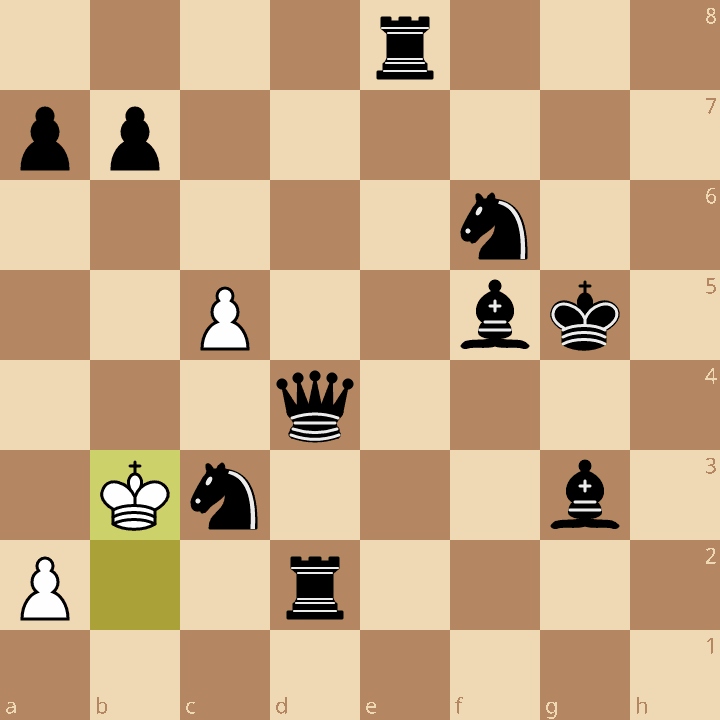
After 40.Kb3, Black has 85 moves available.
To limit the search to positions that do not have any promoted pieces, the filter:not promotedpiecescan be added before the sort filter.
Longest series of captures
The below query will find games with sequences of 15 or more consecutive captures and sort the matching games by the length of the capture sequence. The captures need not all take place on the same square.
// Find games with 15 or more consecutive captures (by both sides)
// and sort the results by the longest sequence found.
sort "Consecutive captures"
{ line nestban --> move capture . + } >= 15
Matching games will be sorted in the output PGN file by decreasing number of consecutive captures.
Each matching game will contain a comment before the first move indicating the length of the
longest capture sequence in the game. The line filter will also add a comment indicating
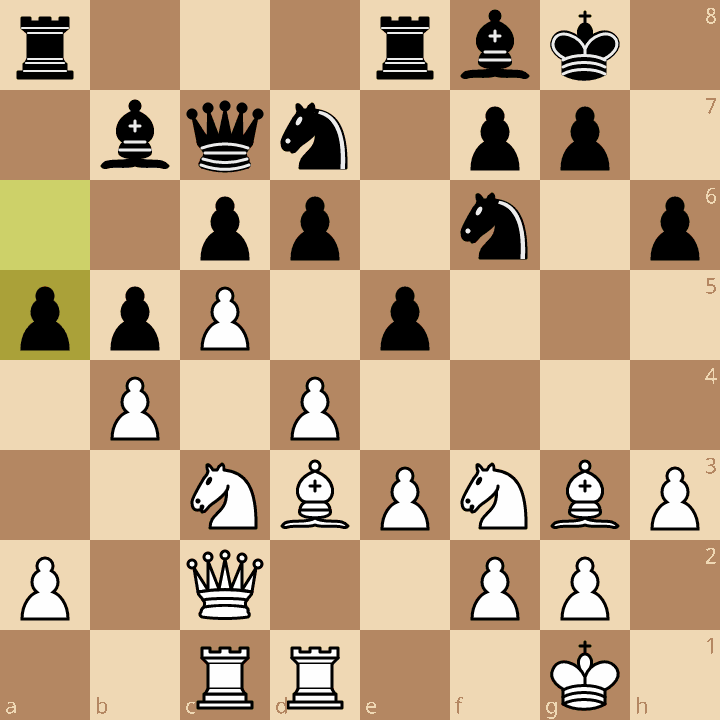
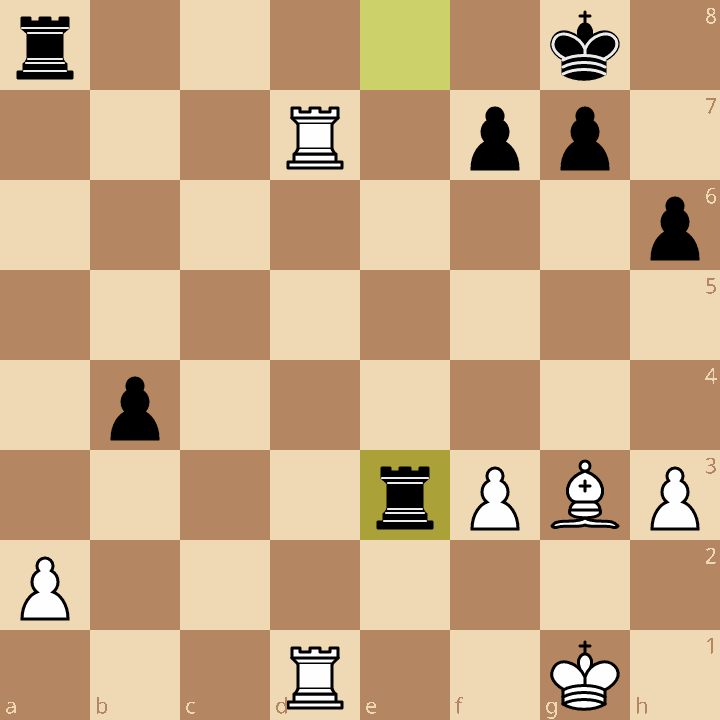
the start and end of the longest sequence found. The following game played between FM Ryszard Sokolowski
and Bartlomiej Piwowarczyk in Sypniewo, Poland in 2021 contains a sequence of 18 consecutive captures:
{Game number 1418609} {Consecutive captures: 18} 1.d4 d6 2.Nf3 Nf6 3.c4 Nbd7 4.
Nc3 e5 5.Bg5 Be7 6.e3 c6 7.Qc2 Qc7 8.Bd3 h6 9.Bh4 b6 10.h3 Bb7 11.O-O O-O 12.
Bg3 Rfe8 13.Rfd1 a6 14.Rac1 b5 15.c5 Bf8 16.b4 a5 {CQL} {Start line that ends
at move 25(btm)} 17.cxd6 Bxd6 18.Nxb5 cxb5 19.Qxc7 Bxc7 20.Rxc7 Bxf3 21.gxf3
axb4 22.Bxb5 exd4 23.Bxd7 Nxd7 24.Rxd7 dxe3 25.fxe3 {End line of length 18 that
starts at move 17(wtm)} 25...Rxe3 26.Rd8+ Rxd8 27.Rxd8+ Kh7 28.Kf2 Ra3 29.Rd2
b3 30.axb3 Rxb3 31.Be5 Rb5 32.Bd6 Rh5 33.Kg3 Rg5+ 34.Kh2 Rf5 35.Rd3 Rb5 36.h4
Rb2+ 37.Kg3 Rb1 38.Bc5 Rc1 39.Be3 Rc6 40.Rd4 Re6 41.Re4 Rc6 42.Bd4 Rd6 43.Rg4
f6 44.Be3 g5 45.Re4 Kg6 46.Re8 Kf7 47.Rb8 Rd3 48.Kf2 Kg6 49.Rb4 Kh5 50.hxg5
hxg5 51.Rd4 Rb3 52.Rd6 f5 53.Bd2 f4 54.Rd5 Kg6 55.Rc5 Rb2 56.Ke2 Ra2 57.Kd3 Ra8
58.Bc3 Re8 59.Rc6+ Kh5 60.Bd4 g4 61.fxg4+ 1/2-1/2
Splitting output into multiple files
The filename provided to the -o option may contain dynamic output file specifiers
which are substituted after the game matches but before being written out to determine the name of the
file that the game should be written to.
The %T{tag-name} specifier can be used to expand to the value of the tag specified
by tag-name. For example, the command:
cqli -i input.pgn -o 'output/eco-%T{ECO}.pgn' -silent
will cause every game (when there is no query provided, every game matches) in input.pgn
to be written to an output file in the output/ directory with the name eco-tag-name
where tag-name is the value of the game's ECO tag. Games that do not have an
ECO tag will be written to output/eco-.pgn (if the tag does not exist, the specifier
expands to an empty string).
When using dynamic output files in this way, CQLi will produce a summary of the files written and the number of
matching games at the end of processing. Depending on the input file, this will produce output that looks
something like:
5935 CQL matches (in 5935 games) written to output/eco-A00.pgn
1846 CQL matches (in 1846 games) written to output/eco-A01.pgn
558 CQL matches (in 558 games) written to output/eco-A02.pgn
367 CQL matches (in 367 games) written to output/eco-A03.pgn
...
12 CQL matches (in 12 games) written to output/eco-E92.pgn
17 CQL matches (in 17 games) written to output/eco-E94.pgn
11 CQL matches (in 11 games) written to output/eco-E97.pgn
4 CQL matches (in 4 games) written to output/eco-E98.pgn
In addition to a tag value, the result of a query can also be used to form the output filename with the
%Q{query}.
For example, the option:
cqli -i input.pgn -o 'output/gn-%Q{str gamenumber % 10}.pgn' -silent
evenly split the games from input.pgn into 10 files (named output/gn-0.pgn,
output/gn-1.pgn, ... output/gn-9.pgn) based on their gamenumber (the first game in
the input file has a game number of 1, the second 2, etc). The 10 can be changed to a number
n to split the games into n files.
Dynamic output file specifiers can also be used with the -a option (which appends games to the
provided file(s) instead of overwriting them). For example, running the commands:
cqli -i input.pgn -o 'output/player-%T{White}.pgn' -silent
cqli -i input.pgn -a 'output/player-%T{Black}.pgn' -silent
The first invocation will write each game to a file named after the White player.
The second invocation will write the same games to files named after the Black player (each
game will wind up in two files). The -a option is used in the second
invocation so that files created in the first invocation are appended instead of being overwritten.
The %T and %Q specifiers remove characters that are potentially problematic in filenames
(namely spaces, dots, slashes, symbols, and control characters) from the substitution, see section Dynamic Output File Specifiers
in the Reference Manual for more information including how to change this behavior.
The -dryrun option will show the files that would have been created, and how many games
would have been written to each file, without actually creating the files. When using dynamic output
file specifiers, this option should always be used first to ensure files being created match user
expectations.
Finding Rating Upsets in Chess Databases
The query below will find decisive games between player with ratings of at least 1900 where the winner had a rating of at least 600 points less than their opponent:
initial
elo white > 1900
elo black > 1900

flipcolor {
    result "1-0"
    sort "Rating difference" {
        elo black - elo white
    } > 600
}
One such game found by this query is Roman Shogdzhiev's win over GM Kirill Shevchenko in the 2023 World Blitz Championships. Roman was 8 years old at the time and defeated 2 other grandmasters in the same event as well as 2 grandmasters in the immediately preceding 2023 World Rapid Championships.
{Game number 2218102} {CQL} {Rating difference: 750} 1.e4 c5 2.Nf3 Nc6 3.Bb5
Nf6 4.Nc3 Qc7 5.O-O Nd4 6.Re1 a6 7.Bf1 Ng4 8.g3 Nxf3+ 9.Qxf3 Ne5 10.Qe2 d6 11.
Bg2 h5 12.f4 Nc6 13.d3 h4 14.Be3 hxg3 15.hxg3 e6 16.Kf2 Nd4 17.Qd2 Be7 18.Rh1
Rg8 19.Ne2 Nxe2 20.Qxe2 Bd7 21.Rh7 O-O-O 22.Qh5 Rdf8 23.Rh1 Qb6 24.b3 Qa5 25.a4
Qc3 26.Qe2 g5 27.Qd2 Qf6 28.Bf3 gxf4 29.gxf4 Qg6 30.Ke2 d5 31.Kd1 Qg3 32.Qf2 d4
33.R7h3 Qg6 34.Bd2 Bc6 35.Kc1 c4 36.Qxd4 cxb3 37.cxb3 Rd8 38.Qc3 Kb8 39.Rh6 Qg3
40.R6h3 Qf2 41.Kb1 Rc8 42.Qb2 Rgd8 43.Bc3 Qe3 44.Bh5 Qxf4 45.Be5+ Qxe5 46.Qxe5+
Bd6 47.Qf6 Rg8 48.Bxf7 Rg2 49.Qxe6 Bf8 50.R3h2 Rg3 51.Qe5+ 1-0
The elo white and elo black filters yield the rating of the
White and Black players, respectively, if available (CQLi looks for several different
tags that are commonly used to convey this information including, see the Reference
Manual for details). If the ratings for either player is not available, the elo
filter will yield a None value which will not match the game. Otherwise,
if both players have a rating that is above 1900, the rest of the query is evaluated.
The result filter matches games where the result is that specified by
its argument, in this case "1-0" indicating a win by White. The sort
filter has two operands here, a description string and the braced filter that contains the
elo difference calculation.
The result of the sort filter is the elo
difference which is then compared to 600 and the query only matches when
Black has a rating 600 points greater than White. The description string is used in
the comment that appears at the beginning of each matching game (see the bold portion
of the above game).
The flipcolor filter is a transform filter. Transform filters
accept an argument (in this case the brace-enclosed compound filter that follows)
and transforms them in some way. The flipcolor transform produces
two filters, one that is identical to the one provided and a duplicate with all
color-related filters flipped, and yields the value of whichever one matches.
This allows us to write the filter from the perspective of a White win against a
higher-rated Black opponent and have the filter also match Black wins against a
highter-rated White opponent.
Finding Arabian Mates: A CQL Pattern Search Example
Employed Definition
The mated king resides in a corner where it is attacked by an opposing adjacent rook. A knight both defends the rook and attacks the escape square diagonally adjacent to the mating rook. About 1 out of 1890 games played on lichess.org results in an Arabian mate.
Exemplar Positions
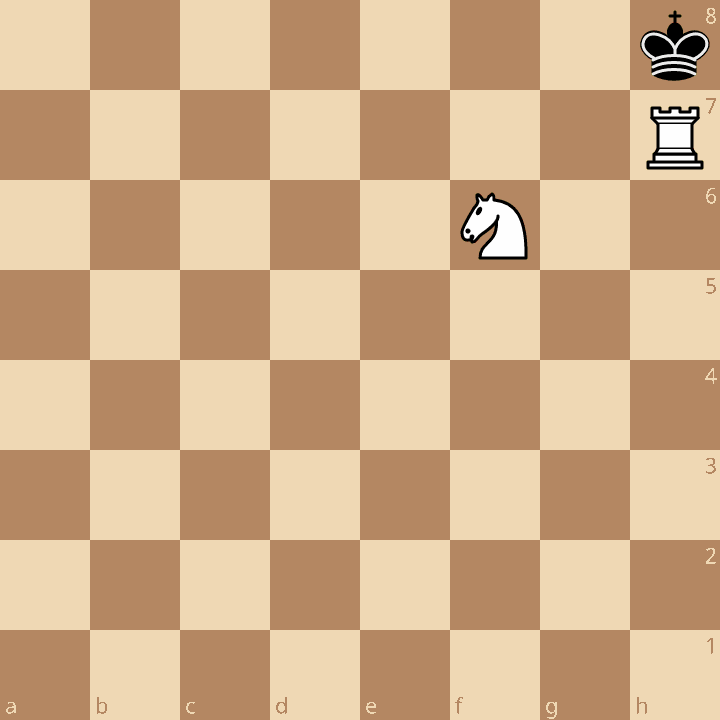
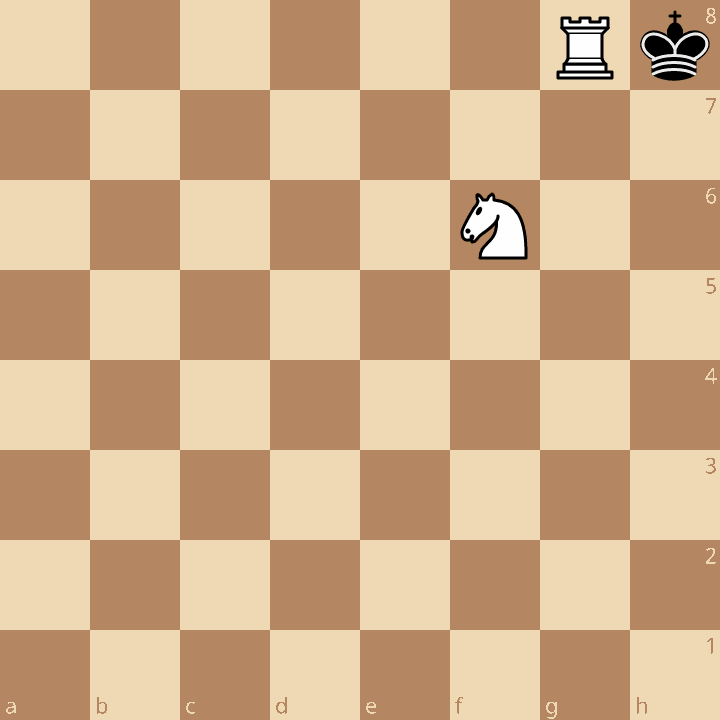
The black king resides on the h8 corner square and a white knight
occupies the f6 square. The king attacks a white rook (which must
therefore be adjacent to it) which is defended by the knight on f6.
The two configurations that match this examplar position are:
Query
The query below encodes the requirements of the exemplar position along with its 90° rotations and the forms where the colors are swapped (i.e. the White king is checkmated):
mate
flipcolor rotate90 {
    kh8 Nf6
    R attackedby k attackedby Nf6
}
Explanation
The filter kh8 matches a position where the Black king is on the
h8 square and Nf6 requires a White knight on the f6
square. The line:
R attackedby k attackedby Nf6matches a position where a White rook is attacked by a Black king and defended
by a White knight residing on the f6 square. Since the location
of the Black king and White knight have already been established, the only place a
White Rook could reside where it is adjacent to the Black King and defended by the
White Knight is on the g8 or h7 squares so this line could
be replaced with:
R[g8,h7]to achieve the same results.
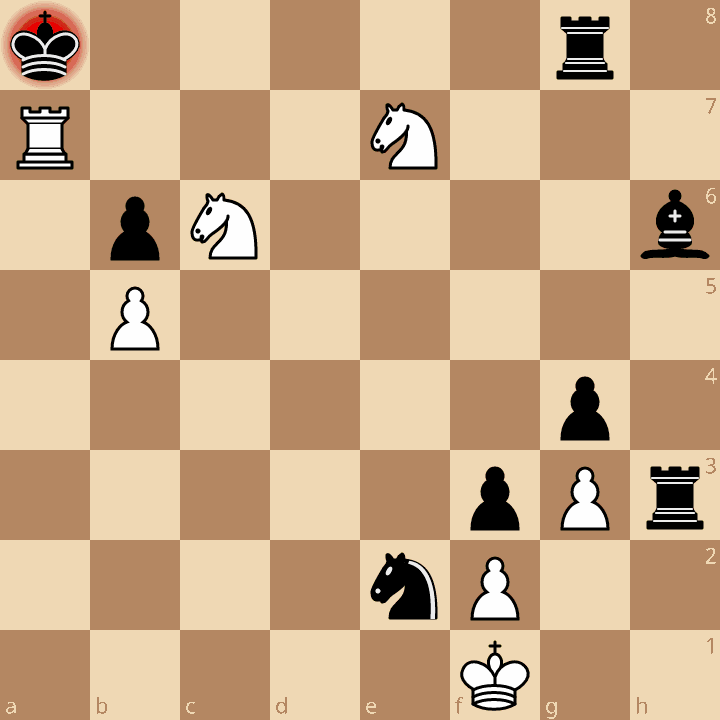
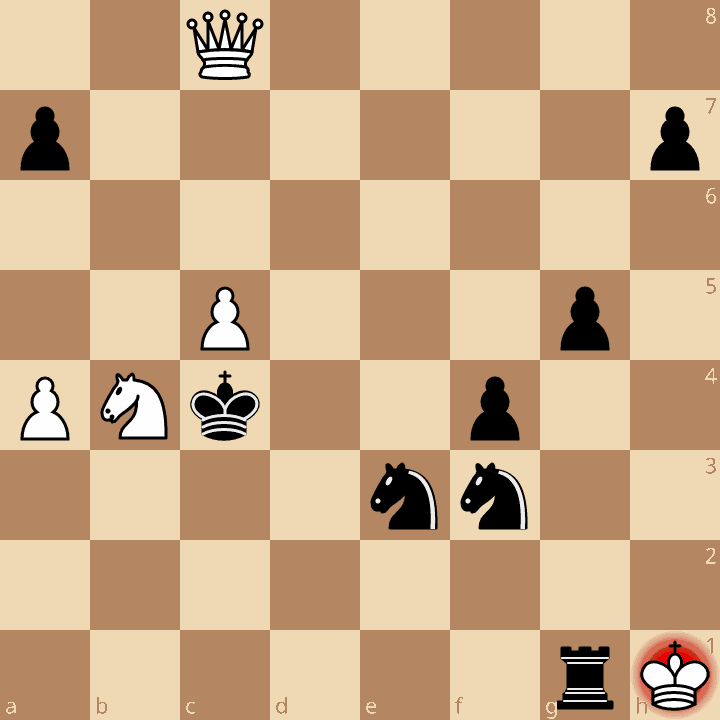
Example Mates
Examples of mates found using the above query: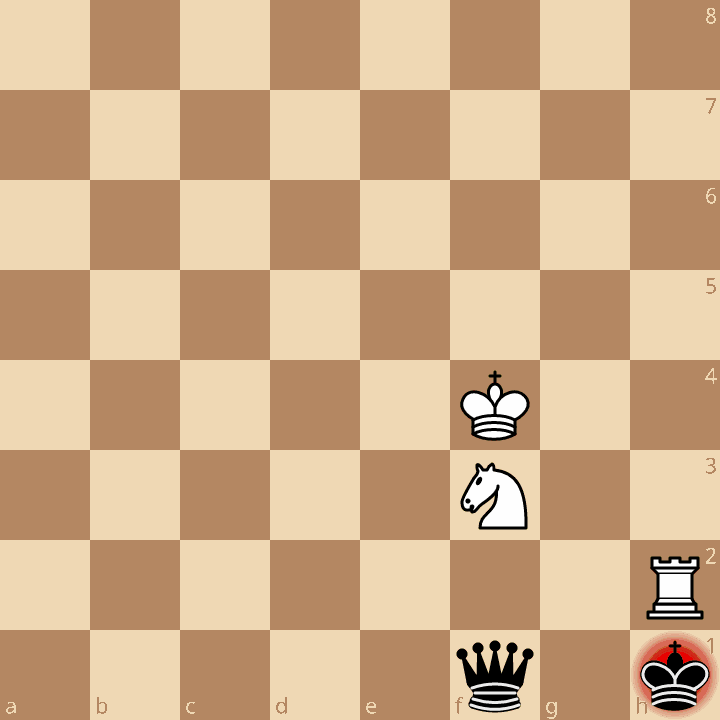
En Passant Checkmate Detection with CQL Queries
Games where en passant capture was played or available
The below query will find games where en passant capture was available as a legal move at some point in the game:
move legal enpassantRoughly 8% of standard games played on lichess.org match this query. En passant capture is played about 35% of the time it is legal as determined by the query:
if (move enpassant) then
    persistent (sum) $enpassant_played += 1

if (move legal enpassant) then
    persistent (sum) $enpassant_available += 1
En passant as the only legal move
The following query will find positions in which the only legal move is en passant:
move count legal enpassant == move count legal > 0which occurs about once out of every 100,000 games.
En passant checkmate
The query:
move enpassant : matewill find positions where capturing en passant results in checkmate. Another way to accomplish the same thing is to find positions that are already mate and check of the previous move was en passant:
mate
move previous enpassant
Below are two such positions found by the above query:
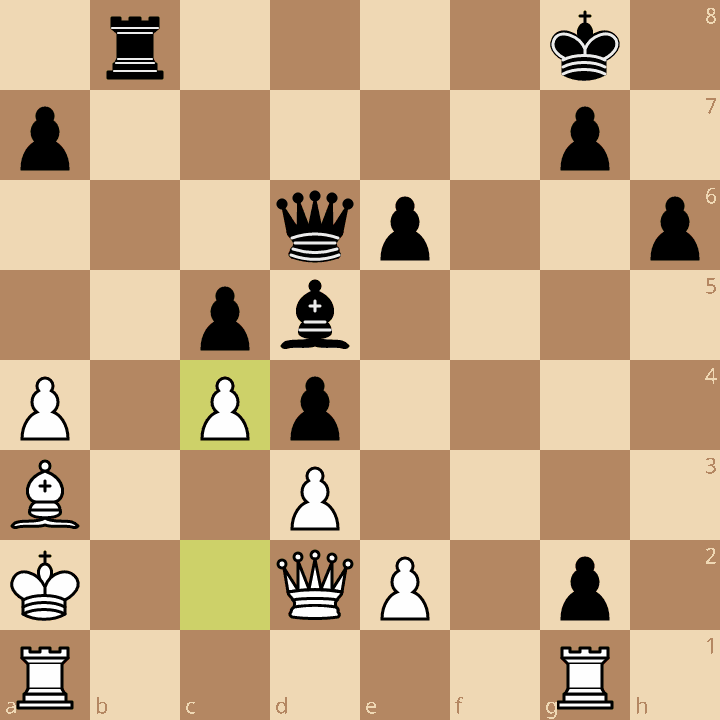
30...dxc3#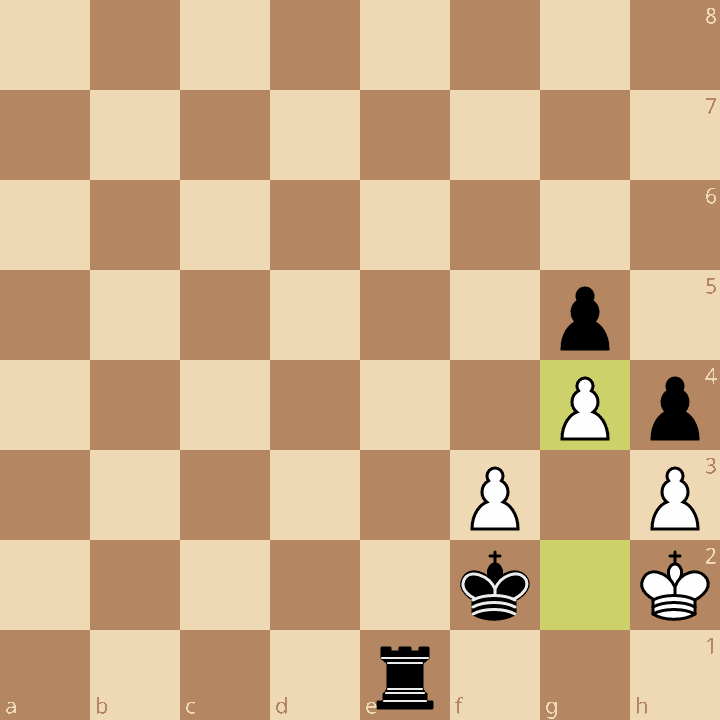
59...hxg3#The below query will find instances where checkmate by en passant capture was available but not played:
not move enpassant
move legal enpassant : mate
Sometimes there are two ways to capture en passant (when there are opposing pawns positioned appropriately
on both sides of the advancing pawn) and either will be mate. This happens less than once in a million games.
The vast majority of such positions have the defending king on the side of the board (in a or h files).
Below is an example where this occurred with the defending king in the middle of the board:
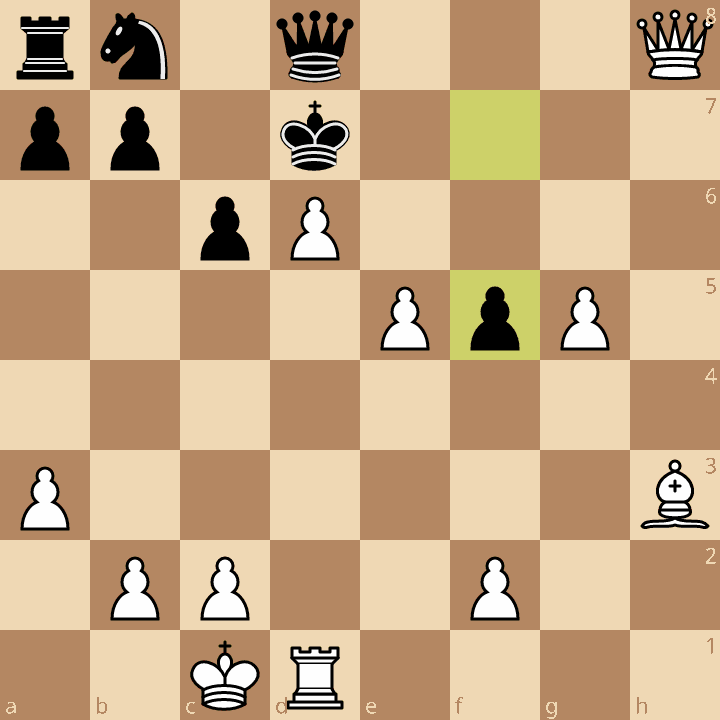
26.exf5# or 26.gxf5# are both mate by en passantThe above position is from this game where White opted instead for
26.Bxf5#.
Positions with two ways to mate with en passant can be found with:
move count legal enpassant > 1
move count legal enpassant : mate == 2