This section contains many short examples with little or no commentary. Many of the examples found here are also included in the section which discusses the relevant filters in more detail.
Illustrative Examples
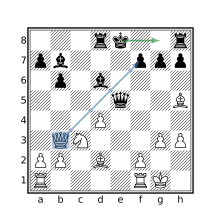
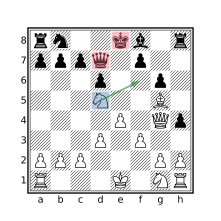
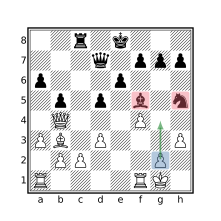
This section contains queries for various types of positional constructs. Each query is accompanied by an illustrative diagram representing a position found by the query.
Pawn Attacks
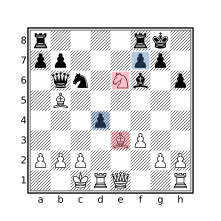
flipcolor [bnrqk] attackedby P > 1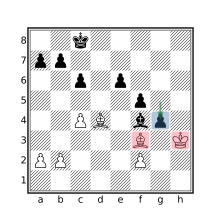
flipcolor piece Pawn in P {
    [bnrqk] attackedby Pawn > 1
}
Castling
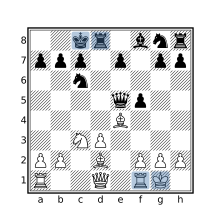
initial
find move o-o
find move o-o-o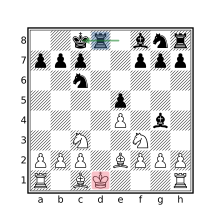
check
move previous castle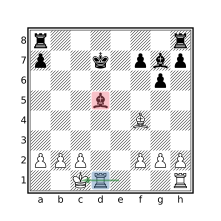
flipcolor {
    btm
    move previous castle
    $pin =? pin through [bn]
        from (R attackedby K)
    $pin attackedby a == []
}
move castle
child : not move legal : mate
imagine sidetomove reverse :
    move legal : mate
Pawn Structures
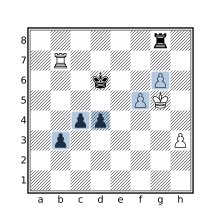
flipcolor Pa-h5-8 & passedpawns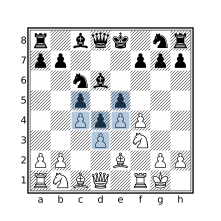
flipcolor p & up 1 P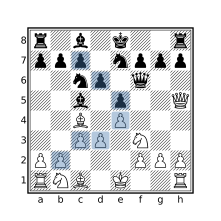
flipcolor P & diagonal 1 P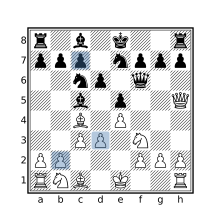
(flipcolor P & diagonal 1 P) &
(flipcolor P & ~ up horizontal 0 1 P)
Promotions
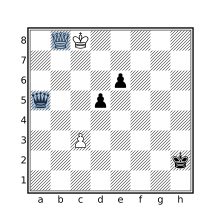
promotedpieces & Q
promotedpieces & q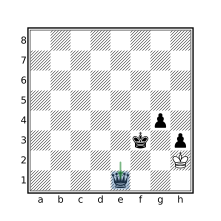
stalemate
move previous promote Q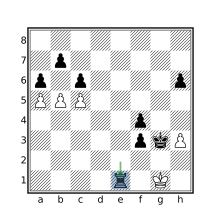
move promote [BNR]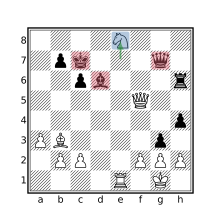
flipcolor {
    btm
    piece $pid = move to . previous
        promote N
    [krq] attackedby $pid > 1
}
King Squares
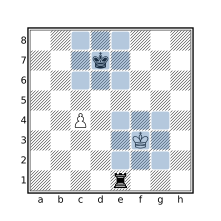
flipcolor { _ attackedby K == 8 }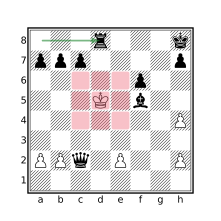
mate
flipcolor { wtm _ attackedby K == 8 }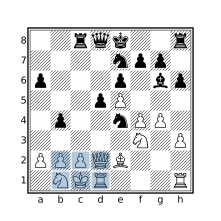
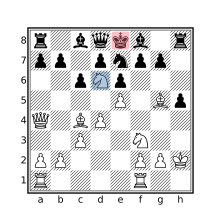
flipcolor {
    [_a] attackedby K == []
}
mate
flipcolor {
    wtm
    [_a] attackedby K == []
}
Speculative move
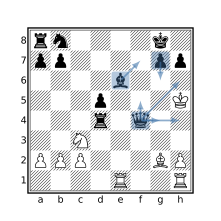
move count legal : mate > 5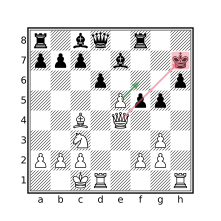
move legal enpassant : {
    check
    flipcolor { [brq] attacks K }
}
flipcolor piece $knight in N {
    move from $knight legal : {
        [kq] attackedby $knight > 1
    }
}
flipcolor piece Pawn in P {
    move to . from Pawn legal : {
        [bnrqk] attackedby Pawn > 1
    }
}
Tactics
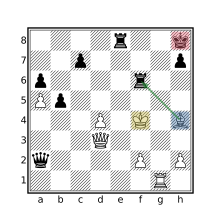
mate
parent : check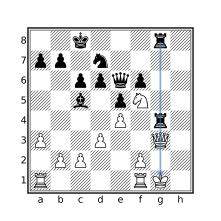
flipcolor ray orthogonal (R R q k)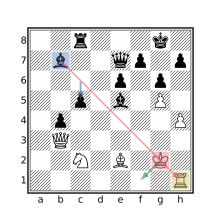
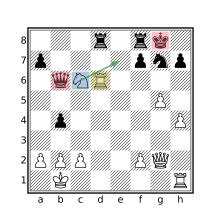
flipcolor {
    xray(B k [qr])
    move from k to _
}
flipcolor
xray(R (move from N to
    ~(. attackedby a): check) q)
Miscellaneous
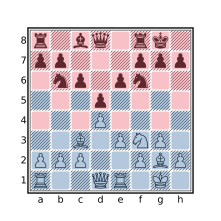
. attackedby A & . attackedby a == []
. attackedby A | . attackedby a == 64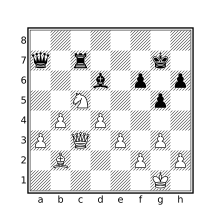
flipcolor dark [Aa] == [Aa]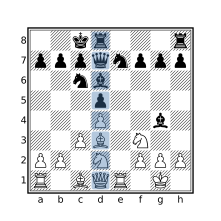
shifthorizontal
up 0 7 a1 & [Aa] == 8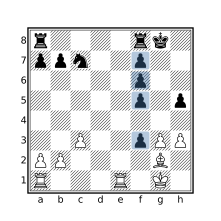
shifthorizontal flipcolor {
    QP = down a8 & P QP > 3 QP
}
Tag Operations
This section contains examples that manipulate PGN tags. The cql(silent) header is used to prevent new comments (such as game header comments or matching position comments) from being added to matching games (which is all of them if a CQL query is not provided).
Set the PlyCount tag to the number of plies in the mainline
cql(silent)
terminal
mainline
settag("PlyCount" str ply)
Populate an EndFEN tag with the FEN of the final position
cql(silent)
terminal
settag("EndFEN" standardfen)
Add missing 7-tag roster components
cql(silent)
initial
if not tag "Event" then settag("Event" "?")
if not tag "Site" then settag("Site" "?")
if not tag "Date" then settag("Date" "????.??.??")
if not tag "Round" then settag("Round" "?")
if not tag "White" then settag("White" "?")
if not tag "Black" then settag("Black" "?")
if not tag "Result" {
    $result = "*"
    if result "1-0" then $result = "1-0"
    if result "0-1" then $result = "0-1"
    if result "1/2-1/2" then $result = "1/2-1/2"
    settag("Result" $result)
}
Remove the Opening tag from all games
cql(silent)
removetag "Opening"
Change the name of a tag
cql(silent)
initial
settag("NewTagName" tag "OldTagName")
removetag "OldTagName"
Find games with inconsistent Result tag
cql(silent)
initial
tag "Result"
$expected_result = "*"
if result 1-0 then $expected_result = "1-0"
if result 0-1 then $expected_result = "0-1"
if result 1/2-1/2 then $expected_result = "1/2-1/2"
$expected_result != tag "Result"Output File Operations
This section provides examples of how to control various aspects of the output file. Since these aspects are handled by the CQL front-end (they are not part of the CQL language), the focus is on the CQLi command and relevant arguments instead of a CQL query. The commands below will match all games in the input file. To limit the operation to matching games, provide a .cql file argument or use the -cql option to supply a query.
The examples below use input.pgn as input file and output.pgn (or the output/ directory when using multiple output files) for the output file, these should be adjusted appropriately.
The –silent option is used to prevent new comments from being added to matching games which is usually the desired behavior. This option can be removed or replaced with any combination of –quiet, –noheader, and –matchstring to obtain an alternate behavior.
Split matching games into files named after a tag
cqli -i input.pgn -o 'output/%T{Event}.pgn' --silent
Use with:
–dryrunto see results without creating the output files.–noclobberto prevent overwriting existing files.–createdirectoriesto create directories that do not exist.
Split matching games into files based on query
cqli -i input.pgn -o 'output/%Q{str gamenumber % 10}.pgn' --silent
See notes above.
Exclude NAGs from matching games
cqli -i input.pgn -o output.pgn --silent --elidenags
Exclude comments from matching games
cqli -i input.pgn -o output.pgn --silent --elidecomments
Exclude variations from matching games
cqli -i input.pgn -o output.pgn --silent --elidevariations
Include all PGN move text on a single line
cqli -i input.pgn -o output.pgn --silent --pgnlinewidth 0
Comment Operations
The queries in this section manipulate comments that appear in the move text portion of the PGN file. The header
cql(quiet)prevents matching position comments from being added but game header comments will still be added. To suppress the game header comments, use the–noheadercommand line option.Find all games containing comments
Find all games with evaluation comments of the form
[%eval ...]Remove all comments from every game
Remove time clock comments having the form
%[clk ...]Add a comment to each position containing the position’s Zobrist Key