Moves that were either played or available in the current position may be queried with the move filter. Various criteria may be specified to limit the set of moves including the pieces involved in the move, the to and from squares of the moving piece, whether the move was a capture, promotion, or castling move, etc. The move filter can provide a count of the matching moves or a set representing from, to, or capture squares of matching moves.
Description
In any position there exists:
- One previous move that was played to reach this position from the immediately preceding position (except for the initial position).
- Zero or more legal moves.
- Zero or more pseudolegal moves.
- Zero or more moves that were played (including moves that started a variation).
- Zero or more reverse moves that could have been played from a theoretical position immediately preceding this one.
The move filter provides information about the (possibly empty) set of moves in one of the above categories that match a set of specified criteria.
move Filter Parameters
Every move filter has a mode which determines the moves that are considered. The default move mode is ordinary which considers the moves actually played at the current position (including any moves that start a variation if variations are enabled). Other modes may be specified using the following move filter parameters:
| Parameter | Effect |
|---|---|
previous |
The move played immediately before this position |
legal |
The legal moves available in this position |
pseudolegal |
The pseudolegal moves in this position |
reverse |
Theoretically possibly previous moves |
A legal move is any move that could legally be played in the current position. Pseudolegal moves also consider moves for which the current side’s king would be in check after making the move. The reverse parameter may only be used in combination with one of legal or pseudolegal, no other parameter combinations are allowed.
The following parameters can be used to limit consideration of moves:
| Parameter | Argument Type | Moves considered |
|---|---|---|
from |
Set | Moves from the square(s) specified by Set |
to |
Set | Moves to the square(s) specified by Set |
capture |
Set | Moves capturing a piece residing in Set |
promote |
Piece designator | Pawn promotions to the specified piece |
drop |
Piece designator | Drops of the specified piece |
enpassant |
Enpassant captures | |
castle |
Castling moves | |
o-o |
Short/kingside castling moves | |
o-o-o |
Long/queenside castling moves | |
null |
Null moves | |
primary |
Moves which do not start a variation | |
secondary |
Moves which start a variation |
For example the query:
move from Rwill match rook moves played at the current position and:
move legal castlewill match castling moves available in the current position.
Multiple parameters may be combined, for example:
move promote [BNR] capture .matches underpromotion moves that capture.
The from Parameter
Every move has a single associated from square which represents the square that the moving piece originated. The from parameter takes a Set argument and constrains consideration of moves to those where the from square is in this set. For example, at the starting position there are two moves with a from square of g1: Nf3 and Nh3.
Castling and null moves are king moves and the from square for these moves is the square the king occupied before the move. Drop moves (used in the Crazyhouse variant) do not have a from square and the drop parameter may not be combined with the from parameter. Drop moves will not be considered if the from parameter is specified, e.g. from . may be used to exclude drop moves from consideration where they would otherwise have been included.
When from appears as the first parameter, and count is not specified, the move filter is a Set filter whose value is the set of from squares of all matching moves.
The to Parameter
Every move has a single associated to square corresponding to the destination square of the moving piece. The to parameter accepts a Set argument and moves considered are limited to those where the to square is a member of this set. For example, at the starting position there are two moves with a to square of a3: a3 and Na3.
The to square of castling and null moves is the square of the current side’s king after the move is made. The to square for drop moves is the square where the piece is dropped.
When to appears as the first parameter, and count is not specified, the move filter is a Set filter whose value is the set of to squares of all matching moves.
The capture Parameter
Capturing moves have a single associated capture square corresponding to the square that was occupied by the captured piece. The capture parameter takes a Set argument and limits consideration of moves to those which result in a capture of a piece in this set. For en passant captures, this is the square on which the captured pawn resided, for all other captures the capture square is the same as the to square. Note that pieces that are exploded by adjacent captures in the Atomic variant are not considered to be captured.
When capture appears as the first parameter, and count is not specified, the move filter is a Set filter whose value is the set of capture squares of all matching moves.
The promote Parameter
The promote parameter accepts a piece designator and limits moves to those where a pawn is promoted to one of the specified pieces. The color of the piece designator is ignored when used with the promote parameter so e.g. promote N is equivalent to promote n. The piece designator may be a compound designator (e.g. [BN]) but may not include a square designator (e.g. Bf8). To specify promotions that occur on a particular set of squares, combine promote with to, e.g. move to f8 promote B. The piece specifier A may be used to specify any promotion move, e.g. move promote A.
The drop Parameter
The drop parameter accepts a piece designator and limits moves to those where a piece of the specified type was dropped, piece drops are only allowed in the Crazyhouse variant. The color of the piece designator is ignored when used with the drop parameter so e.g. drop P is equivalent to drop p. The piece designator may be a compound designator but may not include a square designator. To specify drops that occur on a particular set of squares, use the to parameter in combination with drop. The piece specifier A may be used to specify any drop move, e.g. move drop A.
The count Parameter
If the count parameter is provided, the move filter is a Numeric filter with a value corresponding to the number of matching moves. This form of the move filter always matches the position, if there are no matching moves the result is zero.
The previous Parameter
When previous is specified, only the move that was played immediately preceding this position is considered. If from, to, or capture appear in a move filter where previous is used, their corresponding Set arguments are evaluated at the position preceding the current position. For example, the query:
move previous from Bwill match a move made by the white bishop because the B piece designator is evaluated in the previous position, before the bishop was moved. If B had instead been evaluated in the current position the filter would not work as expected because the square the bishop now resides would correspond to the to square instead of the from square.
When applied to an imaginary position, the move considered is the one associated with the most recently evaluated speculative move filter in effect at the current position, if any. For example:
move legal : message ("move from: " move from . previous)will emit a message containing the from square for every legal move at the current position.
The Set argument of a from, to, or capture parameter in a move previous filter applied to an imaginary position will be evaluated at the position immediately preceding the most recently evaluated speculative move filter in effect at the current position, if any.
The move previous filter does not consider any moves when evaluated for an imaginary position for which there is not a speculative move filter in effect.
The legal and pseudolegal Parameters
When legal is specified, all legal moves at the current position are considered as opposed to just the moves that appear in the PGN file at the current position. When pseudolegal is specified, all pseudolegal moves are considered. A pseudolegal move is either a legal move or a non-castling move that places or leaves the side to move’s king in check but is otherwise legal.
The reverse Parameter
CQLi supports reverse move generation which can produce a list of all of the moves that could have conceivably been played in the position preceding the current one, using the reverse parameter will generate such moves. The reverse parameter must be combined with either legal or pseudolegal to indicate whether the reverse moves considered would have been legal or pseudolegal moves, respectively.
Reverse move generation assumes Standard chess, while the reverse move filter may be used with other variants, the particulars of such variants will not be considered when producing the reverse move list.
A reverse move generated by CQLi does not necessarily imply that the position reached by performing the reverse move is reachable in a real game, even if the current position is reachable. Reverse move generation ensures only position legality, not reachability. For example, consider the following retrograde puzzle where the goal is to determine the last move played:
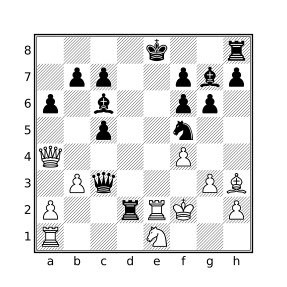
The query:
move legal reverse countwill consider three moves: 1.~Pe3x(N)f4+, 1.~Ke3f2+, and 1.~Ke3x(N)f2+ although only the first one yields a reachable position (the white king would have been exposed to an impossible check for either of the other two moves). The textual versions of these moves can be seen using the query:
move legal reverse : message currentmutationwhich employs the speculative move filter to evaluate a filter for every matching move and the currentmutation filter to portray the moves. The reachableposition filter may be used with the speculative move filter to help determine if positions following reverse moves are reachable, e.g.:
move legal reverse count : reachablepositionwill only consider the one move that is the solution to the above puzzle.
If the en passant target square is set for a position, either because the last recorded move was a double pawn push or the current position is the initial position and a FEN tag appears for the game with the en passant target square set, reverse move generation will assume that the last move must have been a corresponding double pawn push and will not generate other reverse moves.
Null moves
If null is specified, only null moves at the position are matched. Null moves are typically represented in a PGN file with the move text -- (CQLi also recognizes Z0, null, and pass as null moves) and represent the current side “passing”, e.g. not making a move (which is illegal in chess but such moves sometimes exist in puzzles). A null move resets the en passant square, increments the halfmove clock and the ply counter, and changes the side to move. CQLi allows null moves to appear both in the mainline and in variations. Null moves are not considered “legal” and will not be included in the set of available moves when using legal or pseudolegal (a null move can be generated by combining null with legal or pseudolegal in a speculative move filter).
Result of the move Filter
The result type of the move filter is either Boolean, Set, or Numeric depending on the parameters used. If the count parameter is specified, the result is a Numeric value indicating the number of matching moves at the current position. Otherwise, if the first parameter is from, to, or capture, the result has type Set. Otherwise the result is Boolean and matches the position only if there are any matching moves at the position.
If the count parameter is specified, the result will always match the position, even if there are no moves that match (the result will be 0).
If the first parameter is from, to, or capture, the result is the set of squares comprising the from squares, to squares, or capture squares of all of the matching moves, respectively. Every move has exactly one from square and one to square and may also have a capture square. The from square is the location of the moved piece before the move and the to square is the new square of the piece after the move. If the move is a capture move, the capture square is the square that the captured piece occupied immediately before being captured.
Castling is a king move and the from square and to square of such a move represent the position of the king before and after castling. A null move is a king move where the from square and to square are the same. If the move results in a capture, the capture square is the same as the to square except in cases of enpassant capture in which case the to square is the square the capturing pawn occupies after the move is made and the capture square is the location that the opposing pawn occupied before being captured.
If the primary keyword parameter is provided, only the primary move played in the game is considered, if the secondary keyword parameter is specified, only secondary moves (those that start variations) are considered.
Trailing comment Filter
If a comment filter appears immediately after an ordinary move filter (none of legal, pseudolegal, or previous are provided), the move filter becomes the custodian of the comment filter, evaluating the comment filter at the position after the move matching the move filter instead of the current position. This same behavior applies to the message filter as well. For example, the query:
move o-o-o comment "queenside castle"will apply the comment queenside castle to the post-castling position.
This custodial behavior may be suppressed by surrounding either the move filter or the subsequent comment filter in parentheses or braces. Alternatively the comment filter can be placed before the move filter. Any of the following examples will cause the comment to be placed at the current position, instead of the position resulting from the matching move:
move o-o-o (comment "before castling")
(move o-o-o) comment "before castling"
comment "before castling" move o-o-o
Constraints
The following constraints are placed on the move filter and violation of any of these constraints will be diagnosed at query compile time:
- No more than one castling specification may be provided, e.g.
move o-ois legal butmove castle o-ois not. - No keyword parameter may be specified more than once, e.g.
move castle castle. - The keyword parameters
primaryandsecondarycannot both be present. - The
primaryandsecondarykeyword parameters may not be combined withlegalorpseudolegal. - No more than one of
previous,legal, orpseudolegalmay be specified. - The
reversekeyword parameter may only be used in conjunction withlegalorpseudolegal. - The
dropparameter may not be combined withreverse,null,from,capture,promote,enpassant, or a castling specification.
Examples
Consider the following position for which Black has just played 4...Bxc3+:
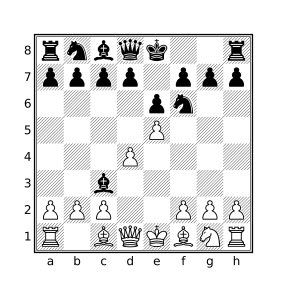
4…Bxc3+ and before 5.bxc3
Given that White responded 5.bxc3 in the game, the below table demonstrates various examples of the move filter and the result of each when evaluated at the above position.
| Filter | Result |
|---|---|
move |
true |
move count |
1 |
move from . previous |
b4 |
move to . previous |
c3 |
move capture . previous |
c3 |
move previous from b4 |
true |
move legal count |
4 |
move from A legal |
[c1,d1,e1,b2] |
move to _ legal |
[d2,e2] |
move to a legal |
c3 |
move capture . legal |
c3 |
move legal castle |
false |
move pseudolegal count |
35 |
move legal reverse count |
2 |
move from . legal reverse |
[b4,a5] |
The four legal moves reported by move legal count are: Ke2, bxc3, Bd2, and Qd2. The two conceivable reverse moves reported by move legal reverse count are: ~Bb4x(N)c3+ and ~Ba5x(N)c3+ which means that the black bishop moved to c3 from either b4 or a5 and captured a knight (this is the syntax by which reverse moves are portrayed by the currentmutation filter). The bishop must have captured a piece during this move or else the white king would have illegally already been in check. White is only missing a knight so this is the only piece that the bishop could have captured.
Note that move from . previous is a Set filter while move previous from b4 is a Boolean filter because the move filter is only a Set filter when from, to, or capture is the first parameter specified. The filter move previous from b4 matches because set arguments to the move filter are evaluated in the previous position when previous is specified, as described above.