Piece Tracking
At the start of each game, CQLi assigns a numeric piece ID to every piece in the initial position beginning with 1 for the first placed piece, 2 for the second placed piece, etc. Pieces in the initial position are placed in descending rank-major, ascending file-minor order, i.e. the same order specified by the piece placement field of a FEN string. The diagram below shows the standard starting position with the corresponding piece IDs assigned by CQLi.
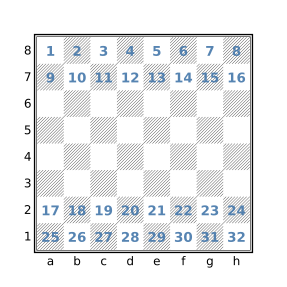
As pieces move around the board, they maintain their assigned piece IDs. The piece IDs can be used to determine if e.g. a particular piece started on the kingside or queenside. Pawns maintain their piece IDs across promotion allowing promoted pieces to easily be correlated to the original pawn.
Piece Variables
The piece assignment filter is used to define a variable that can store the identity of a piece. The syntax of the piece filter is:
piecename=set
where name is any valid variable name and set is any filter with Set type. If set contains a single square and that square is occupied, the variable name has the value of the identity of the piece occupying that square. Otherwise the piece variable has a value of None. For example:
piece $p = a1will create a Piece variable $p which holds the identity of the piece residing on square a1 or None if a1 is unoccupied. The piece variable can then be used to represent the piece in any position, including one where the piece is on a different square. For example, the below query will find positions where the a1 rook appears in all four corners of the board at some point in a game:
initial
piece $p = Ra1
(flip count find $p & a1) == 4
When appearing as an argument to the str, comment, or message filters, a piece variable is portrayed with the piece type followed by the square it occupies (e.g. Ke1) or [absent] if the piece is no longer on the board.
Piece variables are automatically converted to Sets when appearing anywhere except as an argument to a user-defined function or the str, comment, message, or pieceid filters.
Piece variables are also created with the piece iteration filter.
The pieceid Filter
The piece ID of any piece can be obtained with the pieceid filter which accepts a single argument which is either a piece variable or a Set filter. If the argument is a Set filter, pieceid yields the numeric pieceID of the piece that resides on the single square represented by the set argument. If the set argument does not consist of a single square, or if the square represented by the argument is not occupied, the pieceid filter yields None. If the argument is a piece variable the pieceid filter yields the numeric piece ID of the corresponding piece, even if the piece is no longer on the board. The pieceid filter is used primarily to determine if two pieces in different positions are the same piece. For example, the following filter will find two positions within a game that are identical except that two or more pieces of the same type and color have swapped places:
echo (source target) {
    source < target
    source & target == .
    $swapped_pieces = square sq in [Aa] {
        source:pieceid sq != pieceid sq
    }
    $swapped_pieces > 0
    comment("squares of swapped pieces: " $swapped_pieces)
}
Notes
New pieces are not typically added to the board during play although this can occur for dropped pieces in the Crazyhouse variant and when pieces are added to form imaginary positions with either the imagine filter or when generating reverse captures with the speculative move filter. In such cases, the next available piece ID is assigned to the newly placed piece. Captured pieces that are subsequently dropped in the Crazyhouse variant always have a new piece ID, not one that was associated with a captured piece.
In the Crazyhouse variant, it is possible that a game has multiple variations that each consist of drop moves. In such situations it guaranteed that each dropped piece will have a unique piece ID that is not reused in other variations in the same game.
When new pieces are added with the imagine filter or by exploring reverse moves with the speculative move filter, each new piece is assigned the next available piece ID but these piece IDs may be reused by later placements after the corresponding imaginary position has expired. Piece IDs used in imaginary positions saved with the saveposition filter are not subsequently reused.
A maximum of 65,535 distinct piece IDs are supported per game.
The CL_PATH environment variable
The CL_PATH environment variable may be used to specify a set of paths for which CQLi should search for input PGN and CQL query files. When an input file is specified on the command line or via a CQL header input parameter that does not consist of an absolute path name, the file is searched for in the current working directory (the directory from which CQLi was invoked). If the file is not found in the current directory, each of the semicolon-separated directories specified by the CL_PATH environment variable are searched for the file, in the order in which the directories appear. CQLi will then attempt to open the file in the first directory that contains a file with the provided name and terminate if the file could not be successfully processed.
The cqlbegin and cqlend Filters
The cqlbegin and cqlend filters provide a mechanism to perform actions that occur at the beginning and end of processing, respectively.
The cqlbegin Filter
The cqlbegin filter takes a single block (compound statement) argument. The block is evaluated one time prior to processing games. When running with multiple threads, this block is evaluated one time by each thread prior to that thread processing any games (note that it is possible for one thread to evaluate its cqlbegin block after another thread has already started processing games). Multiple cqlbegin blocks may be present in which case they are evaluated in the order in which they appear.
The primary purpose of this filter is to perform preparatory tasks such as initializing persistent variables or processing external files that should be completed before processing the first game (such as in this ).
The cqlend Filter
The cqlend filter takes a single block (compound statement) argument. The block is evaluated once after all games have been processed. When running with multiple threads, this block is evaluated after all persistent variables (including dictionaries) have been merged. Multiple cqlend blocks are evaluated in the order in which they appear.
The cqlend filter can be used to perform post-processing tasks such as writing out custom report information to a file via writefile or the message filter. Since such blocks have access to merged persistent data, they can be used to summarize and/or analyze data collected while processing games.
Metadata filters in cqlbegin and cqlend blocks
While all filters are accessible within cqlbegin and cqlend blocks, the evaluation of such blocks occurs outside the context of a real game so some filters are not particularly useful. Within cqlbegin and cqlend blocks, the gamenumber filter yields a value of zero (which never occurs elsewhere), the result "*" filter yields true to indicate an incomplete game, and the rest of the metadata filters yield a value of None.
All filters in CQLi are evaluated in the context of a current position. In the case of cqlbegin and cqlend blocks, this position is the standard starting position which represents the initial and terminal position of a non-existent game.
The readfile and writefile Filters
The readfile and writefile filters provide a limited extensibility mechanism by which CQLi may interact with its environment during runtime. The Commandpipe feature provides a more powerful extensibility mechanism.
The readfile Filter
readfileinput-filename
The readfile filter accepts a single String argument which represents the name of a file to read. If the provided string is None or the corresponding file cannot be opened for reading, a runtime error is generated and CQLi will terminate. Otherwise the readfile filter yields a String value representing the contents of the specified file. If a relative pathname is provided, it is searched for in the current working directory, the directories specified by CL_PATH are not searched.
The following example will populate the PGN tags ECO and Opening based on the positions reached in each game. The loadEcoFile function reads the tab-delimited files available here which contain opening data carefully curated by Niklas Fiekas (the same data is used by lichess.org to populate these fields for games played on their site). These files contain ECO codes and opening names along with the common set of moves used to reach these positions and a partial FEN string. The data from these files are used to populate two dictionaries, $eco_dict and $opening_dict, whose keys are the first three fields of a FEN string and whose values are the corresponding ECO code and opening name, respectively. The cqlbegin filter is used to ensure that these files are processed one time (per thread) before the first game is analyzed.
cql(silent)
dictionary (min) $eco_dict
dictionary (min) $opening_dict

function loadEcoFile($filename) {
    while ((readfile $filename) ~~ "^(.*?)\t(.*?)\t(.*?)\t(.*?)\t(.*)$") {
        $eco = \1
        $opening = \2
        $fen = \5
        $fen ~~ "^(.*? .*? .*?) "
        $partial_fen = \1
        $eco_dict[$partial_fen] = $eco
        $opening_dict[$partial_fen] = $opening
    }
}

cqlbegin {
    $eco_dir = "chess-openings/dist/"
    loadEcoFile($eco_dir + "a.tsv")
    loadEcoFile($eco_dir + "b.tsv")
    loadEcoFile($eco_dir + "c.tsv")
    loadEcoFile($eco_dir + "d.tsv")
    loadEcoFile($eco_dir + "e.tsv")
}

fen ~~ "^(.*? .*? .*?) "
$partial_fen = \1
if ($eco_dict[$partial_fen]) {
    settag("MyECO" $eco_dict[$partial_fen])
    settag("MyOpening" $opening_dict[$partial_fen])
}
The $eco_dir variable will need to be modified to reflect the location of the opening data files.
The result is to set the ECO and Opening tags to the values corresponding to the most advanced position in each game that has a corresponding position in the opening data. The persistent and dictionary variables are defined with arbitrary merge strategies to allow the query to be run in multi-threaded mode. See the commandpipe filter for an alternate implementation which communicates with an external process to perform the positional inquiries.
The writefile Filter
writefile[noclobber](output-filename contents)
The writefile filter takes a parenthesized argument list containing two String arguments. The first argument specifies the name of the file to write and the second argument specifies the contents to write to the file. The first time that writefile is used to write to a particular file, that file is opened for writing and any previous contents are replaced with contents unless the noclobber parameter is specified in which case the value of contents is appended to the file. Future evaluations of writefile filters writing to the same file cause the specified contents to be appended to the file.
If the output-filename string is None, a runtime error is generated after which CQLi will terminate. Otherwise, if the contents string is None, the writefile filter will yield false without attempting to write to the file. Otherwise, if the corresponding file cannot be opened for writing, a runtime error is generated and CQLi will subsequently terminate.
For example, to write the FEN string of all matching positions where either side could mate if it was their turn, the following query could be used:
move legal : mate
imagine sidetomove reverse : move legal : mate
writefile("mutual-mates.txt" standardfen + \n)
Notes
The readfile and writefile filters may be used in multi-threaded mode in which case it is guaranteed that no more than one read or write operation will occur at a time. This behavior prevents the possibility of interleaved writes to the same file and inconsistent file state due to race conditions involving reads and writes to the same file but does not provide any guarantees related to the order in which reads or writes are performed which may differ between runs. If the order in which reads and writes are performed is important, multi-threaded mode should not be employed.
The –secure option may be used to forbid the use of these filters.
Dynamic Output File Specifiers
The -a and -o options, used to specify where to write matching games, may contain one or more dynamic output file specifiers which allow matching games to be dynamically directed to different output files based on user-defined criteria. The dynamic specifiers supported by CQLi are shown in the table below.
| Output File Specifier | Description |
|---|---|
%t{tag-name} |
Expands to the value of the provided tag or an empty string if the tag is not present |
%T{tag-name} |
Same as the above but limits the characters that may appear in the result |
%q{query} |
Expands to the value given by executing the provided sub-query or the empty string if it does not match |
%Q{query} |
Same as the above but limits the characters that may appear in the result |
When the output filename string contains the above specifiers, they are substituted as described in the above table. This substitution occurs for each matching game, within the context of the game, allowing the output file of matching games to be determined at runtime.
For example, the option -o 'games/eco-%T{ECO}.pgn' will output each matching game to a file with the name that results by substituting %T{ECO} with the value of the ECO game tag, if it exists. Matching games that do not have an ECO tag will be output to the file games/eco-.pgn (the %T specifier expands to the empty string if the specified tag does not exist for the matching game). To exclude games that do not contain the ECO tag, the filter tag "ECO" can be used in the primary query to keep them from matching. The substitution of specifiers occurs after all settag and removetag filters from the primary query have been applied to the game. This means that the values of tags populated during evaluation of the primary query may be used in output tag specifiers.
When a %Q specifier is encountered, the provided CQL query is executed one time at the starting position of the matching game. The query must have string type (the last filter in the query must be a string filter) and the value substituted for the specifier is the string value of the query, or the empty string if the query does not match. This sub-query is separate from the primary query and cannot access the variables or functions of the primary query but may utilize its own persistent and non-persistent variables.
For example, the option -o 'games/%Q{str(gamenumber % 10)}.pgn' would split matching games into ten files based on the last digit of the game numbers. A literal closing brace (}) can be obtained by prefixing it with a backslash (\}). A literal backslash can be obtained with \\. Depending on the shell and quoting mechanism, it may be necessary to double all backslashes when entered on the command line.
The %T and %Q specifiers are called armored specifiers because they implicitly remove any characters that are not either non-ASCII Unicode characters or ASCII letters, numbers, the underscore (_) or hyphen (-) from the substituted values of the specifiers. This helps to mitigate a wide range of potential issues associated with the presence of control characters, slashes, dots, and special symbols appearing in filenames.
It is still important to exercise care when using dynamic output file specifiers in order to prevent unintended behavior. It is strongly recommended that the –dryrun option be employed, and the corresponding output reviewed, every time the dynamic output feature is utilized to prevent surprises. It is also recommended that the .pgn file name extension be included in the literal portion of the output filename, e.g. -o 'games/%Q{...}.pgn' instead of -o 'games/%Q{...}' and relying on the query to include the .pgn extension. The –noclobber option may also be used to prevent CQLi from overwriting existing files.
Below are some additional informational points about using dynamic output file specifiers:
- Tag names are case sensitive, e.g.
%T{site}will not expand to the value of a tag namedSite. - While only the initial position of matching games is evaluated by a sub-query, all of the positions of the full game are accessible to the query so filters such as
findandechowill work as expected. - Advanced functionality, such as defining functions and using
commandpipe, are possible in the sub-query but employing complex logic in the primary query and storing the result in a tag to be used with a%Tspecifier may be easier. - Evaluation of a sub-query cannot be used to “unmatch” a matching game. If a sub-query does not match, the value of the corresponding substitution will be empty but the game will still be output.
- Persistent variables in a sub-query retain their values across games but each thread has its own set of persistent variables which are not merged.
- Tags and comments cannot be removed or modified by sub-queries.
cqlbeginandcqlendblocks are not executed for sub-queries.- CQL headers are ignored when encountered in a sub-query.
- Dynamic output file specifiers may only be used in the argument of the
-aand-ooptions, they will not be expanded if they appear in the output parameter of a CQL header. - Multiple tag and query specifiers may be provided in a single output filename.
- Sub-queries operate on the game after any tag modifications and comment additions/removals that occurred in the primary filter which means the primary query can pass information to the sub-query in the form of a tag or comment.
- The
–excludetagpatternoption can be used to prevent tags that were created solely for the purpose of specifying the output file name from being included in the emitted game. - Positions saved in the primary query using the
savepositionfilter are not accessible in the sub-query. - Run-time errors encountered while evaluating a sub-query will result in program termination with a fatal error message.
- Dynamic output file specifiers are evaluated in the order presented in the output filename string.
- If the filename formed by expanding specifiers cannot be opened, a fatal error will occur.
- The
–dryrunoption can be used to see what files would have been created without actually creating them. - The
–createdirectoriesoption can be used to create directories in the output filename path that do not exist.
Unarmored specifiers
The “unarmored” %t and %q specifiers are provided to support use cases where the replacements performed by the corresponding %T and %Q specifiers are undesired. In this case, it is strongly advised that the replace filter be used to unconditionally replace undesired characters from appearing in the expansion of the format specifier. For %t specifiers, this means that the value of the tag is replaced in the primary query using replace and settag. For the %q specifier, the replace filter should be the last filter in the sub-query, replacing all undesired characters with either the empty string or a suitable replacement string. For example, if the tag Site is used with the %t specifier, the primary query should contain a filter that looks something like settag("Site" replace(tag "Site" "bad-character-set" "")).
The replacements performed by the %T and %Q specifiers are equivalent to evaluating the filter replace(string "[^[-A-Za-z0-9_][^[:ascii:]]]" "") where string is the value that would be substituted before replacements. This may be used as a starting point to implement a different character replacement policy. For example, -o 'games/%q{$var = /* ... */ replace($var "[^[-A-Za-z0-9_~$#]]" "")}.pgn' allows the use of ~, $, and # in filenames but prevents the use of non-ASCII characters. To cause offending characters to be replaced with another character (e.g. _), the "" argument to replace can be replaced with the relevant string, e.g. "_".
When deciding what characters to allow in filenames when using %t or %q, it may be helpful to consider the following:
- Windows does not allow the characters
<,>,:,",/,\,|,?, or*to be present in a file name. - ASCII control characters (
\x00-\x1F) are not allowed in file names for Windows and are not advisable in other filesystems. - The presence of directory separator characters (e.g.
/and\) and.can present security concerns as it could allow parent directory traversal providing a mechanism to access files outside of the intended target directory. - Space characters may present issues with some programs and can be awkward to handle in the shell.
- Windows does not allow a filename to end with a space or
.character.
See also this list of Problematic characters for more information on potential issues that could be encountered when using other symbols in a file name including %, ;, and =.
Filesystem case-sensitivity
It is worth noting that the resulting output files may be impacted by whether the underlying filesystem is case-sensitive or not. On most Windows and macOS systems, file access is case-insensitive meaning that the name test.pgn may be used to access a file with the name test.pgn, Test.pgn, or TEST.PGN. On most Linux systems, the filesystem is case-sensitive which means that attempting to access a file named test.pgn will not access an existing file with the name Test.pgn.
The relevance to CQLi is that when using a dynamic output file specifier that may expand to values that differ only by case, the result will be dependent on the case-sensitivity of the host filesytem. For example, given the option -o 'games/%T{White}.pgn', a game that contains the value "Lasker, Emmanuel" for the White tag, and another game that contains the value "LASKER, EMMANUEL" for the White tag, both games will wind up in the same file on a case-insensitive filesystem but in different files in a case-sensitive filesystem.
To obtain portable results, the lowercase and uppercase filters may be used to ensure consistent case in the resulting expansion. For example, %Q{lowercase(tag "White")} will expand to a value with all uppercase characters converted to lowercase. Similarly, the filter settag("White" lowercase(tag "White")) could be used in the primary query to convert the value of the White tag to all lowercase so that a %T{White} specifier expands to a lowercase value.
Note that the results emitted by the --dryrun option will show case-sensitive filenames which reflect the names that would be used to open the corresponding output files but do not reflect that case-insensitive way in which the resulting files may be accessed.
Multi-threaded Execution
The –threads option may be used to specify the maximum number of concurrent threads. By default, CQLi will use one less than the maximum number of threads reported as being supported by the hardware. The –singlethreaded option may be used to disable multi-threaded execution.
When using multiple threads, CQLi will create the specified number of worker threads with each one processing one game at a time until all games have been processed. The matching games from each thread are then combined and sorted to produce the final output. In most cases, optimal query performance will be obtained by utilizing a number of threads close to the number of available physical or logical cores.
There are several considerations when using multi-threaded execution that are discussed in the following sections.
Persistent Variables and Merge Strategies
Queries that employ persistent variables may not be used with multi-threaded execution unless each persistent variable is defined with a merge strategy that specifies how the final value of the variable is to be formed from the copies used by each thread.
A persistent variable declaration may include an optional parenthesized merge strategy immediately following the persistent keyword. For example, the declaration:
persistent (sum) totalPositions += 1specifies that when the query is run in multi-threaded mode, the final value of the totalPositions variable will be calculated by summing the value of each thread’s copy of this variable. Despite not using the persistent keyword, dictionary variables are always persistent. A dictionary variable may specify a merge strategy following the dictionary keyword and any optional type specifier.
In the vast majority of cases where persistent variables are used, the variable is used to track an extremal (minimal or maximal) value or as a counter in which case the desired semantics can be obtained in multi-threaded mode using corresponding merge strategies. The table below lists the merge strategies available for each variable type.
| Merge Strategy | Allowed Variable Types | Description |
|---|---|---|
min |
Numeric, String, Dictionary | For Numeric or String variables, the smallest value of the variable across all threads is used. For Dictionary variables, the smallest value for each key is used. |
max |
Numeric, String, Dictionary | For Numeric or String variables, the greatest value of the variable across all threads is used. For Dictionary variables, the largest value for each key is used. |
sum |
Numeric, Set, Dictionary | For Numeric variables, the sum of the variable values across all threads is used. For Set variables the result is the union of the variable values across all threads. For Dictionary variables, the sum or union of all values for each key is used. |
int min |
Dictionary | The value used for each key is determined by converting the value of each key to an integer, selecting the smallest integer value, and then converting this value to a string. |
int max |
Dictionary | Like int min except the greatest integer value is used. |
int sum |
Dictionary | Like int min and int max except the sum of all values for each key is used. |
When merging dictionary variables, the final result will contain all of the keys that exist in each thread’s copy, the merge strategy is only employed for keys that exist in multiple threads. The final result of persistent variables is never None unless every thread’s copy of the variable was None, i.e. a non-None value trumps a None value regardless of merge strategy.
The below example employs different merge strategies to collect some simple metrics about games in a database:
persistent (sum) totalPositions += 1
persistent (min) earliestPromotion += 0
persistent (max) greatestPly += 0
if move promote A then
    earliestPromotion = min(earliestPromotion ply)
if terminal then
    greatestPly = max(greatestPly ply)
Indeterminate Processing Order
When running in multi-threaded mode, the order in which games are processed will typically vary between runs as the order is dependent on how long it takes to process each game. In most cases, this is not a concern or even noticeable but there are some situations in which differences may be observed when using multi-threaded mode:
- The output produced when using the
–limitoption may be different between runs on the same database when using multi-threaded execution. - The order in which messages are emitted via the
messagefilter may differ between runs. - Reads performed by the
readfilefilter and the writes performed bywritefileare unordered between threads and may differ between runs. - The order of matching game numbers shown when using the
–showmatchesoption. - The order in which matching games are written when using the
–nosortoption.
Command Pipe Considerations
When a commandpipe filter appears in a CQL query running in multi-threaded mode, a separate instance of the corresponding command-pipe program is invoked for each thread. If the command-pipe program needs to maintain state information between processed games the CQL query may not be an appropriate candidate for multi-threaded mode.
Interacting with External Programs using Command Pipe
Command Pipe is a powerful, language-agnostic, extensibility mechanism that allows CQLi to interact with external programs during processing via a simple text-based interface. A command-pipe program is one that continually reads requests from standard input, one at a time, and responds to each request by printing a response to standard output. Requests and responses each consists of a single line. Command-pipe programs may be written in any language including high-level scripting languages such as Python, Perl, and Ruby.
The commandpipe filter is used to interact with a command-pipe program, it has the syntax:
commandpipe(program-name [args … ] request)
where program-name is a String filter containing the name of the command-pipe program, request is a String filter containing the request to send to the command-pipe program, and args is one or more optional String filters representing commandline options that the command-pipe program should be invoked with. For example:
score = commandpipe("engine-score" standardfen)will send the FEN string corresponding to the current position to the engine-score program and store the resulting response string in the score variable. Any of the arguments to the commandpipe filter may be arbitrary String filters, i.e. they need not be string literals.
The first time a commandpipe filter is evaluated with a new program-name and args combination, the specified program is executed and the provided request is sent. The connection to the same instance of the program persists until CQLi terminates. Subsequent commandpipe filters with the same program-name and args combination as a previously encountered filter communicate with the existing program instance. Because command-pipe programs persist between games, they may accumulate and maintain inter-game state information. Additionally, program startup cost is considerably more expensive than communicating across a pipe; the Command Pipe mechanism can support upwards of 100,000 requests per second per thread.
When running in multi-threaded mode, each thread instantiates its own set of command-pipe programs, a particular instance of a command-pipe program will never service multiple threads. CQLi supports up to 100 concurrently running command-pipe programs per thread.
The –secure option may be used to forbid the use of the Command Pipe feature.
Writing Command Pipe Programs
A command-pipe program consists of three parts: 1) an optional initial startup routine, 2) the main loop, and 3) an optional shutdown routine. The main loop reads one line at a time from standard input (stdin) and responds with a single line written to standard output (stdout). Lines read from stdin correspond to requests sent from CQLi during the evaluation of a commandpipe filter, the line written to stdout forms the result of the same commandpipe filter.
Every request sent to the command-pipe program will automatically be terminated by the platform- specific newline sequence, the request string provided in the commandpipe filter must not contain any embedded newline sequences of its own (this would result in the command-pipe program treating the input as two separate requests for which it would send two separate responses causing a stream desynchronization event for which CQLi will detect, produce a fatal error, and terminate).
The command-pipe program must respond to every request with a single line terminated by the platform’s newline sequence. The command-pipe program must ensure that the stdout stream is flushed after every response is written, this is typically accomplished by calling a flush function on the stream. Failure to flush stdout after writing the request will prevent CQLi from being able to read the result causing a timeout (or a hang if timeouts are disabled).
Requests will always be sent to command-pipe programs using UTF-8 encoding and it is expected that the resulting response will likewise be UTF-8 encoded.
Request and response strings are limited to 4096 bytes, including the newline sequence, CQLi will terminate with a fatal error is this limit is exceeded on either end.
When CQLi is shutting down, it will close the write end of the pipe that is connected to the command-pipe’s stdin stream, the command-pipe program will subsequently read EOF from this stream which should terminate the main loop.
A command-pipe program may need to perform initialization at startup such as connecting to a chess engine, loading data from a file or database, etc. and may also need to perform shutdown tasks such as disconnecting from an engine or server, writing results to a file, etc. Since the command-pipe program is not invoked until there is a pending request, the initialization should generally be performed quickly, if the initial response is not received within one second, a timeout will occur (timeouts are adjustable using the --timeout option described below). Shutdown procedures may take longer as CQLi does not wait for command-pipe programs to exit (CQLi may very well have terminated by the time the command-pipe program is notified that there are no more requests to process).
The stdin and stdout streams must not be read, written, or closed by the initialization or shutdown routines. The stderr stream of the command-pipe process will be connected to the stderr stream of CQLi and may be asynchronously written to at any point during the lifetime of the command-pipe program which is useful for debugging purposes and may also be used to write summary data to the screen.
Timeouts
If a command-pipe program does not respond within a specified amount of time CQLi will produce a runtime error and terminate. There are two timeout values that may be configured, the amount of time it takes a newly spawned command-pipe program to respond to its initial request and the amount of time allowed to respond to subsequent requests. The default timeout values are both one second. The --pipetimeout option may be used to specify different timeouts. This option takes one or two numeric non-negative arguments that represent the timeout in milliseconds (1/1000th of a second), if only one value is provided it applies to both timeouts, otherwise the first value specifies the timeout of initial requests and the second value specifies the response limit of subsequent requests. When two values are provided, the second may not specify a timeout that is larger than the first. A value of zero indicates that no timeout is enforced and may be applied to both timeouts or just the initial timeout. The timeout values are shared by all command-pipe programs.
Note that timeout values represent the wallclock time between sending the request and receiving the response and external resource load could result in spurious timeouts if the specified values are set too low.
Locating the Commandpipe Program
If the provided program-name contains a directory separator, no searching is performed, the program at the provided location will be executed (relative paths will be resolved from the current working directory). If the provided program-name does not contain a directory separator, the specified program is searched for in a platform-specific manner as described in the following sections.
Notes for Windows
If the provided program-name does not contain a directory separator, the program is searched for, in order, in the following locations:
- The directory from which CQLi was launched.
- The Windows system directories.
- The directories specified by the
PATHenvironment variable, in the order in which they appear.
The CL_PATH environment variable is not searched for program-name. If program-name does not contain an extension, a .exe extension is added before the location is resolved.
To execute batch files or scripts, the program-name must specify the coresponding interpreter with the script specified as an argument. For example, to execute a Python script named pipe.py, use:
commandpipe("python" "pipe.py" $request)To pass commandline arguments to pipe.py, provide them as separate arguments to commandpipe after "pipe.py".
Notes for Linux and macOS
If the provided program-name does not contain a directory separator, the program is searched for in the directories specified by the PATH environment variable, in the order in which they appear. If the PATH environment variable is not defined, an implementation-defined set of default directories is searched. The CL_PATH environment variable is not searched for program-name.
Note that unless the PATH variable contains the current directory (which is typically not the case) the current directory will not be searched. To execute a program in the current directory, prefix the name with ./, e.g. ./test.py. Because the name contains a slash, it will be resolved relative to the current directory without a search.
If the file is marked as executable but is not a valid exectuable format and does not start with a recognizable header specifying an intepreter, the default shell (/bin/sh) will be executed with program-name as the first argument (the remaining arguments will also be passed to the shell which will presumably pass them to the interpreter).
If program-name is a script, e.g. a shell or Python script, and contains a shebang line that identifies the interpreter, the interpreter will automatically be invoked to execute the provided script. Otherwise the interpreter must be provided as program-name with the name of the script and its arguments following the interpreter, e.g.:
commandpipe("python3" "test.py" $request)Debugging Command Pipe Programs
The most common errors writing or using command-pipe programs are listed below, these should always be the first things to check when troubleshooting the operation of a commandpipe filter:
- Incorrect specification of the program name in the
commandpipefilter resulting in an error message. - Not terminating response strings with a newline sequence in the command-pipe program resulting in a timeout error or a hang.
- Not flushing
stdoutafter writing a response in the command-pipe program resulting in a timeout or a hang. - Taking too long to respond to a request in the command-pipe program resulting in a timeout or hang.
Other potentially helpful troubleshooting steps include writing event information to stderr from the command-pipe program and using the message filter to write the result of a commandpipe filter to the screen.
Runtime Errors
There are several exceptional conditions that may occur while executing or communicating with a command-pipe program that will result in a runtime error. In all cases CQLi will terminate after issuing a message and providing relevant diagnostic information including the location in the query that was being evaluated when the exception occurred. Possible errors are described below along with typical causes.
command-pipe programprogramsent multiple responses to request
The specified command-pipe program sent multiple messages in response to a single request. This can occur because the request contained an embedded newline sequence causing it to be interpreted as multiple requests by the command-pipe program or because a single response produced by the command-pipe program contained multiple newlines.
maximum number of command-pipe programs (100) reached
CQLi supports up to 100 separate command-pipe programs running alongside each query thread, this error is produced when an attempt is made to launch more than this many programs.
size of request (size) exceeds message size limit (4096)
There is a 4096 byte limit on both requests and responses. If an attempt is made to send a request string that exceeds this limit to a command-pipe program, this error will be emitted.
io error attempting to send request to command-pipe programprogram:detail
An error was encountered while trying to write the request to the specified program’s input pipe. This can occur if the program closed the pipe or terminated prematurely.
command-pipe programprogramfailed to respond within allotted time (Xmilliseconds)
The specified command-pipe program did not respond to a request within the allotted time. This could either represent a bug in the command-pipe program or an inadequate timeout value which may be changed using the
--pipetimeoutoption.
io error attempting to receive response from command-pipe programprogram
An unspecified error was encountered while trying to read the response from the specified program’s output pipe.
failed to start programprogram:detail
The specified program could not be started, detail contains more information about the failure. There are many reasons this error may be encountered including: the program could not be found, the specified file was not executable, and the user does not have sufficient permission to execute the program.
command-pipe programprogramresponse exceeded max length (4096)
The specified command-pipe program sent a response which did not include a newline sequence within the allowed 4096-byte limit.
command-pipe programprogramis no longer responding
The pipe that CQLi established to send requests to the command-pipe’s
stdinstream was closed. This can occur if the program closed the pipe or terminated. This is a common error for interpreted scripts that contain a syntax error that is not diagnosed until after the interpreter starts and processes the script file.
Examples
Communicating with a Chess Engine
The example below uses a Python 3 script that connects to a chess engine using a UCI interface provided by the python-chess library. When the program is first invoked, it launches an instance of the Stockfish chess engine. Requests are expected to consist of a FEN string representing the current position. The running chess engine is then given half a second to evaluate the position and provide an integral score that forms the response. A positive score represents an advantage for White and a negative score an advantage for Black, the magnitude of the number corresponds to the size of the advantage expressed roughly in terms of centipawns (1/100th of a pawn). A score of the form #+X represents a mate in X for White and a score of the form #-X represents a mate in X for Black.
#!/usr/bin/python3

import sys
import chess.engine

def getScore(engine, fen):
    board = chess.Board(fen)
    info = engine.analyse(board, chess.engine.Limit(time=0.5))
    return str(info["score"].white())

# Main loop
with chess.engine.SimpleEngine.popen_uci("/usr/games/stockfish") as engine:
    for line in sys.stdin:
        fen = line.rstrip()
        sys.stdout.write(getScore(engine, fen) + "\n")
        sys.stdout.flush()
The following CQL query simply annotates every position with the engine evaluation score:
cql(quiet)
comment commandpipe("python3" "engine.py" standardfen)
Note that a time limit of 0.5 seconds is insufficient to provide a comprehensive analysis of many positions, increasing this value will provide more accurate and stable scores but may require increasing the default command-pipe timeout with the –pipetimeout option. A depth limit may also be used which may provide more consistently robust results but with greater variance in time. A combined approach might provide both a depth limit and a timeout limit to ensure that analysis never consumes more than e.g. 10 seconds.
Performing an engine analysis on every position of every game is also very expensive, although certainly feasible for a relatively small number of games. A more practical approach for larger databases would be to limit the situations in which the engine analysis is performed.
Debugging Facilities
The message Filter
The message filter behaves like the str filter except that the string formed by the concatenation of its arguments is used to form a message that is emitted during processing. message is a Boolean filter which always yields a true value.
By default, the text emitted as a result of evaluating a message filter will be prefixed with the game number and current move information. For example, the query:
initial
not reachableposition
message standardfen
may produce a message that looks like:
Game 32253: move 1(wtm): 6q1/7p/7p/p6p/6kp/p6p/5R1p/5B1K w - - 0 1If the quiet keyword appears immediately after message, this preamble is omitted:
6q1/7p/7p/p6p/6kp/p6p/5R1p/5B1K w - - 0 1While message is similar to the comment filter, it does not employ the same Smart Comment semantics that comment does. In particular, a message filter that is evaluated will always result in the message being issued, regardless of whether the position ultimately matches. Comment suppression options do not affect messages.
The message filter can be a useful diagnostic tool by showing the values of variables or other filters at specific points in a query. It can also be used as a convenience utility, e.g. to dump pertinent information without having to consult to matching positions in the corresponding output file. By default, messages are emitted asynchronously but the –noasyncmessages option can be used to disable this behavior which is sometimes useful in multi-threaded mode.
The message filter can also be used in a cqlend block to emit the result of post-processing data that was collected during analysis.
The assert Filter
The assert filter takes a single condition argument. If the condition matches the position, the assert filter yields true. Otherwise a runtime error is emitted and CQLi will terminate prematurely. Information about the game and position being examined at the time of the failed assertion is emitted to aid in debugging efforts.
For example, the filter:
assert isbound numPieceswill produce an error similar to the following when the numPieces variable is unbound at the point where the assert filter is evaluated:
test.cql:5:1 error: assert condition failed at game number 57 positionid 101
assert isbound numPieces
^~~~~~~~~~~~~~~~~~~~~~~~
8 . . ♛ . . ♝ . .
7 ♖ . ♞ . ♜ ♞ ♚ .
6 . ♗ ♙ ♟ . ♟ . ♟
5 . . . . ♟ ♙ ♟ .
4 . . . . ♙ . . .
3 . . . . . . ♙ ♙
2 . . . ♘ ♕ . . ♔
1 . . ♖ . . . . .
  a b c d e f g h

Game 57: move 51(btm)
2q2b2/R1n1rnk1/1BPp1p1p/4pPp1/4P3/6PP/3NQ2K/2R5 b - - 8 51
The assert message can be supplemented with additional information by adding or { message … false } to the condition of the assert filter. For example:
assert x <= 100will fail if x is greater than 100 but will not include the value of x in the error message. This information can be included by instead using:
assert x <= 100 or { message("x = " x) false }which will cause the value of x to be emitted immediately before the error triggered by the failed assert condition, e.g:
Game 3487: move 23(wtm): x = 423
test.cql:19:1 error: assert condition failed at game number 348 positionid 0
assert x <= 100 or { message("x = " x) false }}
^~~~~~~~~~~~~~~~~~~~~~~~~~~~~~~~~~~~~~~~~~~~~~
This works because the assert filter first evaluates the LHS of the or condition (x <= 100) and only when that part of the condition fails is the RHS ({ message("x = " x) false}) evaluated because of the short-circuited evaluation of logical operators. During evaluation of the RHS, the value of x is printed by the message filter and the false at the end of the compound filter ensures that the RHS fails as well so that the assertion is still triggered by the failed LHS condition.
Printing the AST
The --parse option will cause CQLi to dump the AST of the parsed CQL query and then exit. This can be useful to determine if the query was parsed as expected. The option can be used with a .cql file or with one or more –cql options (or both). For example, given a file named enpassantecho.cql containing the text:
// Two positions differ only in whether en passant is legal
cql(variations)
move enpassant
echo (source target) {
    sidetomove == source:sidetomove
    not move legal enpassant
    source & target == .
}
when using the --parse option CQLi will emit an AST similar to the following:
QueryContainer {Boolean} <Invalid location>
├─CqlHeader (variations) {Boolean} <enpassantecho.cql:2:1-15>
├─Move (ordinary, enpassant) {Boolean} <enpassantecho.cql:3:1-14>
└─Echo (source slot=0, target slot=1) {Boolean} <enpassantecho.cql:4:1-9:1>
  └─CompoundExpr {Boolean} <enpassantecho.cql:4:22-8:1>
├─EqualToOperator {Numeric} <enpassantecho.cql:5:5-35>
│ ├─SideToMove {Numeric} <enpassantecho.cql:5:5-14>
│ └─ColonOperator {Numeric} <enpassantecho.cql:5:19-35>
│   ├─Identifier (source, slot=0) {Position} <enpassantecho.cql:5:19-24>
│   └─SideToMove {Numeric} <enpassantecho.cql:5:26-35>
├─NotOperator {Boolean} <enpassantecho.cql:6:5-28>
│ └─Move (legal, enpassant) {Boolean} <enpassantecho.cql:6:9-28>
└─EqualToOperator {Boolean} <enpassantecho.cql:7:5-24>
  ├─BitAndOperator {Set} <enpassantecho.cql:7:5-19>
  │ ├─Identifier (source, slot=0) {Position} <enpassantecho.cql:7:5-10>
  │ └─Identifier (target, slot=1) {Position} <enpassantecho.cql:7:14-19>
  └─PieceDesignator '.' {Set} <enpassantecho.cql:7:24>
Node Representation
Each line of the output represents a single filter in the query with children indented below the node. The kind of node is shown first, sometimes followed by parenthetical information that is not directly reflected in any child nodes. For example, the CqlHeader node will contain the options provided in the header and the Move node shows the type of move filter it represents based on supplied parameters. Nodes that represent literal values (numeric literals, piece designators, and strings) will also include the literal value enclosed in single quotes after the node kind. The node may also include annotations enclosed in square brackets, the contents of which are discussed below. The result type of each node is shown in braces followed by the location range of the node as written in the source file shown in angle brackets. Source code comments are not included in the AST.
Node Locations
A location range contains the starting location of the corresponding filter and the ending location, separated by a dash, if different from the starting location (single character filters such as ‘.’ start and end at the same location). The location shows the name of the source entry (usually the name of a file), the line number, and the column number, separated by colons. Line and column numbers start at 1. For example enpassantecho.cql:5:19 refers to line 5, column 19 of file enpassantecho.cql. The source entry name will be elided from the end location if it is the same as the starting location. If the starting and ending locations are on the same line, the line number will be elided from the ending location as well. E.g. enpassantecho.cql:7:5-19 represents columns 5-19 on line 7 of enpassantecho.cql and enpassantecho.cql:4:22-8:1 represents the range starting at line 4 column 22 of enpassantecho.cql and ending on line 8 column 1 of the same file.
Nodes may span multiple source entries when using the -cql option which works by constructing multiple source entries to represent the resulting composite query.
Some nodes do not correspond to anything written in the source file. For example, each top-level filter is implicitly part of what CQLi calls a query container. Default values for omitted optional children of certain filters (such as pin) are included in the AST as implicit nodes. Implicit nodes also include implicit conversions such as position-to-numeric conversions and pieceid-to-set conversions. The location of implicit nodes is represented as “Invalid location” in the AST.
Variables and Slots
Each variable in CQLi is associated with a slot, the index of which is included in the corresponding Identifier node. Different variables can reference the same value such as when pass-by-reference function semantics are employed and the slot for both variables will be the same in such cases. Slot information is also shown for the iterator variable in piece, square, and string iterator filters, and the source and target variables of the echo filter.
Node Annotations
Nodes sometimes contain a node annotation enclosed in square brackets which provides additional contextual information about the node. For example, function call arguments are annotated with the argument index, children of transform filters are annotated with the applied transformation, and the operands of certain filters
are annotated to show which clause of the parent filter the child node corresponds to. When an annotation is present, it appears after any parenthetical information and before the node result type.
Transforms
Transforms are processed and expanded during parse time which is reflected in the corresponding AST. For example, the AST for the query:
rotate90 up 1 c3will look something like:
QueryContainer {Boolean} <Invalid location>
└─Transform (rotate90 4 children) {Set} <test.cql:1:1-16>
  ├─Direction (up) [identity] {Set} <test.cql:1:10-16>
  │ ├─Range {Numeric} <test.cql:1:13>
  │ │ └─Integer '1' {Numeric} <test.cql:1:13>
  │ └─PieceDesignator 'c3' {Set} <test.cql:1:15-16>
  ├─Direction (right) [clockwise90] {Set} <test.cql:1:10-16>
  │ ├─Range {Numeric} <test.cql:1:13>
  │ │ └─Integer '1' {Numeric} <test.cql:1:13>
  │ └─PieceDesignator 'c6' {Set} <test.cql:1:15-16>
  ├─Direction (down) [rotate180] {Set} <test.cql:1:10-16>
  │ ├─Range {Numeric} <test.cql:1:13>
  │ │ └─Integer '1' {Numeric} <test.cql:1:13>
  │ └─PieceDesignator 'f6' {Set} <test.cql:1:15-16>
  └─Direction (left) [counterclockwise90] {Set} <test.cql:1:10-16>
├─Range {Numeric} <test.cql:1:13>
│ └─Integer '1' {Numeric} <test.cql:1:13>
└─PieceDesignator 'f3' {Set} <test.cql:1:15-16>
The kind of transform (rotate90 in this case) is shown in parentheses and the children of the transform node are the transformed target of the rotate90 filter. Each transformed child is annotated with the specific transform applied.
Colored Output and Unicode
By default, ANSI escape sequences will be used to produce colored effects for the dumped AST tree when using the --parse option. If these sequences do not render properly in the terminal or are undesired (such as when redirecting the output to a file), the --noansicolors option may be used to suppress such sequences from being generated.
Unicode characters are used to represent the chess pieces in the chessboard printed during the presentation of a runtime error and Unicode box-drawing characters are used to print the AST tree when using the --parse option. These characters are emitted by default for Linux and macOS and suppressed by default on Windows. The --consoleunicode and --noconsoleunicode options may be used to enable or disable, respectively, the use of these characters.
The CQL Header
CQL queries may contain an optional CQL header which has the syntax:
cql([parameters])
The CQL header provides the ability to specify several front-end properties within the query itself. Commandline options can be used to override parameters provided in a CQL header. The available header parameters are listed in the below table.
| Header Option | Description |
|---|---|
gamenumber range |
Only gamenumbers within the provided range are processed. |
input filename |
Specifies the name of the input PGN file. |
matchcount range |
Only output games with a given number of matching positions. |
matchstring string |
Sets the string that CQLi uses to comment matching positions. |
output filename |
Specifies the name of the output PGN file. |
result result |
Only games with the specified result are processed. |
quiet |
Suppresses match and auxiliary comments. |
silent |
Suppresses all comments generated by CQLi. |
sort matchcount range |
Like matchcount and sort games by number of matches. |
variations |
Enable processing of variations. |
For example, the query:
cql(input HHdbVI.pgn
    output many-terminals.pgn
    variations
    matchcount 100 200)
terminal
will enable processing of variations, find games from HHdbVI.pgn that have between 100 and 200 terminal positions, and write the results to many-terminals.pgn sorted in descending order of the number of terminal positions (which will be included in a sort comment at the beginning of each game). The result is similar to running the query:
100 <= (sort find all terminal) <= 200with the options:
--input HHdbVI.pgn --output many-terminals.pgn --variations
except that in the latter case terminal positions will be commented with a “Found” comment instead of a “CQL” comment.
CQLi allows CQL headers to appear anywhere in the query although it is recommended to place them at the beginning of the query file for compatibility with CQL 6. If multiple CQL headers are provided in a query, only the parameters provided in the latest header are honored.
The input Parameter
The input parameter accepts a single filename argument which may either be a string literal or a series of characters terminated by the first ‘)’ or whitespace character seen. The file designated by the filename argument is used as the input PGN file. The –input option may be used to override this parameter. This parameter is ignored if the –secure option is used.
The matchcount Parameter
The matchcount parameter accepts a range argument with one or two non-negative numeric literals. If two literals are provided, the value of the second must not be less than the value of the first. Only games for which the number of matching positions is within the specified range will be emitted. If zero is included in the specified range, games that do not match the query will be emitted. The –matchcount option may be used to override this parameter.
The matchstring Parameter
The matchstring parameter accepts a single string argument which must be a string literal. The specified string will be used to comment matching positions instead of the default of “CQL”. An empty string may be specified to disable matching comments. The –matchstring option may be used to override this parameter.
The output Parameter
The output parameter accepts a single filename argument which may either be a string literal or a series of characters terminated by the first ‘)’ or whitespace character seen. The file designated by the filename argument is used as the output PGN file. A filename of stdout will cause matching games to be written to standard output. The –output option may be used to override this parameter. Like the --output option, the file specified by this parameter need not have a .pgn extension. This parameter is ignored if the –secure option is used.
The result Parameter
The result parameter accepts a single result argument which is one of the following token sequences: 1-0, 0-1, 1/2-1/2, *, or one of the following string literals: "1-0", "0-1", "1/2-1/2", or "*". Only games that have a result corresponding to the result argument are processed by CQLi. This parameter cannot be overridden by the –result option as the option injects a result filter into the query stream while the result parameter limits the games processed before the CQL query is evaluated.
The quiet Parameter
The quiet parameter does not accept any arguments. Its presence indicates that matching comments and auxiliary comments should not be emitted in matching games. The –silent option may be used to override this parameter.
The silent Parameter
The silent parameter does not accept any arguments. When this option is specified, CQLi will not add any comments to matching games. The –quiet option may be used to override this parameter.
The sort matchcount Parameter
This parameter is identical to the matchcount parameter described above in that it accepts a range which specifies the prerequisite number of matching positions in order for games to be emitted. Additionally, games will be sorted in the output file, in descending order, by the number of matching positions. If the query contains sort filters, those filters take precedence with the match count being the tie-breaker between positions that would otherwise have the same sort order. The –sortmatchcount option provides the equivalent sorting behavior on the commandline. The –matchcount option may be used to override the range associated with this parameter, in such a case the results will still be sorted by the match count.
The variations Parameter
The variations parameter does not accept any arguments. Its presence specifies that processing of variation positions should be enabled. The –mainline option may be used to override this parameter.
HHdbVI and HHdbVII Database Interface
CQL 6.1 provides the hhdb filter as an interface designed specifically for the querying of the endgame study database. CQLi supports this feature and extends it to support the newer database.
The HHdbVI and HHdbVII databases contain a substantial amount of information about the studies they contain in PGN tags and comments. This information is encoded in a uniform way which facilitates methodical extraction. The hhdb filter provides an interface to access this information without needing to know the details of how this information is encoded.
The hhdb keyword must be followed by a command which is one of the string literals or contextual keywords described in the following sections. Some commands may optionally be followed by one or more parameters which affect the operation of the command as described. The commands fall into three general categories: position attributes, study attributes, and award attributes which provide access to information about the position, the study itself, and the awards earned by the study.
Almost all of the functionality provided by the hhdb commands could be obtained using existing language features. Equivalent queries are provided for these commands for illustrative purposes and to assist in the creation of custom functionality that behaves similar to the provided commands. The CQLi functionality is not implemented in terms of the provided equivalencies but the resulting behavior is intended to be identical.
Position Attributes
The following Boolean hhdb filter commands may be used to inspect attributes of the current position. The first five commands must be specified as string literals, the last two as keywords.
| Command | Description | Equivalent Query |
|---|---|---|
"<cook>" |
Study is cooked by the move preceding the current position. | originalcomment "<cook" |
"<eg>" |
The previous move ended the solution, any remaining moves are for analytical purposes. | originalcomment "<eg>" |
"<main>" |
Previous move starts an alternate main line. | originalcomment "<main>" |
"<minor_dual>" |
The start of a attributed minor dual. | originalcomment "<minor_dual" |
"<or>" |
The start of an unattributed minor dual. | originalcomment "<or>" |
mainline |
Current position is a mainline or an alternate mainline position. | not find quiet <--move previous secondaryand not originalcomment "<main>" |
variation |
The current position is neither a mainline nor an alternate mainline position. | find quiet <--move previous secondaryand not originalcomment "<main>" |
The comments <cook>, <eg>, <main>, <or>, and <minor_dual> are used in the HHdbVI and HHdbVII databases to mark the positional characteristics described in the above table. The <minor_dual> comment always includes the initials of the person attributed with finding the dual, e.g. <minor_dual MG>. Most <cook> comments will similarly contain the initials of the person credited with discovering the cook. The initials of multiple people may be provided, separated by slashes, e.g. <cook RB/MG/MR>. To extract the initials attached to a <cook> comment, use:
originalcomment ~~ "<cook (.*?)>" \1Replace cook with minor_dual to accomplish the same for <minor_dual> comments.
Within the HHdbVI and HHdbVII databases, <main> comments are used to mark variations that should be considered part of the mainline for the purpose of the study. An alternate mainline position is one that is not a mainline position but should be treated as one by virtue of a <main> comment appearing in every ancestor position that starts a variation.
Study Attributes
Boolean Attributes
The following hhdb filter commands produce a Boolean value indicating whether the current study has the attribute described by the corresponding entry in the below table.
| Command | Description | Equivalent Query |
|---|---|---|
cooked |
True if any position in the current study contains a <cook> comment. |
none |
dual |
True if the study is marked with the U1 or U2 flags. |
tag "Black" ~~ "U[12]" |
sound |
False if the study is marked with the U3, U4, or U5 flags or the study contains a <cook> comment and the study is marked with the U1 or U2 flags, otherwise true. |
not {hhdb cooked andtag "Black" ~~ "U[12]" ortag "Black" ~~ "U[345]"} |
unsound |
True if any position in the study contains a <cook> comment or if any of U1, U2, U3, U4, or U5 appear in the Black PGN tag. |
hhdb cooked ortag "Black" ~~ "U[1-5]" |
See the table below for the meanings associated with the U1, U2, U3, U4, and U5 tags.
The cooked command searches all comments in the current study for the string <cook, including comments in variation positions when processing of variations is not enabled. This same behavior is employed by the sound and unsound commands as well. The ability to access comments in variation positions when variations are disabled is not otherwise exposed in CQLi.
Note that sound is not the opposite of unsound. In particular, a study marked with either the U1 or U2 flag but that does not contain a <cook> comment is considered to be both sound and unsound by these commands.
The HHdbVI database uses the Black PGN tag to record a variety of possible study flags such as (c) which indicates the study corrects an originally unsound study and CR indicating that the study was originally stipulated as “Black to win” or “Black to draw” (all of the studies in HHdbVI are stipulated from White’s perspective). For each of these flags, there is an hhdb command of the same name as well as a corresponding long version as shown in the below table. Commands marked with * correspond to information only present in the HHdbVII database.
| Command | Description | Equivalent Query |
|---|---|---|
"(c)" or correction or C |
Corrects the original unsound study. | "(c)" in tag "Black" or tag "Black" ~~ " C " or tag "Black" ~~ " C$" |
"(m)" or modification or M |
Modification of the original study. | "(m)" in tag "Black" or tag "Black" ~~ " M " or tag "Black" ~~ " M$" |
"(s)" or corrected_solution |
Contains a corrected solution. | "(s)" in tag "Black" or "solution corrected" in initialposition : originalcomment |
"(v)" or version or V |
A version of the original study. | "(v)" in tag "Black" or tag "Black" ~~ " V " or tag "Black" ~~ " V$" |
AN or anticipation |
Subset of a previously published study. | "AN" in tag "Black" |
CE or computer_based_ending*</s |
up> Study based on endgame databases. | "CE" in tag "Black" |
CR or colors_reversed |
The original stipulation was specified from Black’s perspective. | "CR" in tag "Black" |
MC or too_many_composers |
There are too many composers to fit into the White field. |
"MC" in tag "Black" |
MR or material_restriction*</su |
p> Study from a tourney with a materia restriction. | l "MR" in tag "Black" |
PH or posthumous |
Study was posthumously published. | "PH" in tag "Black" |
TE or theoretical_ending |
Theoretical ending, probably not a study. | "TE" in tag "Black" |
TT or theme_tourney or theme_tournament |
This study is from a theme tournament. | "TT" in tag "Black" |
TW or twin |
Twin study. | "TW" in tag "Black" |
U1 or dual_at_move_1 |
Second solution exists at move 1. | "U1" in tag "Black" |
U2 or dual_after_move_1 |
Extra solution exists after move 1. | "U2" in tag "Black" |
U3 or white_fails |
White cannot fulfill the stipulation with correct play from Black. | "U3" in tag "Black" |
U4 or white_wins_in_draw |
The study stipulated that White should draw but White can win with correct play. | "U4" in tag "Black" |
U5 or unreachable |
Starting position is unreachable. | "U5" in tag "Black" |
For example, to check if a study is marked as a theoretical ending, either of the following may be used:
hhdb TE
hhdb theoretical_ending
The "(c)", "(m)", "(v)", and "(s)" commands must be presented as string literals, the remaining commands must be presented as keywords.
Games containing the U1 - U5 flags contain additional information (typically the person credited with the cook and the publication name and date) in the initial comment. This additional information is preceded by a list of space separated, possibly parenthesized, flags, followed by a colon and ending with a period or the start of another flag elaboration. Some examples from different studies include:
U2: Zadachy i Etyudy=80 26-6-2020.
U2: Schach/9 1975 U1 U2: Hornecker=S HHdbIII#27364 9-7-2004.
(U2): Ulrichsen=J EG=170 10/2007.
This information may be extracted using the hhdb firstcomment filter with a regular expression. For example, to extract information associated with U2 flags in the initial comment, use:
hhdb firstcomment ~~ "\(?U2\)?.*?:(.*?)(\.| \S+:| U\d|$)" \1The reachableposition filter may be used to determine why a position with the U5 flag is unreachable (most of the studies marked with this flag are the result of the analysis performed by the reachableposition filter).
String and Numeric Attributes
The egdiagram attribute is a Numeric value representing the EG (End Game magazine) diagram number if available and None otherwise.
The remaining attributes in the below table have String values. When immediately followed by a string literal, the result is a Boolean value indicating whether the value of the string literal appears anywhere in the extracted string, otherwise the result is the value of the extracted string.
| Command | Description | Equivalent Query |
|---|---|---|
composer |
The composer of the study. | See below |
diagram |
Study diagram number, if any. | event ~~ "#([^ ]+)" \1 |
distinction |
Study distinction, if any. | See below |
egdiagram |
EG diagram number, if any. | initialposition: {originalcomment ~~ "EG#(\d+)" int \1} |
firstcomment |
Comments at initial position. | initialposition: originalcomment |
gbr |
EGBR code of initial position. | tag "Black"~~"[+-=]\d{4}\.\d\d[a-h][1-8][a-h][1-8]" |
gbr kings |
King squares from the EGBR. | tag "Black"~~"[+-=]\d{4}\.\d\d(([a-h][1-8]){2})" \1 |
gbr material |
Material portion of the EGBR. | tag "Black"~~"[+-=](\d{4}\.\d\d)(([a-h][1-8]){2})" \1 |
gbr pawns |
Pawn counts from the EGBR. | tag "Black"~~"[+-=]\d{4}\.(\d\d)(([a-h][1-8]){2})" \1 |
gbr pieces |
EGBR encoded piece counts. | tag "Black"~~"[+-=](\d{4})\.\d\d(([a-h][1-8]){2})" \1 |
search |
The concatenation of the Event, White, and Black tags and the first comment, all separated by newline characters. |
event + \n + tag "White" + \n + tag "Black" +if ($oc = position 0: originalcomment) \n + $oc else "" |
stipulation |
Articulated stipulation, if any. | initialposition: originalcomment ~~"stipulation: (.+?)( [^ :;]+[;:]|\.)" \1 |
tourney_edition |
Tourney edition, if any. | See below |
tourney_name |
Tourney name, if any. | See below |
tourney_year |
Tourney starting year, if any. | See below |
tourney_year_end |
Tourney ending year, if any. | See below |
tourney_year_part |
Tourney year part, if any. | See below |
HHdbVII Tourney Event Fields
HHdbVII stores several database-specific tourney attributes in the Event PGN tag using the format
[distinction] [edition] [tourney name] [part/]year[-year]
where each bracketed component is optional and any returned string is the exact trimmed substring from the Event tag. The distinction, tourney_edition, tourney_name, tourney_year, tourney_year_part, and tourney_year_end commands expose these components directly and return None when the corresponding field is absent.
The distinction command returns values such as 1.p, 17/19.pl, 2.sp.hm, .c, or sp.c. The string returned by the distinction command is the same string that is parsed to extract Award Attributes. The distinction command will work properly with both the HHdbVI and HHdbVII databases while the commands that begin with tourney_ will only produce useful values with the HHdbVII database.
The tourney_year command returns the first year from the trailing year field while tourney_year_end returns the second year only when the Event tag ends in a range such as 2022-2023. The tourney_year_part command returns the Roman numeral from tags such as Shakhmaty v SSSR I/1956 or 64 II/1930.
These commands are intended specifically for the HHdbVII Event formatting conventions. They correctly account for common HHdbVII cases such as entries with no year (for example no ty) and the small number of distinction-only entries where the Event tag contains just an award marker such as 1.p.
Composers
Composers in HHdbVI have the format lname=I where lname is the last name and I is the initial letter of the composer’s first name. I will sometimes consist of the initials of first and middle names if there are multiple composers with the same last name and first initial. If the composer is unknown, this will be represented by the string unknown (for which there are 372 studies in HHdbVI and 379 studies in HHdbVII). For example, the query:
hhdb composerwill yield the composer(s) of the study while:
hhdb composer "Arestov=P"will match studies where Pavel Arestov was a composer. Composer information is traditionally stored in the White PGN field but if there are too many credited composers to list in that field, the initial comment will contain full set of composers (for HHdbVI) or the set of composers not present in the White field (for HHdbVII). In HHdbVI, the White field always ends with “NN” when there are additional composers and usually (but not always) will contain the MC flag in the Black field. When the first comment in HHdbVI contains a list of composers, they start at the beginning of the comment and are terminated by a period.
The HHdbVII database has a first comment that starts with “MC:” followed by the list of composers that could not fit in the White field. This does not have an explicit terminator but the heuristic employed below (looking groups of alphabetic characters with an embedded =) correctly extracts the composer for HHdbVII.
Taking all of this into account, the equivalent query for hhdb composer that works for both HHdbVI and HHdbVII is:
if tag "White" [-3:] == " NN" then
    initialposition: originalcomment ~~ "^([^.]+)"
else
    if initialposition: originalcomment ~~ "^MC:(( [A-Za-z_]+=[A-Z]+)+)" then
        tag "White" + \1
    else tag "White"
Stipulations
221 studies in HHdbVI contain a specific stipulation in the initial comment, 185 of these stipulations have the form “mate in #” and 28 have the form “ult in #” were # is an integer. The stipulation command will yield the extracted stipulation if available or None otherwise. E.g. to find study with a stipulation of “mate in #” where # is greater than 100 use:
initial
hhdb stipulation ~~ "mate in (\d+)"
int \1 > 100
GBR Codes
Every study in the HHdbVI and HHdbVII databases contain an extended GBR code, the first character of which is either + or = corresponding to “White to win” or “White to draw”, respectively. This GBR code is enclosed in parentheses and stored at the beginning of the Black PGN field, before any flags. For example, in the tag:
[Black "(+0002.45h8g5) TT (m) U2"]the extended GBR code is +0002.45h8g5. This GBR code contains encoded piece counts and king locations of the initial position, see Calculating Extended GBR Codes for the details of how this information is represented. The gbr command will yield the entire GBR for the study while gbr kings, gbr pieces, gbr pawns, and gbr material will extract the corresponding portion of the string. For example, using the GBR provided above:
hhdb gbr == "+0002.45h8g5"
hhdb gbr kings == "h8g5"
hhdb gbr pawns == "45"
hhdb gbr pieces == "0002"
hhdb gbr material == "0002.45"
Award Attributes
Nearly a third of the studies in HHdbVI and HHdbVII are marked with award information appearing at the beginning of the Event PGN field, the award commands provide access to this information.
The three categories of awards recorded are: prizes, honorable mentions, and commendations. For each category there are special awards and regular (i.e. nonspecial) awards for a total of six recognized award types. A study will contain at most one recorded award type.
Each award has a minimum rank and a maximum rank. In most cases one or both of these ranks are implicit. When an award specifies a single rank the minimum and maximum rank are the same, e.g. for a “2nd place prize”, the minimum and maximum ranks are both 2. When a shared award is specified, the minimum and maximum ranks are those indicated by the award, e.g. for a “shared 4th-6th place prize”, the minimum rank is 4 and the maximum rank is 6. When there is no rank specified (commendations often do not include a rank), the minimum rank is implied to be 1 and the maximum rank 10000.
An hhdb award command consists of one or more of the following parameters:
| Parameter | Description |
|---|---|
award |
Match studies having an award in any category. |
commendation |
Limit awards to commendations. |
hm |
Limit awards to honorable mentions. |
max |
Yield the maximum award rank instead of the minimum. |
nonspecial |
Exclude special awards. |
prize |
Limit awards to prizes. |
sort |
Sort studies by type and rank. |
sortable |
Yield a numeric key that may be used to sort studies by award. |
special |
Exclude non-special awards. |
Multiple parameters may appear subject to the following constraints within a single hhdb filter:
- No more than one of
award,commendation,hm, orprizemay be specified. - No more than one of
max,sort, orsortablemay be specified. - If
sortis specified, it must be the first parameter of thehhdbfilter. - The
specialandnonspecialparameters may not be combined. - The same parameter may not appear multiple times in an
hhdbfilter.
The result of an hhdb award filter is always Numeric. When neither the sort nor sortable parameters appear in an hhdb command, the result is the value of the minimum rank of the award for the current study or None if the current study does not have a matching award. If the max parameter is specified, the result is the maximum rank of the award, if any.
Examples
| Filter | Description |
|---|---|
hhdb award |
Matches studies that received any award. |
hhdb nonspecial |
Matches studies that received a non-special award. |
hhdb prize == 1 |
Matches studies with a possibly shared, possibly special, first place prize. |
hhdb max prize == 1 |
Matches possibly special, non-shared, explicitly first place prizes. |
hhdb special > 1 |
Matches special awards of any category that are explicitly second place or lower. |
Sorting of Awards
If the sortable parameter is specified, the result is an implementation-defined value encoding the award type and ranks that may be used as a target for the sort filter such that studies are sorted first by award type, then minimum rank, and finally maximum rank. Award types are ordered as follows such that any award of the specified type will always have a smaller sortable value than awards of the types that follow:
- Non-special prizes
- Special prizes
- Non-special honorable mentions
- Special honorable mentions
- Non-special commendations
- Special commendations
In the current version of CQLi, the value produced when sortable is used is:
AwardType * 10000000000 + AwardMinRank * 100000 + AwardMaxRank
where AwardType is a value between 2 (for non-special prizes) and 7 (for special commendations), AwardMinRank is the award’s minimum rank, and AwardMaxRank is the award’s maximum rank. The result will be 11 decimal digits having a value between 20000100001 and 71000010000. For example, a clear first-place non-special prize would have the value 20000100001, a shared 3-4th place non-special honorable mention would have the value 40000300004, and a special commendation without an explicit rank would have the value 70000110000.
The result is to produce the effect that would typically be expected when using sortable in a sort filter, e.g.:
sort min hhdb sortablewill sort matching studies in decreasing order of the relative prestige of the earned awards.
If the sort parameter is specified, the filter is recomposed into a sort filter such that a filter of the form hhdb sort ... becomes sort quiet min hhdb sortable ....
Examples
The documentation for HHdbVII contains several examples of how to use ChessBase to search for certain types of studies. The below table contains equivalent CQLi queries for these examples and the number of matching studies in both the HHdbVI and HHdbVII databases.
| Query | Finds studies that: | HHdbVI | HHdbVII |
|---|---|---|---|
hhdb composer "Kasparyan" |
are composed by Kasparyan | 819 | 831 |
hhdb composer "Kasparyan=G" |
are composed by Ghenrikh Kasparyan | 763 | 765 |
hhdb gbr material "0400.33" |
have 1 rook and 3 pawns on each side | 117 | 131 |
hhdb gbr pieces "0013" and hhdb gbr kings[3] == "8" |
have white bishop against black knight with the black king on rank 8 | 235 | 259 |
hhdb composer "Grunfeld" and hhdb gbr kings "h3b2" |
composed by Grunfeld with white king on h3 and black king on b2 | 1 | 1 |
hhdb U3 |
are incorrect | 11802 | 12396 |
hhdb U5 |
have unreachable starting positions | 72 | 79 |
hhdb CE |
are based on endgame databases | 0 | 420 |
hhdb CR |
were originally published with colors reversed | 642 | 663 |
hhdb TE |
correspond to theoretical endings | 1820 | 1865 |
hhdb TW |
are part of a twin | 1803 | 1931 |
hhdb MC |
contain more composers than are present in the White tag | 202 | 214 |
hhdb AN |
fully anticipated, i.e. plagiarism or accidental recomposition | 692 | 773 |
hhdb PH |
are published posthumously | 944 | 1043 |
hhdb TT |
participated in a theme tourney | 2858 | 3414 |
hhdb MR |
were composed with a material restriction | 0 | 2675 |
hhdb TT and hhdb MR |
theme tourney with material restriction | 0 | 187 |
hhdb firstcomment "after game" |
were inspired by an actual game | 82 | 228 |
hhdb firstcomment "after problem" |
were inspired by a previous problem | 0 | 9 |
hhdb firstcomment "after" |
were inspired by game, problem, or study | 1605 | 2231 |
hhdb firstcomment "after Reti=R h8a6" |
inspired by a particular study by Reti | 13 | 23 |
hhdb firstcomment "diagram:" |
have uncertain initial positions | 4 | 7 |
hhdb firstcomment "also known as:" |
participated in a tourney which has multiple names | 0 | 2589 |
hhdb firstcomment "not found in:" |
could not be found in a reported source | 0 | 160 |
hhdb firstcomment "pseudonym:" |
were published under a pseudonym | 294 | 451 |
hhdb firstcomment "composer:" |
have an incomplete composer name | 21 | 23 |
hhdb firstcomment "name:" |
contain a likely name error | 2 | 15 |
hhdb firstcomment "stipulation:" |
contain a stipulation (e.g. mate in #) | 221 | 247 |
hhdb firstcomment "composed" |
composed earlier than published | 1587 | 1655 |
hhdb "(s)" |
were unsound until published with a corrected solution | 462 | 522 |
HHDB Option Interface
All of the hhdb commands may be accessed from the command line using the --hhdb option which takes one or more arguments consisting of a command and appropriate parameters and injects a corresponding hhdb filter into the composed query. For example:
--hhdb sound
will inject the filter:
hhdb soundinto the query. Commands and parameters that must be presented as string literals in a filter should not be enclosed in quotes when using the --hhdb option, except as necessary for shell escape purposes. For example, use:
--hhdb '<cook>'
instead of:
--hhdb '"<cook>"'
Any commands that yield a String value must be followed by a search parameter (which should not be enclosed in quotes), e.g. to locate studies with a first comment that contains the string “correction” use:
--hhdb firstcomment correction
To inject a filter from the commandline that only matches when there is a first comment use the –cql option instead, e.g.:
--cql 'hhdb firstcomment'