A ray is a set of squares in a straight line formed by starting at a given square and moving forward in one of the eight basic directions. A ray is distinguished from a line in that the former implies a direction while the latter does not.
CQL provides three ray filters which search for pieces arranged in specific patterns along a ray on the chess board: ray, xray, and pin. The ray filter is the most general of these filters and can be used to find any arrangement of pieces along a ray. The xray filter is similar but sequences are limited to those where the first piece in the ray is a sliding piece that can move in the direction of the ray. pin is a filter specialized for finding and reporting pieces that are pinned against another piece or square by an opposing sliding piece.
The ray Filter
ray[direction …](Set1Set2 …)⇒ Set
The ray filter accepts zero or more directions followed by a parenthesized list of two or more Set filters. directions may be any simple or compound directions, a default of anydirection is used if no direction is provided. The result of the ray filter is the set of squares on which matching rays terminate. Matching rays are those that begin on a square in Set1 and, moving in a prescribed direction, consecutively include a square in each successive set Seti in the list of provided sets with only unoccupied squares being allowed to appear between successive sets.
Some examples of ray filters include:
ray (A a A a)           // Four pieces in a line of alternating color
ray diagonal (B n k)    // White bishop pinning a black knight
ray up (R [Pp] r)       // Opposing rooks on a file separated by a pawn
The following query will match any position for which there is an orthogonal ray containing two white rooks, a black queen, and a black king, in that order, without any other pieces in between, i.e. a rook battery pinning the black queen to its king:
ray orthogonal (R R q k)Such a situation occurs in the following position:
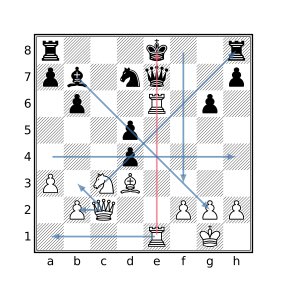
The table below contains other examples of rays shown in the above diagram.
| Ray Example | Ray Start | Ray End |
|---|---|---|
ray(Q b3) |
c2 |
b3 |
ray(Q b2) |
c2 |
b2 |
ray(N p r) |
c3 |
h8 |
ray(a4 a h4) |
a4 |
h4 |
ray(e1 c1 a1) |
e1 |
a1 |
ray(b _ . _ A) |
b7 |
g2 |
ray down (_ _ _ _ _ _) |
f8 |
f3 |
The filter ray(r r) would not match the position in the above diagram because of the presence of the black king between the two black rooks, only empty squares may appear between the consecutive set arguments in the ray filter.
A single ray filter may match multiple rays in which case the result will be the set of the endpoints of all matching rays. For example, ray(p p) matches rays ending on squares a7, b6, g6, a7, and h7. The filter ray right (a1 _) will also match multiple rays ending on squares b1, c1, and d1 as empty squares may appear between the squares specified by a1 and _.
The result of the ray filter represents the end of the matching rays, to obtain the beginning of matching rays simply reverse the set arguments (and possibly the direction) of the ray filter, e.g. ray orthogonal (k q R R) instead of ray orthogonal (R R q k).
The xray Filter
xray(Set1 …Setn)⇒ Set
The xray filter finds pieces along a ray such that a sliding piece in Set1 would attack a square in Setn if the squares between them were unoccupied. The result of the xray filter is the set of squares on which matching rays terminate. Matching rays must consecutively consist of a square in each successive set Seti in the list of provided sets with only unoccupied squares being allowed to appear between successive sets.
The colors of the pieces involved are not significant, it is not even required that pieces reside on any of the squares except a square in Set1.
The following query looks for a white rook that x-rays a black queen through a white knight such that the knight can move to a square not attacked by Black and simultaneously check the black king:
xray(R (move from N to ~(. attackedby a): check) q)The second argument to the xray filter in the above query uses the speculative move filter to find moves by white knights to squares not attacked by Black that also result in check. The result of the move filter is the set of squares on which matching knights reside since the first parameter to the move filter is from.
One position matching this query is:
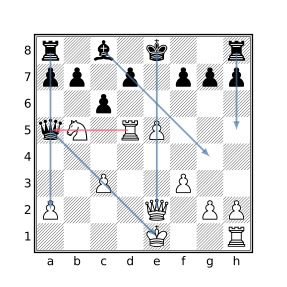
In the above diagram, the matching xray is shown in red (the move 1.Nd6+ wins the black queen), some other examples of xrays are shown with blue arrows.
Note that an xray filter of the form
xray (S1 …Sn)
is functionally equivalent to:
ray orthogonal ((S1&[RrQq])…Sn)
| ray diagonal ((S1&[BbQq])…Sn)
The pin Filter
pin[fromSet] [throughSet] [toSet] ⇒ Set
A pin is induced from a piece Px on square Sx through a piece Py on square Sy to a square Sz when all of the following are true:
- Px attacks Py
- Px and Py are opposite colors
- Sz is not attacked by Px but would be if Py were not present on Sy
- Sz is unoccupied or is occupied by a piece of the same color as Py
In such a case, Py is said to be pinned to Sz by the pinning piece Px. Note that only sliding pieces (bishops, rooks, and queens) can induce a pin. Px attacks Py if Py would be in check by Px if Py were a king. In particular, Px attacks Py even if Px is itself pinned. It can be inferred from the above definition that Sx, Sy, and Sz must be distinct squares.
The pin filter finds pins where the from, through, and to squares each match a particular set of squares specified by the optional from, through, and to parameters. A default value of [Aa] is used for each of from and through if not provided and a default value of [Kk] is used for to if not provided, the result of which is to find absolute pins.
The pin filter is a set filter with a value that depends on the first parameter provided to the filter. If from is specified first, the result is the set of squares occupied by the pinning pieces matching the pin filter. If to is specified first, the result is the set of squares to which the pinned pieces matching the pin filter are pinned. Otherwise, if through is specified first or if no parameters are specified, the result is the set of squares occupied by pinned pieces matching the pin filter.
When no parameters are provided,
pinis equivalent to
pin through [Aa] from [Aa] to [Kk]which has a value corresponding to the squares of pieces pinned to their king. The filter
pin from [Aa]is equivalent to
pin from [Aa] through [Aa] to [Kk]and finds the same pins as pin but has a value of the squares occupied by the pinning pieces instead of the pinned pieces.
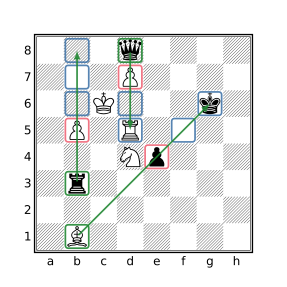
In the above diagram, there are 3 pinning pieces (highlighted in green) that each pin a single opponent piece (highlighted in red). The squares the pinned pieces are pinned to are highlighted in blue. The black rook on b3 pins the white pawn on b5 to the squares b6, b7, and b8 even though there are no pieces on those squares and pawn cannot currently move to another file. The black queen on d8 pins the white pawn on d7 to d6 and d5. The pawn is not pinned to d4 because if the pawn were removed, the queen would not attack d4. The white bishop on b1 pins the black pawn on e4 to the empty f5 square and the king on g6 but not to the square h7 which would not be attacked by the bishop even if the pawn were removed.
The rook on b3 does not pin the bishop on b1 because even though the rook attacks the bishop, there is no square Sz along the ray of attack that is not attacked by the rook but would be if the bishop were removed (because the bishop is on the edge of the board).
Using the pin filter without any parameters in the diagrammed position will find just the black pawn pinned to the black king. To find all of the pins shown, the query
pin to .can be used which is equivalent to
pin to . from [Aa] through [Aa]Note that for the purposes of the pin filter, kings may be pinned (may occupy a square in the through set) despite the fact that such a situation would ordinarily be referred to as a skewer as an attacked king cannot legally remain in check.