Direction Filters
A direction filter consists of a basic or compound direction keyword followed by an optional range and a Set target filter. The result is the set of squares that can be reached by moving in the specified direction from any of the squares in the target set. If an optional range is provided, only the squares that can be reached in a number of steps enclosed by the range are included, a range of 1 7 is implied if not provided. If the range includes 0, the squares in the target set are included in the result. Negative values included in the range represent squares that can be visited by moving in the opposite direction.
The eight basic directions are: up, down, left, right, northeast, northwest, southeast, and southwest. The compound directions and their component directions are given in the below table.
| Compound Direction | Component Directions |
|---|---|
vertical |
up, down |
horizontal |
left, right |
orthogonal |
vertical, horizontal |
maindiagonal |
northeast, southwest |
offdiagonal |
northwest, southeast |
diagonal |
maindiagonal, offdiagonal |
anydirection |
orthogonal, diagonal |
Examples
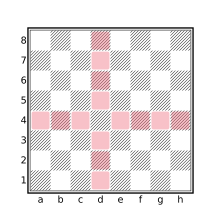
orthogonal d4
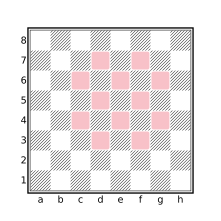
diagonal 1 orthogonal 1 e5
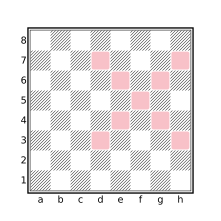
diagonal 0 2 f5
![anydirection 1 [Kk]](../assets/figures/diagram-425cb24fe0dab686.svg)
anydirection 1 [Kk]
The between Filter
The between filter takes two Set arguments, set1 and set2, and returns the set of squares that are between any two squares S1 and S2 where S1 is a square in set1 and S2 is a square in set2. A square S is between two squares S1 and S2 if S is present in the set that results from evaluating the query anydirection sq1 & anydirection sq2. In other words, if S is traversed when starting on S1 and moving in a single direction to reach S2 then S is between S1 and S2. Similarly, if S1 can be reached by moving in a single direction from S and S2 can be reached by moving in the opposite direction from S, then S is between S1 and S2.
The below diagram shows the result of the query between([a1,a3,g1] a-h8).
![Squares between [a1,a3,g1] and a-h8](../assets/figures/diagram-3afc349af607fd45.svg)
[a1,a3,g1] and a-h8
The dark and light Filters
The light and dark filters each accept a single Set argument and yield the set of light or dark squares, respectively, contained in the provided set. For example:
dark [Bb]represents the squares on which dark-squared bishops reside and:
move to light . legal from Rrepresents the light squares on which a white rook may legally move in the current position.
The meanings of dark and light are influenced by color transforms (see Transform Filters). For example:
flipcolor dark [Aa] == [Aa]will match any position where all pieces of both sides reside either on light squares or dark squares.
The file and rank Filters
The file and rank filters each take a single Set argument. If the set argument contains exactly one square, the result is the numeric value of the corresponding file or rank of the square, respectively, otherwise these filters yield None. The numeric values returned by these filters are in the range 1-8 with file a having the value 1 and file h having the value 8.
For example, the Chebyshev distance (the minimum number of king moves needed to move between two squares) between two squares sq1 and sq2 is given by the query:
max( abs(file sq1 - file sq2) abs(rank sq1 - rank sq2) )The makesquare Filter
The makesquare filter accepts either a single String argument or two Numeric arguments, and yields a set value representing the square corresponding to its argument(s) or an empty set if the provided input is not valid.
makesquare with a String Argument
A string argument represents a square if it consists entirely of two characters, the first being a lowercase letter between a-h and the second being a digit between 1-8. For example, “c4” and “h7” represent valid squares but “C4”, “c 4”, and “4c” do not. Thus:
makesquare "f6" == f6
makesquare "f6x" == []
makesquare with Numeric Arguments
This form of the makesquare filter accepts a parenthesized argument list consisting of two Numeric values, the first specifying the file and the second specifying the rank. Valid values for file and rank, and their corresponding meaning, is the same as the values returned by the file and rank filters. If both arguments have valid values (numbers between 1 and 8), the result is a set value representing the corresponding square, otherwise the result is an empty set. Thus:
makesquare(1 3) == a3
makesquare(6 1) == f1
makesquare(0 3) == []
makesquare(3 9) == []