The attackedby and attacks Filters
The attackedby and attacks filters provide information about the squares attacked by one or more pieces. Both filters are binary infix filters each accepting a Set filter for both their LHS and RHS operands.
The attackedby filter has the form X attackedby Y and yields a Set value representing the subset of squares in X which are attacked by pieces occupying squares in Y.
The attacks filter has the form X attacks Y and yields a Set value representing the set of squares in X occupied by a piece that attacks a square in Y.
A piece P attacks square S if a king of the opposite color on square S would be in check by piece P. In particular, P can attack S even if P may not legally move to S, e.g. P is pinned, it’s king is in check, or it is not P’s side to move. The pin filter can be used to determine if attacking pieces are pinned.
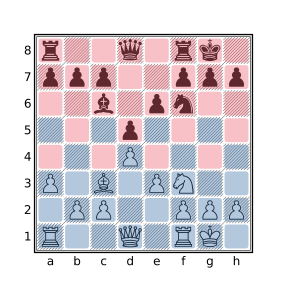
In the above diagram, the squares attacked by white pieces are highlighted in blue and the squares attacked by black pieces are highlighted in red (this is a very unusual position in that all squares are attacked by exactly one side). The query:
. attackedby Awill yield the set of squares attacked by white pieces (those shown in blue above) and:
. attackedby awill yield the set of squares attacked by black pieces (those shown in red above). The following query was used to find a position where all squares were attacked by exactly one side:
. attackedby A & . attackedby a == []
. attackedby A | . attackedby a == 64
Note that X attackedby Y will match the position only when Y attacks X would (and vice versa) but the result of these filters is not the same: the former yields the set of squares attacked while the latter yields the pieces which attack these squares. For example:
A attacks kwill yield the squares occupied by white pieces which attack the black king but:
k attackedby Awill yield the square on which the attacked king resides. The following query will find squares on Black’s side of the board that are attacked by White but not defended by Black:
a-h5-8 & (. attackedby A & ~ . attackedby a)To find undefended black pieces attacked by White use:
a attackedby A & ~ a attackedby aThe below query will find underdefended black pieces attacked by White:
square sq in a {
    a attacks sq
    #A attacks sq > a attacks sq
}
The attackedby and attacks filters have a higher precedence (bind tighter) than most other operators including the &, |, and ~ set filters, comparison filters, and the cardinality filter (#). Consequently, queries such as a attackedby A & ~ a attackedby a and #A attacks sq > a attacks sq used above need not be parenthesized to obtain the expected meaning.
See Calculating Effective Attackers for examples of how to exclude pinned attackers and/or include battery attackers.
CQL 6.1 allows the attackedby filter to be spelled using two tokens: attacked by. For backwards-compatibility CQLi does the same.
The black, white, btm, wtm, and sidetomove Filters
The btm, wtm, and sidetomove filters provide information about the side to move in the current position. The btm filter yields true if it is Black to move and the wtm filter yields true if it is White to move, these filters yield false otherwise. The sidetomove filter yields the value of either black or white corresponding to the side that has the move. black and white are numeric filters that always yield the values -1 and 1 respectively.
The btm and wtm filters are provided for convenience, the same behavior can be achieved with sidetomove, e.g. sidetomove == white to determine if White has the move. The sidetomove filter is useful when using position relationship filters to determine if two different positions have the same side to move.
The check, mate, and stalemate Filters
The check, mate, and stalemate filters yield true if the current side to move is in check, is checkmated, or is stalemated, respectively. The side to move is considered to be in check if said side’s king is attacked by an opposing piece. For Standard chess, the check filter is equivalent to:
flipcolor { wtm and K attackedby a }The side to move is considered to be checkmated when the said side’s king is in check and no legal moves are available. For Standard chess, the mate filter is equivalent to:
check and move legal count == 0The side to move is stalemated when there are no legal moves available and the king is not in check. The stalemate filter is equivalent to:
not check and move legal count == 0Note that some chess variants supported by CQLi have different notions of what constitutes check, mate and/or stalemate. For example, some variants allow pawns to be promoted to kings which are not subject to check. See Behavior of check, mate, and stalemate with Variants for details of how these filters work with such variants.
Examples
The below query will find checkmates delivered via a discovered double check:
mate
flipcolor { wtm a attacks K > 1 }
To find smothered mates (defined here as mate delivered by an opposing knight where the king is surrounded by friendly pieces preventing its potential escape), the below query may be used:
mate
flipcolor {
    wtm
    [_a] attackedby K == []
}
The below query will find stalemates that occurred as the result of a pawn promoting to a queen:
stalemate
move previous promote Q
An example of such a game is:
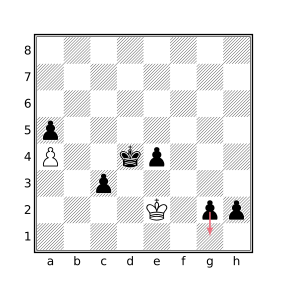
Black played 57...g1=Q?? stalemate. Black could have mated in 3 by instead playing 57...g1=R or 57...h1=Q.
The following query will find positions where the side to move has at least 4 legal moves but all of them, save one, results in stalemate:
(move count legal == move count legal : stalemate + 1) > 3Here is one such position found by this query:
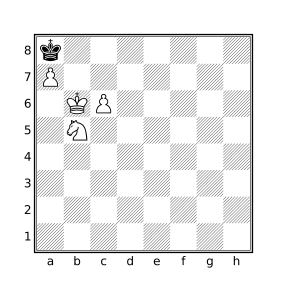
There are 10 legal moves by White in the above position, 9 of which are stalemate, the remaining move is checkmate. The correct move is Nc7#, in the actual game White played 50.Ka5??.
The colortype and type Filters
The colortype and type filters each accept a single Set operand. If this operand does not consist of exactly one square, the filter does not match the position. Otherwise the result is a numeric value representing the piece type (for type) or piece type and color (for colortype) present on the specified square. The numeric values used to represent piece types by the type filter is given in the below table:
| Piece Type | Type Value |
|---|---|
| None / Empty | 0 |
| Pawn | 1 |
| Knight | 2 |
| Bishop | 3 |
| Rook | 4 |
| Queen | 5 |
| King | 6 |
The colortype filter additionally encodes piece color information in the result by negating the type value for black pieces. For example, a white rook will be represented with the value 4 by colortype and a black rook with the value -4; type would yield a result of 4 in both cases.
The typical use case of these filters is to check if the piece or piece type present on two squares or in two positions are the same.
The currentfen and standardfen Filters
standardfen is a String filter whose result is the representation of the current board state in Forsyth–Edwards Notation (FEN). The FEN string for the starting position in standard chess is:
rnbqkbnr/pppppppp/8/8/8/8/PPPPPPPP/RNBQKBNR w KQkq - 0 1
The first field provides a rank-major listing of piece placements starting at rank 8 with ranks separated by slashes and pieces being presented in file order within each rank. A number represents the specified number of consecutive empty squares in the rank. The second field is either w or b indicating White or Black to move, respectively. The remaining fields represent the castling permissions, the en passant target square, the halfmove clock, and the move number. A - is used to represent the complete lack of castling permissions when appearing in the third field and the lack of an en passant target square when appearing in the fourth field.
The currentfen filter is identical to standardfen except that the halfmove clock is always represented as 0 and the move number represented as 1 making currentfen more amiable for use as a dictionary key when identical board positions should produce the same key. See also Positional Intersection and the zobristkey filter for similar applications.
These filters are useful to dump matching board positions for processing by external tools outside of the PGN format.
Castling and X-FEN Format
CQLi uses the X-FEN notation to express castling rights in order to support Chess960. When the castling rook is the one closest to the corner on the back rank, the standard KQ/kq notation is used. Otherwise, the names of the files corresponding to the castling rooks are used (uppercase for White, lowercase for Black). For Standard chess games, the castling rooks will always be in the corner (since that is where they start and they cannot be used for castling once moved) and the KQ/kq notation will be used.
En Passant Target Square
CQLi follows the standard FEN convention for encoding the en passant square, specifically if the last move was a double pawn push, the en passant square will be populated even if there is no opposing pawn attacking this square.
Extensions Supporting Variants
The Crazyhouse variant needs to track both pocket pieces and the pieces on the board that have been promoted. This information is included in the FEN string to allow the full game state to be reconstituted. CQLi represents the pocket pieces with a bracketed list appended to the first field. Promoted pieces are represented by suffixing them with a ~ when they appear in the piece placement field. For example, the below FEN represents a position where the white queen on b8 and the black queen on f1 were both the result of pawn promotions and White has a pawn and a knight in pocket while Black has a pawn and a bishop in pocket:
rQ~b1kbnr/pp3ppp/8/2p5/5P2/8/PPPPK1qP/RNBQ1q~NR[PNpb] w kq - 0 9
In the Three-Check variant, it is necessary to track the number of remaining checks each side can be exposed to. CQLi represents this information by inserting a new field between the en passant target square field and the halfmove clock field of the form D+d where D is the number of checks that White needs to deliver against Black to win and d is the number of checks Black would have to deliver to White to win. For example, in the FEN below White can win by delivering 1 more check to Black while Black would need to deliver 3 checks to White to win via check:
5k2/p7/1p6/3B2P1/3P1rp1/b1P2P2/P5K1/7R w - - 1+3 4 34
The fen Filter
If the fen filter is not immediately followed by a string literal, it behaves the same as currentfen. Otherwise the provided string literal must contain the piece placement portion of a FEN string where the characters A, a, ., and _ may be used in addition to the standard piece characters allowed in a FEN string with their usual meaning in CQL. FEN strings are checked at parse time and an invalid string argument will result in a parse error.
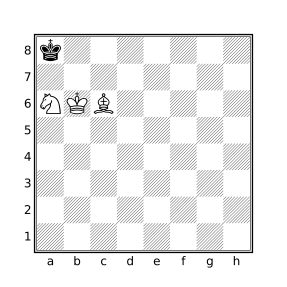
The fen filter matches the position if the pieces on the board in the current position correspond to the provided FEN string. For example:
fen "k7/8/NKB5/8/8/8/8/8"will match the position:
The FEN string is subject to manipulation by enclosing flipcolor, reversecolor, and dihedral transform filters. For example:
flipcolor fen "k7/8/NKB5/8/8/8/8/8"will also match the position:
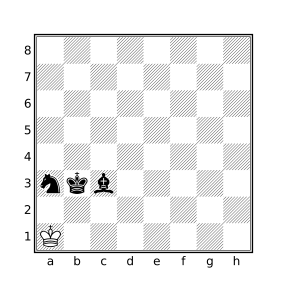
and the query:
flipcolor flip fen "k7/8/NKB5/8/8/8/8/8"will match any of the following 16 FEN strings (these can be seen when using the --parse option to show the transformed query tree):
k7/8/NKB5/8/8/8/8/8
8/8/8/8/8/5B2/5K2/5N1k
8/8/8/8/8/NKB5/8/k7
8/8/8/8/8/2B5/2K5/k1N5
7k/8/5BKN/8/8/8/8/8
5N1k/5K2/5B2/8/8/8/8/8
8/8/8/8/8/5BKN/8/7k
k1N5/2K5/2B5/8/8/8/8/8
8/8/8/8/8/nkb5/8/K7
5n1K/5k2/5b2/8/8/8/8/8
K7/8/nkb5/8/8/8/8/8
K1n5/2k5/2b5/8/8/8/8/8
8/8/8/8/8/5bkn/8/7K
8/8/8/8/8/5b2/5k2/5n1K
7K/8/5bkn/8/8/8/8/8
8/8/8/8/8/2b5/2k5/K1n5
In most cases, it is easier and clearer to use piece designators to specify desired piece arrangements but the fen filter is convenient when looking for positions that match a FEN string copied from a chess program, online game, or other electronic media. See also the –fen option.
The halfmoveclock Filter
The halfmoveclock filter yields the current value of the halfmove clock, an integer that represents the number of halfmoves (plies) for which no captures or pawn moves have been made. By default, all games start with a halfmove clock initialized to zero. Games may specify a different initial value by using the FEN PGN tag which will be honored by CQLi.
The following query will find positions where a valid claim fifty-move rule claim becomes available, i.e. each side has made 50 moves without a capture or pawn push and the side to move is not mated or stalemated:
halfmoveclock == 100
move legal
The movenumber Filter
The movenumber filter yields the move number of the current position. Move numbers start at 1 unless the FEN PGN tag specifies a valid alternate starting move number in which case the initial position starts at the specified move number. The move number is incremented after each move by Black, regardless of the side to move in the initial position. The movenumber filter always matches the position. The query below will find games that end before move 20:
terminal
movenumber < 20
Pawn Structure Query Filters
A group of two or more pawns of the same color on adjacent files are connected. The group must span at least two files and consists of all of the pawns in the adjacent files. A pawn is isolated if there are no friendly pawns in an adjacent file.
A group of two or more pawns of the same color on a single file are doubled. The pawns in the group need not occupy adjacent ranks. A pawn that has no opposing pawns in front of it on the same or adjacent file (i.e. a pawn that can keep it from advancing) is a passed pawn.
The connectedpawns filter evaluates to the set of squares occupied by connected pawns on both sides. The doubledpawns, isolatedpawns, and passedpawns filters similarly evaluate to the set of squares occupied by doubled pawns, isolated pawns, and passed pawns, respectively.
A pawn query can be isolated to a particular side by using the bitwise and operator &. For example, the query
passedpawns & pwill yield the set of squares occupied by passed black pawns. The query
doubledpawns & a-d1-8will yield the set of queen side doubled pawns. Connected passed pawns can be found using
connectedpawns & passedpawnsNote that every pawn is either isolated or connected so
isolatedpawns & connectedpawnswill always evaluate to the empty set and
isolatedpawns | connectedpawns == [Pp]will always be true.
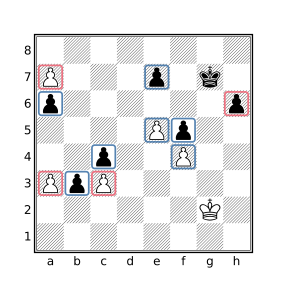
In the diagram below, the connected pawns are highlighted in blue and the isolated pawns are highlighted in red.
In the following diagram, passed pawns are highlighted in blue and doubled pawns in red.
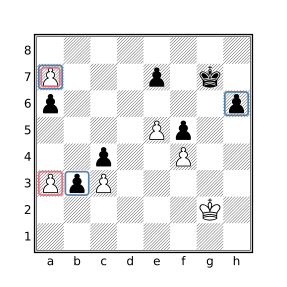
The pawn on a7 is both passed and doubled so it is highlighted twice.
Equivalent filters
The pawn structure query filters do not provide any new functionality, the effect of each of these filters can be accomplished using existing CQL filters. Instead, these filters provide a convenient short-hand that is easier to type and understand. The functional equivalents for each of the pawns structure query filters is provided in the table below for instructive purposes. In CQLi the shorter versions are optimized and execute faster than the written out equivalent.
| Filter | Equivalency |
|---|---|
connectedpawns |
notransformflipcolor {P & horizontal 1vertical 0 7 P} |
doubledpawns |
notransformflipcolor {P & vertical P} |
isolatedpawns |
notransform[Pp] &~ flipcolorP & horizontal 1vertical 0 7 P |
passedpawns |
notransformflipcolor {P & ~down horizontal 0 1 p} |
The use of notransform in the above equivalencies is necessary to prevent undesired transformations when appearing inside of a rotate90 filter.
Querying Other Pawn Structures
Tripled and Quadrupled Pawns
Tripled pawns can be found using:
shifthorizontal flipcolor { TP = down a8 & P TP > 2 TP }Quadrupled pawns may be found by replacing TP > 2 with TP > 3 in the above query.
Advanced Pawns
A pawn that has passed its own fourth rank is sometimes referred to as an advanced pawn. Advanced pawns can be found with the query
flipcolor Pa-h5-8Fixed Pawns
A pawn that is blocked by an opposing pawn immediately in front of it is sometimes called a fixed pawn. Fixed pawns can be found using
flipcolor p & up 1 PPawn Chains
A pawn chain is two or more pawns of the same color that are diagonally adjacent. Pawn chains can be found using
flipcolor P & diagonal 1 PThe base of a pawn chain is the pawn in the chain that is not defended by another pawn. The bases of pawn chains can be located with the query
(flipcolor P & diagonal 1 P) & (flipcolor P & ~ up horizontal 0 1 P) The power Filter
The power filter takes a single Set argument S and returns a numeric value representing the sum of the power of each of the pieces that occupy the squares in S. For the purpose of this filter, each piece has a static power value, expressed in terms of the power of a pawn, given by the table below.
| Piece | Power Value |
|---|---|
| King | 0 |
| Pawn | 1 |
| Knight | 3 |
| Bishop | 3 |
| Rook | 5 |
| Queen | 9 |
power X, where X is a set filter, is therefore equivalent to:
#[Pp]&X + #[Nn]&X * 3 + #[Bb]&X * 3 + #[Rr]&X * 5 + #[Qq]&X * 9The power filter always matches the position and yields a value of zero if the provided Set is empty or there are no non-king pieces occupying the squares in Set.
A user-defined function can be employed to calculate the power of pieces using alternative piece values. For example, if rooks should be valued at 5.5 pawns, queens at 10, and bishops at 3.5, the following function can be used:
function altPower(X) {
    #[Pp]&X * 10 + #[Nn]&X * 30 + #[Bb]&X * 35 +
        #[Rr]&X * 55 + #[Qq]&X * 100
}
Because numeric values in CQL are integers, relative values need to be scaled. The altPower function therefore represents power in decipawns (tenths of a pawn) instead of pawns.
The ply Filter
The ply filter yields the ply of the current position. The ply represents the number of half-moves made since the initial position. The ply starts at zero for the initial position (regardless of the move number specified by an optional PGN FEN tag) and is incremented by one for each half-move played by either side.
The following query will find games with a length of at least 200 ply (at least 100 moves played by each side):
ply == 200Note that this will not limit matches to games with exactly 200 ply but rather match any games that have a position where ply is 200. Using ply >= 200 will achieve the same results except that every position above ply 200 will be commented instead of just the position at ply 200 (the --quiet or --matchstring="" options may be used to prevent matched positions from being commented at all). To find games that end at a particular ply, use terminal to match the desired ply at the terminal position, e.g.:
terminal
ply == 200
Changing == in the above query to >= will find all games with 200 plies or more and comment only the terminal position instead of the position that represents the 200th ply.
Note that an even ply typically represents a position where it is White to move and an odd ply Black to move but this is not always the case. If the game contains a FEN tag that specifies Black to move in the starting position, even plies will correspond to Black-to-move positions. Use the wtm and btm filters to determine which side has the move.
The promotedpieces Filter
The promotedpieces filter yields the set of squares occupied by promoted pawns. For example, the query:
promotedpieces & Q
promotedpieces & q
will match positions where both sides have a promoted queen on the board.
Tracking of promoted pieces is necessary for the Crazyhouse variant (captured promoted pieces are dropped as pawns instead of the promoted piece type) but CQLi performs promoted piece tracking for all variants.
The zobristkey Filter
CQLi maintains a 64-bit Zobrist hash key for each position, the zobristkey filter yields a string containing the hexadecimal representation of this value for the current position.
A Zobrist hash is calculated by XORing predefined 64-bit keys that correspond to characteristics of the current board state. Invented by Albert Zobrist, this simple but effective method is fast to calculate and produces significantly different values for similar positions, providing positional keys that are all but guaranteed to be different for different positions in a game (like all hashing methods, collisions are possible but it is extremely unlikely for different positions in a recorded game to have the same Zobrist hash) and guaranteed to be identical for identical positions even in different games.
The Zobrist hash incorporates the following pieces of board state into the hash key:
- The piece type and color present on each square.
- Castling permissions for each side.
- En-passant capture rights.
- The side to move.
- The pieces each side has in their pocket (only used for the Crazyhouse variant).
For the purpose of calculating the Zobrist hash, the side to move is considered to have “en passant capture rights” if the last move was a double-pawn push and the side to move has a pawn that attacks the square behind this pawn, even if en passant capture would otherwise be illegal (e.g. because the pawn is pinned).
In particular, the ply, move number, and half-move clock (i.e. number of half-moves since the last capture or pawn push) do not influence the value of the Zobrist key making it an effective mechanism to detect positional repetition which is how such detection is commonly employed by chess engines. See Detecting 3-fold Repetition for an example of how this can be accomplished using the zobristkey filter.
Polyglot Compatibility
For Standard chess, CQLi produces Polyglot-compatible hash keys which means the produced hash will match the keys used by Polyglot opening books and the zobristkey filter can be used to look for position matching a Polyglot hash. For Crazyhouse, CQLi will hash pocket pieces using its own keys making Zobrist keys for this variant unique to CQLi. No other variants introduce new state information into the Zobrist hash.
A Note About Collisions
While it is guaranteed that two identical positions will have the same Zobrist key, it is possible that two different positions also produce the same key, this is called a hash collision. The likelihood of hash collisions is directly related to the size of the hash and the number of keys generated. With the 64-bit hash employed for Zobrist keys a collision would be expected about once in every few billion keys. In practice this is rarely a concern. For an application that is not able to tolerate the possibility of collisions of this frequency, a full or partial fen string may be used. Using FEN strings as keys takes more space (because FEN strings are larger than Zobrist hashes) and the currentfen filter is slower than the zobristkey filter because FEN strings are calculated on demand while Zobrist keys are not.