A transform filter accepts a single target filter, optionally preceded by the count keyword, which is semantically transformed in some way at parse time. For example, to find games that end in checkmate where the mating side is down two rooks or more in material, the following query can be used:
{wtm mate power A - power a >= 10} or
{btm mate power a - power A >= 10}
The query consists of two parts that differ only in the color of the side to move and the color of the pieces used in the power calculation. The flipcolor transform filter can be used to write a concise version of the query:
flipcolor {wtm mate power A - power a >= 10}The flipcolor filter takes a single target filter and creates two filters from it, one which represents the original filter and one which represents the same filter with certain filters modified, including flipping wtm to btm and A to a (and vice versa). The original and transformed filter are then both evaluated and the result is the combination of the results (the value of the material advantage for the opposing side in this case if one of the filters matches the position).
Other transform filters perform geometric transformation of square designators and/or directions. For example, the following query will match positions where there is a white rook behind a white pawn on the h file:
shiftvertical { Rh1 Ph2-7 }The above query is equivalent to:
{ Rh1 P[h2-7] } | { Rh2 P[h3-8] } | { Rh3 P[h4-8] } | { Rh4 P[h5-8] } |
{ Rh5 P[h6-8] } | { Rh6 P[h7-8] } | { Rh7 Ph8 }
The following query will yield the set of squares on which a knight would attack a white king and queen:
(flip northeast 1 up 1 Q) & (flip northeast 1 up 1 K)The above query is equivalent to:
((northeast 1 right 1 Q) | (northeast 1 up 1 Q) |
 (northwest 1 left 1 Q) | (northwest 1 up 1 Q) |
 (southeast 1 down 1 Q) | (southeast 1 right 1 Q) |
 (southwest 1 down 1 Q) | (southwest 1 left 1 Q)) &
((northeast 1 right 1 K) | (northeast 1 up 1 K) |
 (northwest 1 left 1 K) | (northwest 1 up 1 K) |
 (southeast 1 down 1 K) | (southeast 1 right 1 K) |
 (southwest 1 down 1 K) | (southwest 1 left 1 K))
Transform Types
The types of transforms can be grouped into the following five categories:
Identity Transform
The identity transform is the original, unmodified target filter of the transform filter. All transform filters, except for
reversecolor, include the identity transform in the resulting transform set.
Dihedral Transforms
Modification of square designators and directions via geometric rotation and reflection composing the
D4 dihedral group transforms. See Dihedral Transform Filters for details.
Translation Transforms
Modification of square designators via horizontal and/or vertical translation. See the Shift Filters for details.
Color Transform
- Interchange of the following filters:
black⇔white,wtm⇔btm,result 1-0⇔result 0-1,elo black⇔elo white, andplayer black⇔player white.
- Reversal of piece colors within piece designators and the
fenfilter.
The
flipcolorandreversecolorfilters are the only ones that perform these transformations.
45° Rotations
Modification of directions independent of dihedral transforms. The only filter that employs this set of transforms is
rotate45.
Each of the transform filters employ one or more of these transform types.
Note that transforms do not modify the board itself, only the effect of specific filters appearing within the target filter are modified. While square and piece designators are modified by certain transforms, other Set filters are not. The rank, file, and makesquare filters are not affected by transforms.
Transposition of light and dark Filters
In addition to the filters described above as being influenced by various transforms, the light and dark filters are transposed within a transform in which a square specified by a square designator would be modified to a square of the opposite color.
The table below lists each transform filter and shows which types of transforms are employed by each filter.
| Transform Filter | Identity | Dihedral | Translation | Color | 45° Rotations |
|---|---|---|---|---|---|
flip |
✓ | ✓ | |||
flipcolor |
✓ | ✓ | ✓ | ||
fliphorizontal |
✓ | ✓ | |||
flipvertical |
✓ | ✓ | |||
reversecolor |
✓ | ✓ | |||
rotate45 |
✓ | ✓ | |||
rotate90 |
✓ | ✓ | |||
shift |
✓ | ✓ | |||
shifthorizontal |
✓ | ✓ | |||
shiftvertical |
✓ | ✓ |
Result of Transform Filters
When a transform filter is evaluated, each non-elided transformation associated with the transform filter, including the identity transform, is evaluated in an unspecified order. If the count keyword parameter is provided, the result is the number of evaluated transformations that matched the position. Otherwise, the result of the transform filter depends on the type of the target filter.
If the target filter is a Set filter, the result is the union of each evaluated transformation that matched the position. If the target filter is a Numeric filter, the result is the largest value of the matching transformations. Otherwise, the result of the transform filter matches the position if any of the evaluated transformations matched the position.
The flipcolor and reversecolor filters
The color reversing transform performs the following modifications to the target filter:
- The
blackandwhitekeywords are transposed. - The
wtmandbtmfilters are transposed. - The
result 1-0andresult 0-1filters are transposed. - The colors of pieces within piece designators and
fenfilters are reversed, e.g.Qbecomesq,abecomesA, etc.
In addition, square designators are reflected about the horizontal bisector.
The flipcolor and reversecolor filters are the only ones that employ the color reversing transform. The flipcolor filter represents both the identity transform and the color reversing transform of the target filter while the reversecolor transform represents only the color reversing transform.
Examples
Mate in KNBvK ending
terminal mate flipcolor { A == K a == [knb] == 3}The equivalent filter is:
terminal mate { A == K a == [nbk] == 3 } or { a == k A == [NBK] == 3 }Win by player 400+ Elo lower
initial flipcolor { result "1-0" elo white + 400 <= elo black }The equivalent filter is:
initial { result 0-1 elo black + 400 <= elo white } or
        { result 1-0 elo white + 400 <= elo black }
Bishop pins rook to queen
flipcolor xray(B r q)The equivalent filter is:
xray(B r q) | xray(b R Q)Advanced passed pawns
flipcolor Pa-h5-8 & passedpawnsThe equivalent filter is:
(Pa-h5-8 & passedpawns) | (pa-h1-4 & passedpawns)Fixed pawns
flipcolor p & up 1 PThe equivalent filter is:
(P & down 1 p) | (p & up 1 P)Pawn chains
flipcolor P & diagonal 1 PThe equivalent filter is:
(P & diagonal 1 P) | (p & diagonal 1 p)Dihedral Transform Filters
Dihedral transforms consist of geometric rotations and reflections of square designators and directions appearing in the target filter of a corresponding transform filter.
There are eight possible distinct transformations of any position that can be reached by applying rotation and reflection transforms associated with the D4 dihedral group of a chessboard. These are demonstrated in the below diagrams where the effect on the square designators a2 (marked with a red circle) and c1 (marked with a blue cross) are shown as well as the ray formed by the filter up 0 1 e1 (shown as a green arrow).
The type of dihedral transform is shown under each diagram as both the combination of rotation and reflection (which are non-commutative operations) and the equivalent set of commutative operations vflip (reflection about the vertical bisector), hflip (reflection about the horizontal bisector), and swap (interchange of file and rank offsets).
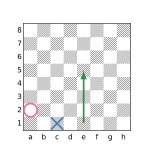
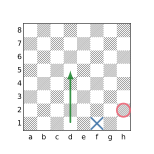
(vflip)
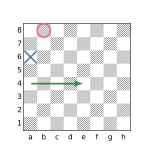
(vflip + swap)
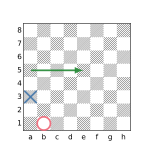
(swap)
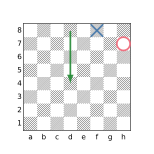
(vflip + hflip)
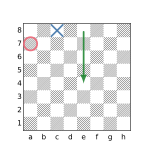
(hflip)
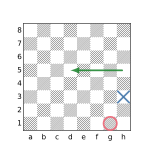
(hflip + swap)
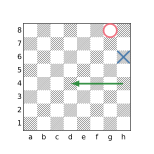
(vflip + hflip + swap)
The flip filter employs all of the above transforms. The rotate90 filter performs the first four transforms shown (the identity transform and the rotation transforms without reflection). The fliphorizontal and flipvertical filters add only the hflip and vflip transforms, respectively, to the identity transform.
The rotate90 Filter
The rotate90 filter introduces transforms by which square designators and directions appearing in the target filter are rotated clockwise by 90°, 180°, and 270°. The result of the filter is the combination of evaluating the original target filter and the transformed target filters.
The fliphorizontal and flipvertical Filters
The fliphorizontal and flipvertical filters introduce a transform by which square designators and directions appearing in the target filter are reflected about the horizontal bisector (hflip) or vertical bisector (vflip). The result of the filters is the combination of evaluating the original target filter and the transformed target filter.
The flip filter
The flip filter introduces transforms by which square designators and directions appearing in the target filter are subject to all of the D4 dihedral group transforms discussed above, i.e. clockwise rotations of 0°, 90°, 180°, and 270° as well as similar rotations applied to the reflections. The result of the filter is the combination of evaluating the original target filter and the transformed target filters.
Examples
The following diagrams show the effect of each of the dihedral transform filters applied to several target filters. Recall that when the target of a transform filter is a Set filter, the result is the union of the sets formed by each of the individual participating transforms.
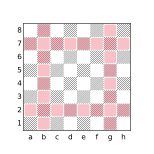
flip up b3
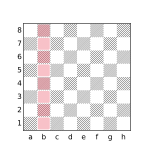
fliphorizontal up b3
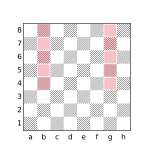
flipvertical up b3
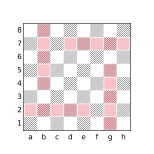
rotate90 up b3
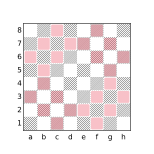
flip orthogonal 1 b3
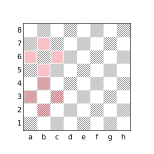
fliphorizontal orthogonal 1 b3
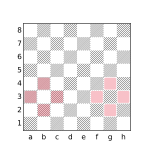
flipvertical orthogonal 1 b3
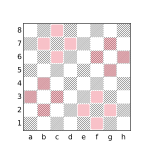
rotate90 orthogonal 1 b3
![flip [c1,b3,d3]](../assets/figures/diagram-2b57a35c8d7573a3.svg)
flip [c1,b3,d3]
![fliphorizontal [c1,b3,d3]](../assets/figures/diagram-c41772017b760b64.svg)
fliphorizontal [c1,b3,d3]
![flipvertical [c1,b3,d3]](../assets/figures/diagram-d0bfce07d3dadf14.svg)
flipvertical [c1,b3,d3]
![rotate90 [c1,b3,d3]](../assets/figures/diagram-5bfaab285de55a06.svg)
rotate90 [c1,b3,d3]
The Shift Filters
The shift filters perform square translation transforms. The shifthorizontal filter performs horizontal square translations within square designators appearing in the target filter, the shiftvertical filter performs vertical square translations within the square designators in its target filter and the shift filter employs compositions involving both horizontal and vertical square translations.
There are 15 possible horizontal square translations referred to as H-7 through H7 and 15 possible vertical square translations referred to as V-7 through V7. The horizontal square translation Hi indicates translation of square designators i files to the right and the vertical square translation Vj indicates translation of square designators j ranks up. A negative value for i results in translation to the left and a negative value for j results in a downward translation. For example, the result of applying the translation H5 to square c2 is h2 and the result of applying the translation V-1 to the square c2 is c1.
Translations that cause a non-empty square designator in the target to be transformed to an empty designator are automatically elided from the corresponding shift filter.
Horizontal square translations do not modify squares in a square designator that is part of a full rank and vertical square translations do not modify squares in a square designator that is part of a full file. For example, applying the translation H3 to the square designator [c5,a-g2] yields [d-h2,f5] but applying the same translation to the designator [c5,a-h2] yields [a-h2,f5] (the full rank a-h2 being preserved).
The shifthorizontal Filter
The shifthorizontal filter introduces transforms by which square designators appearing in the target filter are translated horizontally. For example:
shifthorizontal a1≡a1 | b1 | c1 | d1 | e1 | f1 | g1 | h1≡a-h1
Only translations H-1 through H2 are included in the below example because the translations H3 through H7 would result in the f5 square to be shifted off the board and the translations H-7 through H-2 would result in the square b1 being shifted off the board:
shifthorizontal b1|f5≡a1|e5 | b1|f5 | c1|g5 | d1|h5≡[a-d1,e-h5]
The shiftvertical Filter
The shiftvertical filter introduces transforms by which square designators appearing in the target filter are translated vertically. For example:
shiftvertical a1≡a1 | a2 | a3 | a4 | a5 | a6 | a7 | a8≡a1-8
Only translations V0 through V3 are included in the below example because the translations V4 through V7 would result in the b5 square to be shifted off the board and the translations V-7 through V-1 would result in the square a1 being shifted off the board:
shiftvertical a1|b5≡a1|b5 | a2|b6 | a3|b7 | a4|b8≡[a1-4,b5-8]
The shift Filter
The shift filter introduces transforms by which square designators appearing in the target filter are translated by the composition of horizontal and vertical translations. For example:
shift b2|h7≡a1|g6 | a2|g7 | a3|g8 | b1|h6 | b2|h7 | b3|h8≡[a-b1-3,g-h6-8]
Elided Transforms
When a non-empty square designator appearing in the target of a shift filter becomes empty due to the application of a translation transform, that transform is elided from the set of transforms associated with the shift filter. For example, the result of the query:
shiftvertical a1is all of the squares on the a file, the result of combining eight translation transforms (the identity transform and the vertical translation transforms V1 through V7). The transforms V-7 through V-1 are elided because each of them would transform the square designator a1 to an empty set as there is no square below a1.
This elision behavior can be used to control the set of transforms that compose a particular shift filter. For example, to find positions where the black king, white king, and white pawn stand on ranks 8, 6, and 5, respectively, of the same file, the following query may be used:
shifthorizontal { Pe5 Ke6 ke8 }If these are the only pieces on the board, white-to-move is a forced win unless the pieces are on the a or h files in which case black can easily draw. To exclude the drawing cases from matching the filter, sentinel values can be included in the filter which will become empty when the shift would cause the e-file squares to be shifted to the a or h files:
shifthorizontal { d1 f1 Pe5 Ke6 ke8 }The d1 designator will become empty in the transform that would shift Pe5 Ke6 ke8 to Pa5 Ka6 ka8 and the f1 designator will become empty in the transform that would shift Pe5 Ke6 ke8 to Ph5 Kh6 kh8 causing both transforms to be elided. The presence of the sentinel values does not otherwise affect the behavior of the filter.
Restricted Shifts
As explained above, transforms are elided when the target contains a square designator that becomes empty when the transform would be applied. When a square designator refers to multiple squares, e.g. a1-4 or [a1,h7], transforms are only elided when the entire set of squares designated becomes empty. For example the query:
shiftvertical [a1,h7]is equivalent to:
[a1,h7] | [a2,h8] | a3 | a4 | a5 | a6 | a7 | a8 | h1 | h2 | h3 | h4 | h5 | h6 which yields all the squares in the a and h files. If a shift filter is followed by the restrict keyword, translation transforms will be elided whenever any square in a designator is shifted off the board. For example, the query:
shiftvertical restrict [a1,h7]is equivalent to:
[a1,h7] | [a2,h8]having the same behavior as:
shiftvertical a1 | h7The rotate45 Filter
The rotate45 filter performs rotations on directions appearing in the target filter. Directions consist of the basic directions up, down, left, right, northeast, northwest, southeast, and southwest, and the compound directions vertical, horizontal, orthogonal, maindiagonal, offdiagonal, diagonal, and anydirection. The rotate45 filter affects the direction filters with these names and the directions with the same names used in a ray filter.
The result of rotate45 is the combination of each distinct 45-degree rotation transform applied to the target. For example, when rotated counter-clockwise by 45 degrees, the direction up becomes northwest, when rotated an additional 45 degrees the direction becomes west, etc. The 8 basic directions each produce a new basic direction when transformed and compound directions produce new compound directions of the same cardinality.
There are a total of 8 potential rotational transforms including the identity transform, although fewer transforms may be produced depending on the directions encountered in the target as non-distinct transforms are elided. For example when the compound direction orthogonal is rotated by 45 degrees, it becomes diagonal. Further rotations will simply alternate the direction back and forth between these two compound directions so that:
rotate45 orthogonal X ≡ orthogonal X | diagonal X ≡ anydirection X
given some filter X.
Because the effect of applying the rotate45 transform to any single direction in isolation is the same as replacing the direction with anydirection, the rotate45 filter is not as widely used as some of the other transforms. The most common use cases are when the target filter is a function call (in which case it may not be desired to modify the direction(s) in the function definition) and when the target filter contains multiple directions that need to be rotated in a synchronized way to achieve the desired effect. For example, one way to describe a knight’s movement is that it move one square in an orthogonal direction and then one square diagonally in a direction adjacent to the orthogonal direction. For example, the filter:
northeast 1 up 1 Nexpresses one of the possible knight’s moves while the filter:
rotate45 northeast 1 up 1 Nwill express all of them, being equivalent to:
northeast 1 up 1 N | up 1 northwest 1 N |
northwest 1 left 1 N | left 1 southwest 1 N |
southwest 1 down 1 N | down 1 southeast 1 N |
southeast 1 right 1 N | right 1 northeast 1 N
Note that this works because a knight’s move can always be expressed as a combination of moving one square orthogonally and one square diagonally, a characteristic which each rotation will maintain. While a single knight’s move can be expressed as moving 2 squares orthogonally and 1 square in a perpendicular direction, a 45 degree rotation of such a move will result in moves that cannot be made by a knight, i.e moving 2 squares diagonally and then 1 square in a perpendicular diagonal direction. For example, the query:
rotate45 up 2 right 1 Nwill yield:
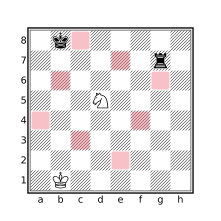
rotate45 up 2 right 1 N
Because rotate45 only affects directions in the target filter, applying the transform to a filter which contains square designators may represent a misuse of the filter. For this reason, CQLi will issue a warning if the target of a rotate45 filter contains a square designator unless the square designator appears within a notransform filter. For example:
rotate45 up 1 d5will elicit a warning while:
rotate45 up 1 notransform d5will not as the intention is explicit.
Transforms Do Not Operate on Sets
It is important to understand that the dihedral transform filters affect directions and square designators but do not affect other Set filters such as Set variables. The flip, flipvertical, fliphorizontal, and rotate90 filters do not modify piece designators either. For example, to obtain the squares attacked by white knights, the query:
flip up 2 right 1 Nmay be used. Specifying the square of the knight using a square designator though:
flip up 2 right 1 d5which will not yield the same result as shown in the below diagrams.
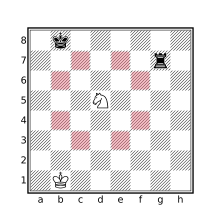
flip up 2 right 1 N
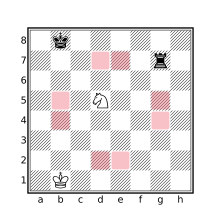
flip up 2 right 1 d5
This is because the square designator (d5) will be subject to the effects of the flip filter whereas the piece designator (N) in the first example will not. The first query is equivalent to:
up 2 right 1 N | right 2 up 1 N | down 2 right 1 N | left 2 up 1 N |
up 2 left 1 N | right 2 down 1 N | down 2 left 1 N | left 2 down 1 N
whereas the second query is equivalent to:
up 2 right 1 d5 | right 2 up 1 e4 | down 2 right 1 d4 | left 2 up 1 d4 |
up 2 left 1 e5 | right 2 down 1 e5 | down 2 left 1 e4 | left 2 down 1 d5
Elision of Duplicate Transforms
A transform filter will not include transforms that introduce duplicate target filter transformations. For example, the following queries will produce the same set of corner squares:
rotate90 a1     // [a1,a8,h8,h1]
flip a1         // [a1,a8,h8,h1]
The additional transforms introduced by the flip filter do not produce modifications of the a1 square designator that are not present in the transforms produced by the rotate90 filter so those additional transforms are elided. This is noticeable when dumping the query tree, when the target filter contains side effects, or when the count parameter is used. The filter message currenttransform may be used inside the target of a transform filter to see the individual transforms being applied during evaluation.
Note that if the result of applying the transforms associated with a transform filter does not produce any non-identity transforms a warning message will be issued indicating that the presence of the transform filter has no effect. For example:
shift Kwill produce the warning:
Superfluous transform does not modify any filters in the target filteras the Shift Filters do not modify piece designators.
Transformation Order
The order in which transforms are applied within a composition is significant when the transforms involved in the composition are not commutative as is the case with dihedral transforms involving reflections. When transform filters are nested, transforms associated with the most nested filters are applied first. For example, the following diagrams show the difference between the queries shiftvertical rotate90 a1 and rotate90 shiftvertical a1.
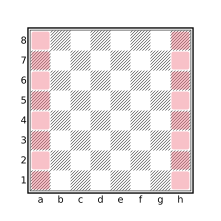
shiftvertical rotate90 a1
rotate90 shiftvertical a1
The notransform Filter
The notransform filter suppresses the effects of enclosing transform filters on its target. This filter is typically used in functions to protect the body of the function from being subjected to enclosing transforms during invocation that would result in undesired effects.
For example, the doubledpawns filter could be implemented as:
notransform flipcolor { P & vertical P }The notransform filter here is necessary to prevent the vertical direction filter from being subjected to transformations of enclosing transform filters. For example:
rotate90 flipcolor { P & vertical P }would find multiple pawns on the same rank in addition to those on the same file while:
rotate90 notransform flipcolor { P & vertical P }will work as expected by preventing the effects of rotate90 from penetrating the target of notransform. Note that the notransform filter only suppresses the effects of enclosing transforms, transforms appearing within the target filter, such as flipcolor in the above example, will still be honored.
The currenttransform Filter
The currenttransform filter is a String filter yielding a textual portrayal of the transforms in effect when the filter is evaluated. This filter is sometimes useful for debugging purposes and often combined with the message or comment filters.
If there are no transforms in effect when currenttransform is evaluated, the result is an empty string. Otherwise, the result is a space-separated list of transforms in effect, in the order in which they have been applied in the evaluation of the current transformation.
The textual representations currently used by the currenttransform filter to articulate transforms are shown in the below table.
| Transform Type | Representation |
|---|---|
| Identity transform | identity |
| Piece color reversal | invertcolor |
| Dihedral transforms | clockwise90, rotate180, counterclockwise90, reflect_h, reflect_v, reflect_a1h8, reflect_a8h1 |
| Shift translations | up^n, down^n, left^n, or right^n to represent a shift up, down, left, or right by n squares. |
For example, the string “right^6 up^3 reflect_a8h1” indicates that the current transform is formed by reflecting the board about the a8-h1 diagonal, shifting the result up by three squares, and then shifting right by six squares.
Note that one transform filter may result in multiple transformations, e.g. a shift filter may produce composite transformations that translate squares in both the horizontal and vertical directions.