Calculating Effective Attackers
The attacks filter can be used to find all direct attacks on a square, but will not include indirect attacks from batteries or exclude pinned pieces that could not move to the target square. This section discusses how both of these cases might be handled.
Batteries
A battery consists of two or more sliding pieces arranged along a ray such that one of the pieces attacks some square S and the remaining pieces x-ray through the initial piece. The initial piece in a battery may be a pawn that attacks S if the other pieces in the battery are bishops or queens that appear in the same ray as the pawn’s attack. For example, consider the following position:
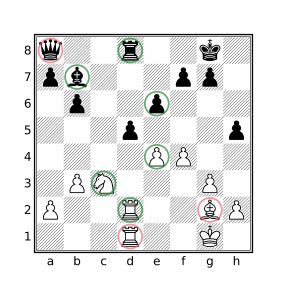
d5
The pieces circled in green are direct attackers of d5 and the pieces circled in red are indirect attackers, they may participate in a defense of d5 but are not reported by the attacks or attackedby filters. It is sometimes necessary to consider indirect attacks from batteries and this requires some additional work.
The following situations are considered:
Rooks and queens orthogonally aligned with the target square may attack it if the only pieces occupying the squares between them are rooks and queens.
Bishops and queens diagonally aligned with the target square may attack it if the only pieces occupying the squares between them are bishops and queens, or a pawn that also attacks the target square.
The following function will yield the pieces that directly or indirectly attack the target square:
function batteryAttacks($sq) {
    $ortho_attacks = flipcolor piece $p in orthogonal $sq & [RQ]
        { not between($p $sq) & ~[_RQ] }
    $diag_attacks = flipcolor piece $p in diagonal $sq & [BQ]
        { not between($p $sq) & ~([_BQ]|P attacks $sq) } |
    $other_attacks = [PpNnKk] attacks $sq
    $ortho_attacks | $diag_attacks | $other_attacks
}
To find all sliding pieces that may participate in an attack, the piece filter is used to iterate over the sliding pieces. Those whose attacking direction intersects the target piece, without intervening pieces that do not, are included in the result. The filter between($p $sq) & ~[_RQ] is used to exclude sliders that are blocked by pieces that do not move in the same direction. The between($p $sq) filter will yield the squares between the sliding piece and the target square and ~[_RQ] will yield the squares occupied by non-rook non-queen pieces. The intersection of these filters are the blocking pieces, their presence will prevent a candidate from being included by the function. Diagonal attackers are similarly calculated except that a pawn that attacks the target square is allowed to be present in the attacking line. Pawn, king, and knight attackers are calculated using the attacks filter.
Note that knights cannot move to any of the squares that a sliding piece on the same square could move to so a sliding piece cannot x-ray a knight that attacks the target. The king cannot be captured so it similarly cannot open a line for an x-rayed attacker.
Dichromatic Batteries
The above function limits batteries to conjoined attacks by pieces of the same color. A black queen behind a white rook might be considered an attacker of a square in front of the white rook, depending on the application, since the black queen could recapture on said square if the white rook captures on that square first. On the other hand, the black queen’s ability to do so would be dependent on the white rook performing such a capture so it may not be desired to consider the queen to be an attacker. The batteryAttacks function can be modified to consider such dichromatic batteries by removing the flipcolor filter and specifying black and white pieces in the piece designators:
function batteryAttacksDichromatic($sq) {
    $ortho_attacks = piece $p in orthogonal $sq & [RQrq]
        { not between($p $sq) & ~[_RQrq] }
    $diag_attacks = piece $p in diagonal $sq & [BQbq]
        { not between($p $sq) & ~([_BQbq]|[Pp] attacks $sq) } |
    $other_attacks = [PpNnKk] attacks $sq
    $ortho_attacks | $diag_attacks | $other_attacks
}
Pinned Pieces
While pinned pieces may be excluded from the list of attackers using e.g. [Aa] attacks d5 & ~pin, this likely will not produce the intended result as pinned pieces may sometimes participate in an attack: pinned pawns and sliders may move along the pinning line. To determine whether a pinned piece may effectively participate in an attack, it is necessary to consider the ray which forms the pin. For example, consider the following position:
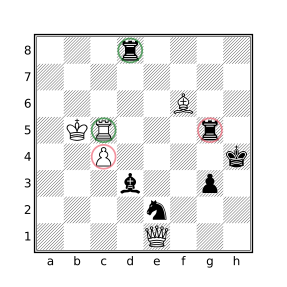
d5
Both black rooks attack d5 but the rook on g5 is not an effective attacker because it is pinned by the bishop on f6. White attacks d5 with two pinned pieces. The pinned pawn is not an effective attacker as it is pinned by the black bishop but the c5 rook is an effective attacker as the d5 square is on the same line as the pin by the black rook on g5. Black attacks f2 with a pinned pawn, this is an effective attacker as the pawn could move to this square (if there was an opposing piece to capture).
The nonpinnedAttackers function shown below will yield the direct attackers of the provided target square that are not prohibited from moving to the square due to a pin.
function canVisit($sq $p) {
    $pin_from = pin from [Aa] through $p
    $pin_to = pin to [Kk] through $p
    $sq & (between($pin_to $pin_from) | $pin_from)
}

function nonpinnedAttackers($sq) {
    $pinned_pieces = pin
    $ortho_attacks = piece $p in orthogonal $sq & [RQrq] {
        not $p in $pinned_pieces or canVisit($sq $p)
    }
    $diag_attacks = piece $p in diagonal $sq & [BQbq] {
        not $p in $pinned_pieces or canVisit($sq $p)
    }
    $pawn_attacks = piece $p in [Pp] attacks $sq {
        not $p in $pinned_pieces or canVisit($sq $p)
    }
    $knight_attacks = ([Nn] & ~$pinned_pieces) attacks $sq
    $king_attacks = [Kk] attacks $sq

    $ortho_attacks | $diag_attacks | $pawn_attacks |
        $knight_attacks | $king_attacks
}
Note that pinned knights can never move and kings cannot be pinned. All other piece types are considered valid attackers unless they are pinned and the target square is not within the pinning line. A naive implementation of canVisit might look like:
$sq & between([Kk] pin from [Aa] through $p)but this version has two problems: 1) it incorrectly allows the pinned piece to move to a square on a line between the opposing king and the pinning piece, and 2) it does not afford the pinned piece the opportunity to capture the pinning piece (the between filter does not include the bounding squares). Since the or filter is short-circuited, the canVisit function will only be called for pinned pieces.
The above function will consider a king to be an attacker even if the target square is attacked by an opposing piece. Such attacks can be excluded by replacing the assignment of $king_attacks with:
$king_attacks = flipcolor { not $sq attackedby a K attacks $sq }Putting it all Together
The effectiveAttacks function below combines the handling of pinned pieces and batteries yielding all the effective attackers of the target square. An effective attacker is one of:
- A non-pinned direct attacker of the target square.
- A pinned direct attacker if the target square lies on the pinning line.
- X-rayed attackers that are not lined up behind a pinned attacker which could not move to the target square.
function canVisit($sq $p) {
    // Determine if square $sq lies on the pinning
    // line for which $p is restricted to.
    $pin_from = pin from [Aa] through $p
    $pin_to = pin to [Kk] through $p
    $sq & (between($pin_to $pin_from) | $pin_from)
}

function effectiveAttacks($sq) {
    // Return the set of pieces that effectively attack $sq.
    $pinned_pieces = pin

    $eff_pawn_attacks = piece $p in [Pp] attacks $sq
        not $p in $pinned_pieces or canVisit($sq $p)
    $eff_ortho_attacks = flipcolor piece $p in orthogonal $sq & [RQ] {
        not between($p $sq) & ~[_RQ]
        not between($p $sq) & $pinned_pieces
        not $p in $pinned_pieces or canVisit($sq $p)
    }
    $eff_diag_attacks = flipcolor piece $p in diagonal $sq & [BQ] {
        not between($p $sq) & ~([_BQ] | $eff_pawn_attacks & A)
        not between($p $sq) & $pinned_pieces & [BQ]
        not $p in $pinned_pieces or canVisit($sq $p)
    }
    $eff_knight_attacks = ([Nn] & ~$pinned_pieces) attacks $sq
    $eff_king_attacks = [Kk] attacks $sq

    $eff_pawn_attacks | $eff_ortho_attacks | $eff_diag_attacks |
    $eff_knight_attacks | $eff_king_attacks
}
Note that no special handling is necessary to allow pieces in a monochromatic battery to be behind a pinned piece that can move along the same line as a piece that can only be pinned by an opposite colored piece appearing behind it. The below diagram shows effective attackers of e5 as calculated with the effectiveAttacks function which includes batteries and pinned pieces which may move along the pinning line to reach e5.
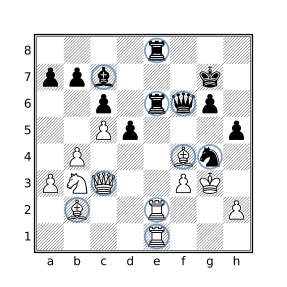
e5
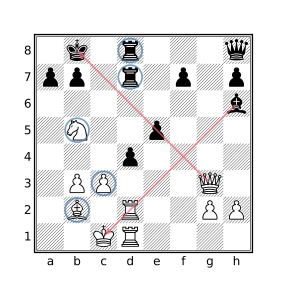
d4
The diagram on the left above shows the effective attackers of the e5 square including the two rook batteries. The white bishop on f4 and the black queen on f6 are both pinned but can effectively attack e5 as this square resides in both pinning lines.
The diagram on the right shows the effective attackers of d4 including the black rook battery and a battery formed by the white pawn and bishop. The black pawn on e5 is not an effective attacker as it is pinned to the black king by the queen on g3. Likewise, the white rook on d2 is pinned and cannot participate in an attack on d4, for this reason the rook on d1 is not considered an effective attacker either.
Effective Attackers with Dichromatic Batteries
A version of the effectiveAttacks function which supports dichromatic batteries is given below.
function effectiveAttacksDichromatic($sq) {
    // Return the set of pieces that effectively attack $sq,
    // including pieces participating in a dichromatic battery.
    $pinned_pieces = pin

    $eff_pawn_attacks = piece $p in [Pp] attacks $sq
        not $p in $pinned_pieces or canVisit($sq $p)
    $eff_ortho_attacks = flipcolor rotate90 piece $p in down $sq & [RQ] {
        not between($p $sq) & ~[_RQrq]
        not between($p $sq) & $pinned_pieces or up $sq & K
        not $p in $pinned_pieces or up $sq & K
    }
    $eff_diag_attacks = flipcolor rotate90 piece $p in northeast $sq & [BQ] {
        not between($p $sq) & ~([_BQbq] | $eff_pawn_attacks)
        not between($p $sq) & $pinned_pieces or southwest $sq K
        not $p in $pinned_pieces or southwest $sq & K
    }
    $eff_knight_attacks = ([Nn] & ~$pinned_pieces) attacks $sq
    $eff_king_attacks = [Kk] attacks $sq

    $eff_pawn_attacks | $eff_ortho_attacks | $eff_diag_attacks |
    $eff_knight_attacks | $eff_king_attacks
}
Unlike the monochromatic version, accommodating dichromatic slider batteries does need to handle intervening pinned pieces which may be able to move in the same direction as the opposite-colored slider that pins it.
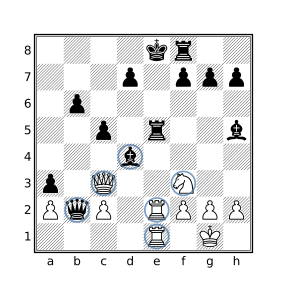
e5 including dichromatic batteries
White is winning after 1.Rxe5+ Bxe5 2.Qxe5+ Qxe5 3.Rxe5+ Kd8 4.Rxh5.
Final Notes
These functions obviously do not consider aspects of the position that may be critical to the evaluation such as whether the side to move is in check, a piece pinned by an attacker that will become unpinned during a capture sequence when the pinning piece moves to the attacked square, or whether a particular capture sequence exists that will result in an advantage for one side.
While the above functions could be modified to handle specific situational themes based on the particular application, the subtleties of positional evaluation are better left to chess engines. In many cases, the role of CQLi will be to find a relatively small set of candidate positions which can then be more rigorously analyzed with the assistance of a chess engine.
Detecting 3-fold Repetition
The following query will detect 3-fold position repetition in a game:
$key = zobristkey
(find all {zobristkey == $key}) > 2
but is a bit slow. A (5x) faster approach using dictionaries is:
dictionary str --> int (min) $D
if initial then unbind $D

$D[zobristkey] += 1
$D[zobristkey] > 2
An arbitrary merge strategy is used for the declared dictionary so that the query can be executed with multiple threads. Since the dictionary is explicitly reset at the beginning of each game, the actual merge strategy does not matter as the merged key values are not used.
Properly Handling En Passant with 3-fold Repetition
The above queries for detecting 3-fold repetition overlook a rarely encountered subtlety involving a difference between how 3-fold repetition is defined and how most Zobrist implementations work with regards to en passant capture possibilities.
The FIDE Laws of Chess, section 9.2.2 (dealing with position repetition) states:
Positions are considered the same if and only if the same player has the move, pieces of the same kind and colour occupy the same squares and the possible moves of all the pieces of both players are the same. Thus positions are not the same if:
- at the start of the sequence a pawn could have been captured en passant
- a king had castling rights with a rook that has not been moved, but forfeited these after moving. The castling rights are lost only after the king or rook is moved.
The Polyglot book format specifies the following related to Zobrist hashing:
If the opponent has performed a double pawn push and there is now a pawn next to it belonging to the player to move then “enpassant” is the entry from RandomEnPassant whose offset is the file of the pushed pawn (counted from 0(=a) to 7(=h)). If this does not apply then enpassant=0. Note that this is different from the FEN standard. In the FEN standard the presence of an “en passant target square” after a double pawn push is unconditional. Also note that it is irrelevant if the potential en passant capturing move is legal or not (examples where it would not be legal are when the capturing pawn is pinned or when the double pawn push was a discovered check).
In other words, Polyglot-compatible Zobrist hash keys will include the en passant square in the hash if en passant capture is pseudolegal but FIDE only considers two otherwise identical positions to be different if en passant capture is legal in one of them and not the other. What this means is that the queries provided above will not detect legitimate 3-fold repetitions when the first instance of the repeated position appears immediately after a double pawn push and there is a pseudolegal en passant capture move but not a legal en passant capture move (they will instead be detected upon the 4th appearance of the position). Consider the following position:
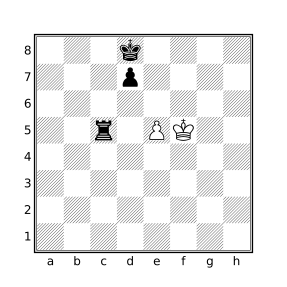
The table below shows the Zobrist key after each move:
| Move | Zobrist Key |
|---|---|
1...d5 |
7f2953c5a45efa72 First occurrence |
2.Kg5 |
911cf55c7be6025c |
2...Ke8 |
a38d6ed99b80a39c |
3.Kf5 |
512116937880cb13 |
3...Kd8 |
63b08d1698e66ad3 Second occurrence |
4.Kg4 |
afb9464c21d0ef37 |
4...Ke7 |
4970e0692dd2f1c1 |
5.Kf5 |
85792b3394e47425 |
5...Kd8 |
63b08d1698e66ad3 Third occurrence |
The noted entries show positions that are considered to be identical according to the FIDE rules but the first of these identical positions has a different Zobrist key. White cannot capture en passant after 1...d5 as the pawn is pinned by the black rook. To properly accommodate this rare situation, the following can be added immediately after $key is assigned in the above query:
if move pseudolegal enpassant and not move legal enpassant {
    move legal null : move legal null : { $key = zobristkey }
}
When a position is encountered for which there is a pseudolegal en passant move but not a legal one, the speculative move filter is used to effectively remove the en passant square from the Zobrist hash by creating a new imaginary position that is the result of applying two null moves to the current position and setting $key to the Zobrist hash of that position. Null moves reset the en passant square and the side to move (which is why two null moves are needed instead of one) but do not change anything else about the position that is included in the Zobrist hash. In other words, with the above change, $key will be assigned the same Zobrist key value that it would if there were no pseudolegal en passant move available resulting in different keys only if there is a legal en passant move in one position and not the other which matches the FIDE rules.
With all that said, from a practical standpoint, the change is probably not significant in most applications. The modified version runs about 27% slower than the original and did not produce different results when testing with ten million lichess games. If you are working in this area it is a potentially important point to understand though, especially since so many chess programs get 3-fold repetition wrong with regards to en passant, and in more interesting ways than the one discussed here. For example, some software will never differentiate based on the availability of en passant, incorrectly allowing a 3-fold claim when the number of moves available are different (chess.com and ICC reportedly among them). The venerable pgn-extract tool behaves the same as the unmodified query present in the previous section when using its --repetition option to find 3-fold repetitions.
Insufficient Mating Material
The FIDE Laws of Chess (section 5.2.2) state:
The game is drawn when a position has arisen in which neither player can checkmate the opponent’s king with any series of legal moves. The game is said to end in a ‘dead position’. This immediately ends the game, provided that the move producing the position was in accordance with Article 3 and Articles 4.2 – 4.7.
The type of position described above is called a dead position. A subset of dead positions in which mate cannot be achieved due to lack of material that can execute a mate by either side is referred to as insufficient mating material and can be distinguished from situations where sufficient mating material exists but cannot reach the opposing king to effect mate due to e.g. fixed pawn structures trapping the pertinent pieces.
The following situations will be considered in this example:
- King vs King.
- King + Knight vs King.
- King + n Bishops vs King + m Bishops where all Bishops reside on squares of the same color, and m + n > 0. This includes all King + Bishop vs King endings.
Note that in some situations it is possible to force mate with King + Knight vs King when there are also pawns on the board and that mate can be achieved (although not forced) with King + 2 Knights vs King so such positions are not considered here.
The resulting query simply checks the 3 above situations:
function InsufficientMaterial() {
    // King vs King
    [Aa] == [kK] or
    // King + Knight/Bishop vs King
    ([Aa] == 3 and [BbNn]) or
    // King vs King + all light/dark square Bishops
    ([Aa] == [kKBb] and flipcolor not dark [Bb])
}
Note that flipcolor not dark [Bb] is equivalent to not dark [Bb] or not light [Bb] which will be true if there are either no light square bishops or no dark square bishops meaning that all of the bishops are of the other color square. This is not equivalent to not flipcolor dark [Bb] as flipcolor dark [Bb] will yield a set containing the light and dark square bishops which will always match the position. This is because a transform containing a set filter yields the union of the transformed children while a transform containing a Boolean filter yields a Boolean indicating whether any of the transformed children matched the position.
Calculating Extended GBR Codes
The GBR code of a chess position is a string that encodes the number of each piece type present on the board. The name is derived from the initials of those involved in its creation: Richard Guy, Hugh Blandford and John Roycroft. GBR codes are useful for classifying endgames and are often included in endgame study databases such as HHdbVI.
The standard GBR code has the form:
abcd.ef
where a, b, c, and d represent the number of queens, rooks, bishops, and knights in the position with white pieces having a value of 1 and black pieces a value of 3. E.g. a position with 2 white rooks and 1 black rook has a value of 5 for b. A value of 9 is used if there are more than 2 white or 2 black pieces of the specified type.
The values of e and f correspond to the number of white and black pawns, respectively.
A common extension to GBR coding is to include the location of the white and black kings at the end of the string, e.g.:
0416.01b8c6
represents a position consisting of 1 white rook and 1 black rook, 1 white bishop, 2 black knights, and 1 black pawn with the white king residing on square b8 and the black king on c6.
The below query defines functions to calculate both the standard GBR code and the extended version that includes the positions of the kings. The extended GBR code is then stored in the tag “GBRCode”.
function GBRCode() {
    // Perform individual component calculations
    queen_count  = if Q > 2 or q > 2 then 9 else #Q + 3*#q
    rook_count   = if R > 2 or r > 2 then 9 else #R + 3*#r
    bishop_count = if B > 2 or b > 2 then 9 else #B + 3*#b
    knight_count = if N > 2 or n > 2 then 9 else #N + 3*#n
    wpawn_count  = if P > 8 then 9 else #P
    bpawn_count  = if p > 8 then 9 else #p

    // Create a string from the components representing the GBR code
    str(queen_count rook_count bishop_count knight_count
        "." wpawn_count bpawn_count)
}

function EGBRCode() {
    str(GBRCode() K k)
}

initial
settag("GBRCode" EGBRCode())
Note that the GBR codes stored by the above query will correspond to the starting position which makes sense for endgame studies which start at interesting endgame positions. The initial filter may be changed to terminal to store the GBR code associated with the ending position of regular chess games or used with a custom query to store the GBR code of some other key position in the game.
Static Evaluation Functions
In his seminal paper “Programming a Computer for Playing Chess” (published in Philosophical Magazine, Ser.7, Vol. 41, No. 314 - March 1950 available here), Claude Shannon describes a process for programatically evaluating chess positions which forms the basis of traditional chess engine evaluation today. At its core, the process combines a static evaluation function with the minimax algorithm to find the best possible move in a given position. The evaluation function is used to assess leaf nodes in the game tree reached by exploring candidate moves by both sides. In his paper, Shannon provides the following example of a “crude” evaluation function:
Pw - Pb - 0.5 (Dw - Db + Iw - Ib + Bw - Bb) + 0.1 (Mw - Mb)
where P is the combined power of the pieces on the specified side (Pw being the power of the white pieces and Pb the power of the black pieces), D, I, and B are the number of double, isolated, and backward pawns, and M is the mobility of the specified side. Power is calculated using the traditional piece values as per the power filter and mobility is defined as the number of moves available to each side in the current position. The result is a numerical approximation of the relative advantage held by White, where a negative value indicates an advantage for Black.
The pgn-extract program provides an option to annotate positions with the result of a simplified version of the above function that forgoes the penalties associated with particular pawn structures, i.e.:
Pw - Pb + 0.1 (Mw - Mb)
The following CQL query may be used to comment positions in a game with values produced by this function:
function scale_number($n $scale) {
    str(if $n < 0 then "-" else "" abs($n/$scale) "." abs($n%$scale))
}

$eval = 10 * (power A - power a)
    + imagine sidetomove white : move legal count
    - imagine sidetomove black : move legal count
comment scale_number($eval 10)
Values are internally scaled by a factor of 10 as numeric values in CQL are limited to integers.
To implement the original function, the doubledpawns and isolatedpawns filters may be used to calculate the first two penalties. There is no standard definition of “backward pawn” and Shannon does not provide one in the paper. For the purpose of this exercise, a pawn will be considered to be “backward” if any square between it and its final rank, or an intervening opposing pawn, is attacked by more opposing pawns than friendly pawns and there are no friendly pawns behind or beside it on adjacent files. In other words, a pawn is considered backward if it cannot be safely pushed up the board without the assistance of other pieces. See Dan Heisman’s article “What is a backward pawn?” for a breakdown of the various definitions of backward pawn in chess literature and the definition he offers, the spirit of which is hopefully captured here. The following function may be used to detect such pawns.
function backwardpawns() {
    $backward_candidates = notransform [Pp] &
        ~ flipcolor P & horizontal 1 up 0 7 P
    flipcolor piece $p in $backward_candidates & P {
        square $sq in up $p & ~(up 0 7 p) {
            # p attacks $sq > P attacks $sq
        }
    }
}
The function starts by identifying candidate backward pawns which are those having no friendly pawns behind/besides it on adjacent files. The query expression used to identify such pawns closely resembles the equivalent query for isolated pawns except that friendly pawns in front of it are not considered. The remainder of the function iterates over the candidate backward pawns checking for squares in its path that are attacked by more opposing pawns than friendly pawns.
The modified query that applies pawn penalties then becomes:
$dp = doubledpawns
$ip = isolatedpawns
$bp = backwardpawns()
$eval = 10 * (power A - power a)
    - 5 * ((#$dp&P) - #$dp&p + #$ip&P - #$ip&p + #$bp&P - #$bp&p)
    + imagine sidetomove white : move legal count
    - imagine sidetomove black : move legal count
comment scale_number($eval 10)
An accurate static evaluation function is a critical component of traditional chess engines. While the above functions provide a starting point for writing such a function, there are many additional variables that need to be considered by a robust implementation including consideration of piece combinations, passed pawns, king safety, outposts, trapped pieces, controlled squares, threat analysis, etc. Most chess engines have separate evaluation functions for different game phases and may utilize endgame tablebases when there are few pieces left on the board. The reliability of static board evaluation is also limited to quiescent positions, engines must be able to recognize volatile positions and handle them accordingly.
See Communicating with a Chess Engine for an example of how CQLi may obtain dynamic position evaluations from external chess engines such as Stockfish.
Most-occurring Events
The find filter is the natural choice for counting the number of times a particular situation occurred in a game. If processing of variations is enabled, evaluation of the find filter will include positions within variations. If this is not desired, the queries below may be modified to replace initial with terminal and find with find <-- to do a “bottom up” search from the end of each line. Note that the “Found i of n” comments added by the find filter will be in reverse order when doing a bottom up search compared to a top down search.
Most Active Piece
The following query will find games where at least one piece was moved over 100 times:
// Games with 100 or more moves by a single piece.
initial
piece $p in [Aa] {
    sort "Number moves by a single piece"
    { find all move previous from $p } >= 100
}
Since $p is a Piece variable which holds the identity of a piece and the piece identity persists across promotion, the moves made by a pawn before and after promotion will both count toward the total moves made by the piece.
The body of the find filter uses move previous instead of move so that the comments inserted by find for the matching positions appear after the move is made instead of before the move.
Most Captures by a Single Piece
A minor variation of the previous query which will yield games where one piece captured at least 10 opposing pieces:
// Games with 10 or more captures by a single piece
// sorted by the number of captures.
initial
piece $p in [Aa] {
    sort "Number captures by a single piece"
    { find all move previous capture . from $p } >= 10
}
Most Captures on a Single Square
The following query will find games in which 10 or more pieces were captured on a single square. The captures need not have occurred consecutively.
// Games where 10+ captures occurred on a single square.
initial
square $sq in . {
    sort "Most captures on a single square"
    { find all move previous capture $sq } >= 10
}
Most Squares Visited by a Single Piece
The below query will find pieces that visited at least 30 different squares in the course of a game (including the square the piece started on):
// Games where a piece visits 30+ different squares.
initial
piece $p in [Aa] {
    sort "Most squares visited by a single piece" {
        $visited = []
        find all quiet {
            not $p in $visited
            $visited |= $p
            comment("Square " #$visited ": " $p&.)
        }
        $visited
    } >= 30
}
For each piece, the $visited variable keeps track of every square that the piece has visited. The find filter iterates over each position and if the current piece is on a square not previously visited, it is added to the set of visited squares and a comment is added indicating the position at which the piece first visited the new square. Since $p is a piece variable, it will include both the piece and the square when appearing in a comment filter so $p&. is used to convert it to a Set value so only the square is included in the comment. The value of the sort filter is $visited, which is implicitly converted from a Set to a Numeric value, so only the comments added in association with the piece that visited the largest number of squares will be kept.
Most Available Moves
The query below will find positions with more than 70 legal moves available.
// Games with more than 70 moves in a position
cql(quiet)
sort "Most moves in a position" {
    $num_moves = move count legal
    comment($num_moves " legal moves")
    $num_moves
} > 70
Unlike the previous queries, the find filter is not employed here; all of the action takes place in the body of the sort filter. Only games having a position with more than 70 legal moves will match, games will be sorted by the maximum number of legal moves. The comment filter is used to annotate the position that has the most available moves (Smart Comments suppresses comments that do not correspond to the position with the most moves). The quiet parameter is used to suppress matching position comments, otherwise every position that had more than 70 available moves would have a matching comment instead of just the comment added for the position with the most moves.
Below is a position found using the above query where no promotions have occurred and Black has 79 different legal moves available.
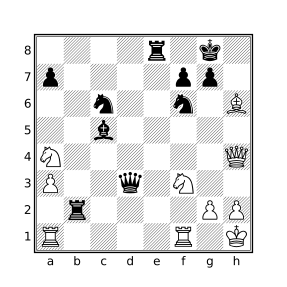
Black played 23...Rc2.
Longest Consecutive Sequences
While the find filter is useful for counting the number of positions matching a condition (e.g. “Most-occurring events”), the line filter is the tool of choice for identifying events that occur in sequence.
Notes about the Examples
The nestban parameter to the line filter is used in most of the following examples. The effect is to prevent subsequences from being reported as the examples in this section are concerned only with the longest sequence. The result of the line filter is the length of the longest line found which is used with the sort filter in the following examples so that matching games are sorted by the length of the longest sequence.
Since the line filter only considers sequences within individual lines, no extra work is necessary to prevent consideration of positions across different variations. Processing of variations will need to be enabled using either the variations parameter in the cql() header or the commandline --variations argument for variations to be considered though.
Longest Series of Mutual Checks
The following query will find games containing consecutive sequences of five or more moves where each move (played by both sides) delivers check:
// Find games with 5 or more consecutive checks (moves by both sides)
// and sort the results by the longest sequence in each game.
sort "Consecutive checks"
    { line nestban --> check + } >= 5
An example of a matching game is found here. The CQLi annotated move text of the game resulting from the above query is:
{consecutive checks: 5} 1.e4 e5 2.Nf3 d6 3.d3 Bg4 4.Be2 Nf6 5.Bd2 Nc6 6.Nc3 Qd7
7.h3 Be6 8.O-O O-O-O 9.Bg5 Bxh3 10.gxh3 Qxh3 11.Bxf6 gxf6 12.Nd5 Rg8+ 13.Ng5
Rxg5+ {CQL} {Start line that ends at move 16(wtm)} 14.Bg4+ Rxg4+ 15.Qxg4+ Qxg4+
{End line of length 5 that starts at move 14(wtm)} 16.Kh1 Be7 17.Rg1 Qh3# 0-1
Longest series of captures
The below query will find games with sequences of 15 or more consecutive captures and sort the matching games by the length of the capture sequence. The captures need not all take place on the same square.
// Find games with 15 or more consecutive captures (by both sides)
// and sort the results by the longest sequence found.
sort "Consecutive captures"
    { line nestban --> move capture . + } >= 15
Here is a game that matches this query. The CQLi annotated move text of the game is:
{consecutive captures: 15} 1.d4 Nf6 2.g3 g6 3.Bg2 Bg7 4.Nf3 d6 5.O-O O-O 6.Nbd2 c6 7.a3
b6 8.b3 Bb7 9.Bb2 Nbd7 10.c4 c5 11.d5 e6 12.e4 Re8 13.Re1 Bh6 14.e5 {CQL} {Start line
that ends at move 21(btm)} 14...dxe5 15.Nxe5 Nxe5 16.Bxe5 exd5 17.Bxf6 Qxf6 18.Bxd5 Bxd5
19.Rxe8+ Rxe8 20.cxd5 Bxd2 21.Qxd2 {End line of length 15 that starts at move 14(btm)}
21...Qxa1+ 22.Kg2 Qxa3 23.d6 Qxb3 24.d7 Rd8 25.Qd6 Qe6 26.Qc7 Qxd7 27.Qxd7 Rxd7 0-1
Longest series of non-capturing moves
The below query will find games where 200 or more consecutive moves were made (100 by each side) without a capture.
// Find games with 100+ consecutive non-capture moves.
sort "Consecutive non-capturing moves"
    { line nestban --> not move capture . + } >= 200
Longest symmetrical game
The following query will find games where the position before each move by White is symmetrical for at least the first 10 white-to-move positions. A position is symmetrical if each piece has an opposing piece of the same type on the square on the opposite side of the board.
// Find games where positional symmetry is maintained for at
// least the first 10 white-to-move positions.
function isSymmetrical() {
    square all $sq in [Aa] {
        $opp_sq = makesquare(file $sq (8 - (rank $sq) + 1))
        colortype $sq == -colortype $opp_sq
    }
}

initial
sort line singlecolor --> isSymmetrical() {10,}
The isSymmetrical function matches symmetrical positions. It works by iterating over each square on which there is a piece, calculating the square on the opposite side of the board (the one with the same file but the rank flipped along the horizontal bisector) and then checking that the piece on the opposite square has the same type but opposite color using the colortype filter.
The starting position is symmetrical but that symmetry can only be maintained in positions after both White and Black have moved. The singlecolor parameter is used with the line filter to limit examined positions to those where it is the same side to move as in the initial position (White to move unless the FEN tag is used to specify an alternate starting position).
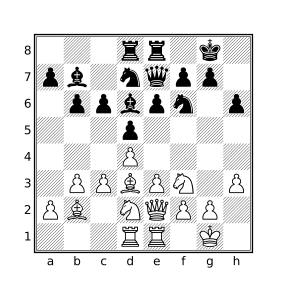
Below is the final position of a game in which symmetry was maintained for the entire 21 moves played before ending in a draw.
Earliest or Latest Occurrence
Finding the earliest or latest occurrence of an arbitrary condition simply involves evaluating a query to detect the presence of the condition and using the sort filter along with ply or movenumber to order the occurrence. Queries designed for finding the earliest or latest occurrence of an event will generally employ the following templates.
To find the earliest occurrence of some event, the following template may be used:
cql(quiet)
sort minsort-string{
condition-expr
commentcomment-expr
movenumber
} <=max-value
The template for latest occurrences is:
cql(quiet)
sort maxsort-string{
condition-expr
commentcomment-expr
movenumber
} >=min-value
The sort-string is a textual description of the condition used in the comment generated by the sort filter, condition-expr is the filter that detects the condition and may have any type. max-value and min-value specify the maximum and minimum allowed values for the movenumber filter, respectively. The comment filter can be used to annotate the reported position.
The value that will be sorted by sort is the value of the compound expression. Recall that a compound expression has the type and value of the last contained expression, in this case the value of movenumber so occurrences will be sorted by move number. ply could be used instead of movenumber to order by half-moves. Note that ply always starts at zero while movenumber may start at a value greater than one if the FEN tag in the PGN file is used to specify a starting position with an alternate starting move number.
Note that the sort filter will suppress comments appearing within its body for all positions except the one corresponding to the best position (e.g. the earliest or latest position) but match comments will still be inserted for every position that matches the query. For example, if ten positions match the criteria, only the best position will include the comment generated by the comment filter but all ten positions will have the matching comment CQL added which is typically undesired. The quiet parameter in the CQL header is used to suppress these comments, the parameter matchstring "" can be used as well without also suppressing auxiliary comments.
Earliest Exchange Game
To find the earliest exchange of all pieces, the below query may be used:
// Games in which all pieces were exchanged within 20 moves.
cql(quiet)
sort min "Earliest exchange game" {
    [Aa] == [KkPp]
    comment "Only kings and pawns remain"
    movenumber
} <= 20
One game found by this query is emitted by CQLi as:
{Earliest exchange game: 18} 1.e4 e5 2.Nf3 Nc6 3.Bb5 Nf6 4.Nc3 Bb4 5.Bxc6
dxc6 6.O-O Bxc3 7.dxc3 Qxd1 8.Rxd1 Bg4 9.Bg5 O-O 10.Bxf6 gxf6 11.h3 Bxf3 12.
gxf3 Rfd8 13.Kf1 Kf8 14.Ke2 Rxd1 15.Rxd1 Ke7 16.f4 Rd8 17.Rxd8 Kxd8 {Only
kings and pawns remain} 18.fxe5 fxe5 19.Ke3 Ke7 20.f4 exf4+ 21.Kxf4 Ke6 22.e5
f6 23.exf6 Kxf6 24.h4 h5 25.Ke4 Ke6 26.Kf4 Kf6 27.Ke4 Ke6 28.Kf4 Kf6 1/2-1/2
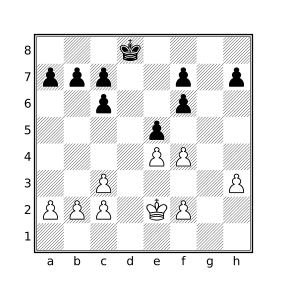
The position at which all pieces had been captured (the beginning of move 18) is:
Latest Initial Capture
The following query will find the latest initial capture in a game:
// Games where the initial capture occurs after move 50
cql(quiet)
sort max "Moves before initial capture" {
    [Aa] == 31
    move previous capture .
    comment "Initial capture"
    movenumber
} > 50
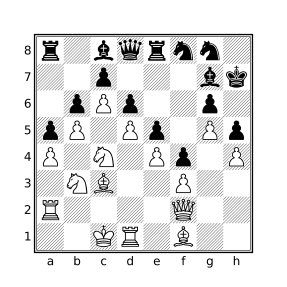
The condition here is that there are 31 pieces on the board and that the move that lead to this position was a capture. If the check for the number of pieces is left out, the latest capture will be reported, not the latest initial capture. If the move filter is left out, the latest position that had 31 pieces will be reported which might be significantly later.
Below is a game found by this query in which the initial capture did not occur until move 71 by White:
71.Nbxa5
The game concluded:
71...bxa5 72.Bxa5 Be6 73.dxe6 Nxe6 74.Rxd6 Qe7 75.Rd7 Qc5 76.Qxc5 Nxc5
77.Bxc7 Nxd7 78.cxd7 Rf8 79.Nb6 1-0
Statistics
The dictionary type provides a simple mechanism by which many types of statistics may be collected and reported with a CQL query. The following examples use dictionaries to collect statistics and the --showdictionaries option to cause the dictionary values to be emitted at the end of processing. The results can then be graphed or consumed by a post-processing tool.
It is also possible to perform post-processing work directly within CQLi using cqlend blocks which are evaluated at the end of processing, after dictionaries and other persistent variables have been merged.
The examples below define each dictionary with an appropriate merge strategy so that the query may be used in multi-threaded mode.
Game Lengths
The following query will produce a breakdown of games by length:
dictionary int --> int (sum) plies_per_game
terminal
plies_per_game[ply] += 1
false
Player Counts
The query below will produce a count of the number of games played by every player:
dictionary str --> int (sum) players
initial
players[player white] += 1
players[player black] += 1
false
Generating and Solving Chess Problems
While not a replacement for programs that specialize in solving specific types of chess problems, the imaginary position features that CQLi provides (via the imagine filter, speculative move filter, and reachable position detection) make it particularly well-suited for solving many types of chess problems and, in some cases, generating such problems. The ability to rigorously solve chess problems, including confirming that a given solution is the best and unique solution, provides an aid to the chess problem composer by helping to ensure that the problem is sound. This section describes how CQLi may be employed to solve or generate various types of chess problems.
Direct Mate Puzzles
Mates in 1
The simplest problem type considered here is the mate in 1 in which the current side to move makes a move which is checkmate. Such puzzles are generally considered to be well-formed only if there is exactly one solution. For example, the below diagram shows a position for which White has 81 legal moves (including the four different promotions via dxc8), 21 of which result in check but only one of which is mate.
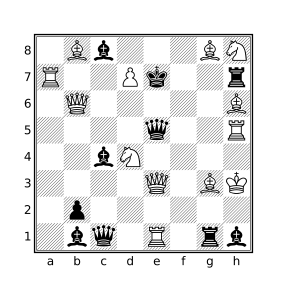
The unusual nature of the position (which is reachable) as well as the relatively large number of moves which check, but do not mate, the black king serves as a greater challenge than many other mate in 1 puzzles.
The solution is shown with the CQL query:
move legal : { mate comment currentmutation }which, for the above position, will produce the comment 1.Qa3#. For puzzles with multiple solutions, each solution will appear in a separate comment. The above query is a simple application of the speculative move filter which iterates over each legal move in the current position, makes that move, and then evaluates the target filter at the new position. In this case, the target filter checks that the new position is mate and if it is, adds a comment that articulates the new position using the currentmutation filter.
The same query can be used to find mate in 1 positions in actual games and can be extended to match particular conditions or themes. For example, to find mate in 1 positions for which a knight move exposes the king to a double attack (which is mate), this is the only move that mates, and this move was not played in the actual game, the following query may be used:
move count legal : mate == 1
not move : mate
flipcolor move legal from N :
    { mate A attacks k == 2 comment currentmutation }
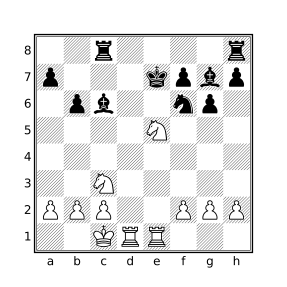
One position found using the above query appears at move 17 in this game:
17.Nxg6#
In the actual game White played 17.Nxc6+ and went on to lose the game (which was a 30 second bullet game).
Who’s the Goof?
“Who’s the Goof” is the name coined by Jeff Coakley for a puzzle where the goal is to determine why a presented position is unreachable. While some of the puzzles are simple, such as having too many pawns on the board or both kings in check, many of the puzzles require retrograde analysis to solve. Two such puzzles are shown in the below diagrams.
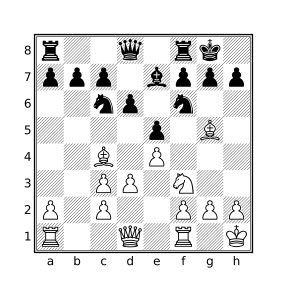
J. Coakley, 1996
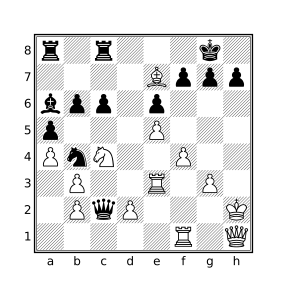
J.Coakley, 2010
The reachableposition filter can be used to try to determine if a position is reachable. The filter yields false if CQLi can prove that the position cannot be reached by any sequence of moves from the starting position and true otherwise. When reachableposition appears as an argument to the comment, message, or str filters the result is a string stating that the position is reachable or explaining why the position is unreachable. The string articulations for the reachableposition filter for the above two positions are:
<Unreachable position: Black is missing light-square Bishop but all
 White captures occurred on dark squares (square c3)>

<Unreachable position: Position implies 1 White promotion but promoting
 this many pawns would require too many captures
 [Presence of 1 dark-square White Bishop (square e7) implies at least
  1 promotion]
 [Missing dark-square White Bishop could not have escaped starting square
  (c1)]
 [Existing White pawn structure already implies 1 capture]
 [Promotion of 1 White pawn requires at least 3 additional captures]
 [Black is only missing 3 pieces]
 [Promotion cost calculated using pawn start squares a2, c2, e2, f2, g2, h2
  and promotion files a, b, c, d, e]>
Some unreachable positions require examination of the potential previous positions in order to determine that the position is unreachable, the reachableposition filter does not automatically perform such recursive analysis. For example, the following position is not reachable but will not be detected as such just by using reachableposition:
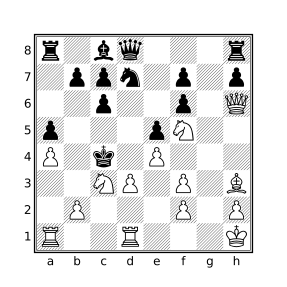
J.Coakley, 2016
The following query will detect the unreachable nature of this position:
move legal reverse count : reachablepositionThe query will yield 0 if none of the previous position candidates themselves are reachable. The below query can be used to obtain a textual articulation detailing why each of the previous candidate positions is unreachable:
move legal reverse count : reachableposition == 0

articulation = ""
if (not move legal reverse : {
    articulation +=
        "After " + currentmutation + ": " + str reachableposition + \n
}) then articulation = "No possible previous moves in position"
comment articulation
The above query will produce the following articulation for the previously diagrammed position:
After 1.~Pd2d3+: <Unreachable position: All of White's missing pieces were
    captured by Black Pawns currently on the board but missing trapped c1
    Bishop could not have been captured by one of these Pawns>
After 1.~Pc2x(N)d3+: <Unreachable position: Black is missing dark-square
    Bishop but all White captures occurred on light squares (square f3)>
After 1.~Pc2x(B)d3+: <Unreachable position: Position implies 1 Black Pawn
    promotion but no promotions are possible
    [Presence of 2 light-square Black Bishops (squares d3, c8) implies at
     least 1 promotion]
    [Black is not missing any Pawns];
    Black is missing dark-square Bishop but all White captures occurred on
    light squares (square f3)>
After 1.~Pe2x(N)d3+: <Unreachable position: White Pawn structure implies 2
    captures but Black is only missing 1 piece;
    Black is missing dark-square Bishop but all White captures occurred on
    light squares (square f3)>
After 1.~Pe2x(B)d3+: <Unreachable position: White Pawn structure implies 2
    captures but Black is only missing 1 piece;
    Position implies 1 Black Pawn promotion but no promotions are possible
    [Presence of 2 light-square Black Bishops (squares d3, c8) implies at
     least 1 promotion]
    [Black is not missing any Pawns];
    Black is missing dark-square Bishop but all White captures occurred on
    light squares (square f3)>
Switcheroos
“Switcheroo” is the name given to a type of puzzle invented by Jeff Coakley in which the goal is to switch the positions of any two pieces such that Black is checkmated in the resulting position. The only requirement is that the solution position must be reachable. Switcheroos should have a single valid solution but often have one or more candidate solutions that result in positions that are unreachable in subtle ways.
Solving Switcheroos
The diagrams below contain two examples of Switcheroos.
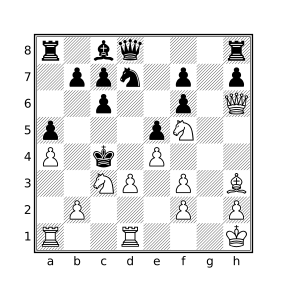
J.Coakley, 2012
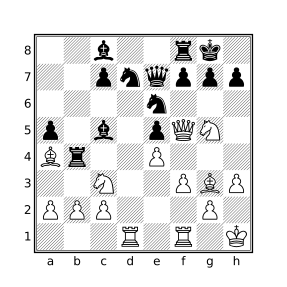
J.Coakley
The imagine filter can be used to swap two pieces. The legalposition filter will check if a position violates any basic chess principles without performing any retrograde analysis, e.g. both kings in check, pawns on the back rank, etc. The reachableposition filter will try to determine if a position is unreachable by additionally applying more sophisticated checks. These filters can be combined to solve Switcheroo puzzles.
The below query will find valid solutions to Switcheroo puzzles as well as identify switches that result in mate and what superficially appears to be a legal position but is in fact unreachable (reported as “Tries”).
// Solve Switcheroo puzzles and report unreachable tries.

tries = ""
solutions = ""

piece $p1 in [Aa] {
    piece $p2 in [Aa] {
        // Don't consider identity swaps or previous swaps
        pieceid $p1 > pieceid $p2
        try = str($p1 " <--> " $p2)
        // Perform the swap and make sure it is black to move
        imagine swap $p1 $p2 sidetomove black : {
            mate
            legalposition
            if reachableposition {
                solutions += try + " "
            } else {
                if tries != "" then tries +=  ", "
                tries += str(try "?: " reachableposition)
            }
        }
    }
}

if solutions != "" {
    comment("Solutions: " solutions)
    comment("Tries: " tries)
}
The output of the above query applied to a PGN file that contains the previously-diagrammed positions is provided below (with comments reformatted to improve readability):
[FEN "1r1Q1B1k/pp3p1p/2nb1rpN/4q1N1/7P/1P4Pb/P1P2R2/R2B2K1 b - - 0 1"]
[SetUp "1"]

{Solutions: bd6 <--> kh8}
{Tries: Ng5 <--> kh8?: <Unreachable position: Impossible check of Black King>,
rf6 <--> kh8?: <Unreachable position: Impossible check of Black King>} *

[FEN "2b2rk1/2pnqppp/4n3/p1b1pQN1/Br2P3/2N2PBP/PPP3P1/3R1R1K b - - 0 1"]
[SetUp "1"]

{Solutions: Rf1 <--> kg8}
{Tries: Ba4 <--> kg8?: <Unreachable position: Impossibly trapped White Bishop
                        on square g8>,
Qf5 <--> ph7?: <Unreachable position: Black Pawn structure implies 2 captures
                but White is only missing 1 piece>,
Ng5 <--> kg8?: <Unreachable position: Impossible check of Black King>,
ne6 <--> kg8?: <Unreachable position: Impossible check of Black King>,
nd7 <--> kg8?: <Unreachable position: Impossible check of Black King>} *
Note that in the first puzzle, the position after bd6 ↔︎ kh8 is reachable if the previous move was e7xd8=Q#.
Finding Switcheroos
The following query will search games in a database for positions which meet the requirements of a Switcheroo. In order to provide higher-quality puzzles and keep things interesting, the following additional conditions will be incorporated:
- Only positions containing mutual switcheroos will be sought. A mutual switcheroo is one in which there is exactly one swap that will checkmate black and a different swap which will checkmate white. This significantly reduces the frequency of matching positions and adds another element to the puzzles.
- Only positions that contain at least one unreachable try for each checkmate will be considered. This makes for more interesting and challenging puzzles.
- Only positions with solutions that do not involve swapping kings are considered. Most switcheroos encountered in actual games involve this theme which gets tired quickly and does not provide the same satisfaction as other puzzles.
// Find Mutual Switcheroos in real games.

tries = ""
opp_tries = ""

mates = 0
opp_mates = 0
solution = ""
opp_solution = ""

piece p1 in [Aa] {
    piece p2 in [Aa] {
        pieceid p1 > pieceid p2
        try = str(p1 " <--> " p2)

        imagine swap p1 p2 : {
            mate
            legalposition
            if reachableposition {
                mates += 1
                if solution != "" then solution += ", "
                solution += try
            } else {
                if tries != "" then tries += ", "
                tries += str(try "?: " reachableposition)
            }
        } or true

        imagine sidetomove reverse swap p1 p2 : {
            mate
            legalposition
            if reachableposition {
                opp_mates += 1
                if opp_solution != "" then opp_solution += ", "
                opp_solution += try
            } else {
                if opp_tries != "" then opp_tries += ", "
                opp_tries += str(try "?: " reachableposition)
            }
        }
    }
}

mates == 1
opp_mates == 1
tries != ""
opp_tries != ""
not "k" in lowercase(solution + opp_solution)

comment(standardfen)
comment("Mutual switcheroo: " solution ", " opp_solution)
comment("Tries: " tries ", " opp_tries)
The above query can easily be modified to relax or add additional constraints. Below are two mutual switcheroos found using this query.
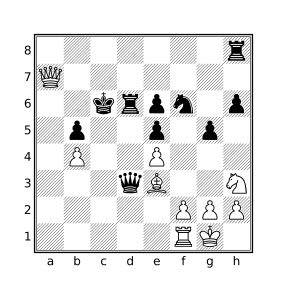
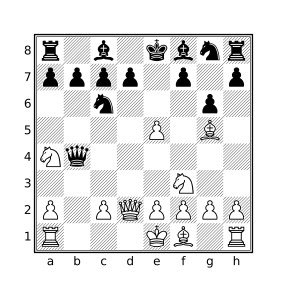
The first puzzle comes from the position after 33...Kc6 in this game, the second comes from the position after 8.Qd2 in this game. The solutions to the first puzzle are: Rf1 ↔︎ rh8 (White is checkmated) and Nh3 ↔︎ pe5 (Black is checkmated). The solutions to the second puzzle are: Ra1 ↔︎ rh8 (White is checkmated) and Nf3 ↔︎ pc7 (Black is checkmated).
The failed tries for the two puzzles are articulated by the following comments:
{Tries: Kg1 <--> Be3?: <Unreachable position: Impossibly trapped White Bishop
on square g1>, Nh3 <--> Pb4?: <Unreachable position: Impossible White Pawn
structure (squares f2, g2, h2, h3, e4)>}

{Tries: Na4 <--> pc7?: <Unreachable position: Black Pawn structure implies 2 captures
but White is only missing 1 piece>, Ra1 <--> ra8?: <Unreachable position: All of
Black's missing pieces were captured by White Pawns currently on the board but
missing trapped a8 Rook could not have been captured by one of these Pawns>}
Retractor Problems
In a retractor problem, the side to move retracts their last n moves and then plays m different moves to reach a specified position.
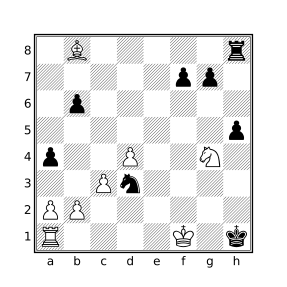
Sam Loyd, 1860
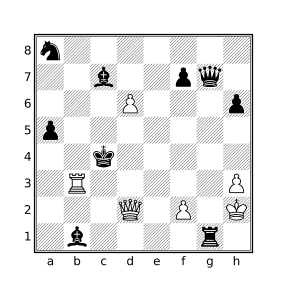
Sam Loyd, 1860
The first part of the problem requires determining what the candidates for the last move(s) are and then determining which of the resulting positions is reachable. CQLi provides reverse move generation which will provide the reverse moves that result in legal positions and the reachableposition filter which will weed out resulting positions that CQLi can determine are unreachable. From there it is simply a matter of iterating over legal moves in the new position to match the stipulation.
For example, to solve problems having the stipulation “White retracts a move to mate in one” the following query may be employed:
move legal reverse : {
    reachableposition
    move legal : { mate comment currentmutation }
}
Running the above query on these positions yields:
[FEN "1B5r/5pp1/1p6/7p/p2P2N1/2Pn4/PP6/R4K1k b - - 0 1"]
[SetUp "1"]

{1.~Pa7x(B)b8=B 1.a8=Q#} {1.~Pa7x(B)b8=B 1.a8=B#} *

[FEN "n7/2b2pq1/3P3p/p7/2k5/1R5P/3Q1P1K/1b4r1 b - - 0 1"]
[SetUp "1"]

{1.~Pe5x(P)d6 1.Qc3#} *
In words, the solution to the first puzzle is to retract the move “pawn on a7 captures bishop on b8 and promotes to bishop” and then to play the move a8=Q# or a8=B#. In the second puzzle the move to retract is “pawn on e5 captures pawn on d5 en passant” and then play the move Qc3#.
Triple Loyds
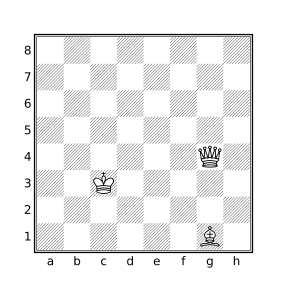
Sam Loyd, 1866
A “Triple Loyd” is the name coined by Jeff Coakley for a puzzle conceived of by Sam Loyd in which the task is to find three distinct squares on which the black king may be placed to produce positions that are 1) mate, 2) stalemate, and 3) mate in 1. The diagrammed position below shows the original puzzle by Sam Loyd.
Solving Triple Loyds
The imagine filter can be used to place the black king on different squares checking for one of the three conditions. The square filter will iterate over a set of squares. The following query will iterate over the set of empty squares to see if any of the conditions are met when a black king is placed thereon. The position only matches if the king can be placed on squares satisfying all three conditions. If there are multiple solutions for any of the three conditions, these will be noted. Unreachable positions will be excluded.
checkmates = []
stalemates = []
matein1s = []

square sq in _ {
    imagine piece k --> sq sidetomove black : {
        reachableposition
        if mate then checkmates |= sq
        if stalemate then stalemates |= sq
        imagine sidetomove white : {
            reachableposition
            move legal : mate
            matein1s |= sq
        }
    }
}

checkmates stalemates matein1s
unsound_reason = ""
if checkmates > 1 then unsound_reason += "multiple checkmates "
if stalemates > 1 then unsound_reason += "multiple stalemates "
if matein1s > 1 then unsound_reason += "multiple mate in 1s "
if stalemates & matein1s then unsound_reason +=
    str("squares " stalemates & matein1s " reused")

comment("Triple Loyd: " checkmates " (mate), " stalemates
    " (stalemate), " matein1s " (#1)")
if unsound_reason != "" then comment("Unsound: " unsound_reason)
Running this query on the above position produces:
[FEN "8/8/8/8/6Q1/2K5/8/6B1 b - - 0 1"]
[SetUp "1"]

{Triple Loyd: e3 (mate), h1 (stalemate), a8 (#1)} *
The mate in 1 after the black king is placed on a8 is 1.Qc8#.
Chess Mazes
A chess maze is a puzzle where a target piece must make its way from its starting square to a specified ending square without moving to a square that is attacked by an enemy piece. The target piece makes all of the moves. There generally should be a single path through the maze that can be traversed in the smallest number of moves.
There are several kinds of chess mazes with different rules that dictate the types of moves that can be made, whether captures are allowed, etc. The mazes considered here use the rules provided by Jeff Coakley in his Puzzling Side series (see issue 69). The rules are relatively simple:
- The goal is for the specified white piece to find the shortest path to capture the black king.
- No other captures are permitted.
- No piece other than the specified traversing piece may move.
- The traversing piece may not move to a square which is attacked by a black piece although it may move through such a square.
For example, the following diagrams show a “Rook Maze in 17” and “Knight Maze in 29” with safe squares highlighted in blue and the shortest paths shown in orange.
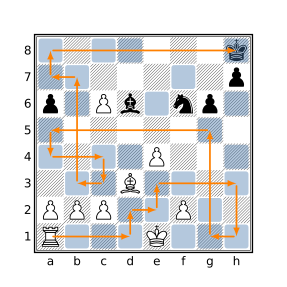
J. Coakley, 2006
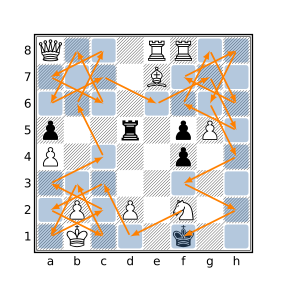
J. Coakley, 2020
The shortest path through such a maze can be calculated using a breadth-first exploration algorithm implemented by iteratively expanding a frontier of reachable positions. The dictionary variable dict_next contains all of the positions that can be reached in n-1 moves, at the beginning of the algorithm this dictionary just contains the starting position. At each iteration, all of the possible moves at every position in dict_next are calculated and the resulting positions are added to a temporary array that becomes the new dict_next at the beginning of the next iteration. The algorithm will find the length of the shortest path, the number of distinct solutions of that length, and the paths for each distinct solution.
The dict_reached dictionary stores the length of the shortest path to each reached square to ensure that every considered move makes forward progress. The dict_paths dictionary stores a string representing the best path for each saved position.
// Solve Coakley-style piece mazes.
initial

// The piece that will traverse the maze, specified by the 'Start' tag.
piece target = makesquare tag "Start"

// The destination square is either specified by the 'End' tag or else
// assumed to be the square on which the black king resides.
dest_square = if tag "End" then makesquare tag "End" else k

// The empty squares that may safely be traversed by the target piece.
safe_squares = (_ & ~(. attackedby a)) | dest_square

// For pawn mazes, are promotions to queen allowed?
allow_queen_promo = 0

dictionary int --> int dict_next      // Next positions to examine
dictionary str --> int dict_reached   // The shortest path to all reached distinct positions
dictionary int --> str dict_paths     // Representation of path used to reach saved position
dictionary int --> int dict_next_temp // New positions reached while processing dict_next
dictionary int --> int unique_paths   // Count of unique paths by ply

// Dictionaries are persistent but entries from previous games should
// not affect the currently analyzed maze so they are reset first.
unbind dict_next
unbind dict_reached
unbind dict_paths
unbind dict_next_temp
unbind unique_paths

dict_next[positionid] = 0
dict_reached[zobristkey] = 0
dict_paths[positionid] = str target
is_pawn_maze = if target & P then 1 else 0
shortest_path = 1000

while (#dict_next > 0) {
    key $key in dict_next {
        position $key : {
            num_premove_pieces = #[Aa]
            premove_target_piece_type = type target
            imagine sidetomove white : move legal from target to safe_squares : {
                allow_queen_promo == 1 or is_pawn_maze == 0 or not target & Q
                if (not dict_reached[zobristkey] or dict_reached[zobristkey] == ply) {
                    imag_position = saveposition
                    save_pos_id = imag_position: positionid
                    dict_next_temp[save_pos_id] = ply

                    dict_reached[zobristkey] = ply
                    if not dict_paths[save_pos_id] then dict_paths[save_pos_id] = ""
                    capture_indicator = if num_premove_pieces != #[Aa] then "x" else ""
                    promote_indicator = if premove_target_piece_type != type target
                        then "=" + (str target)[0]
                        else ""
                    dict_paths[save_pos_id] = dict_paths[$key] + "-" + capture_indicator +
                        str target&. + promote_indicator

                    if target == dest_square {
                        us = if unique_paths[ply] then unique_paths[ply] else 0
                        unique_paths[ply] = us + 1
                        if ply < shortest_path then shortest_path = ply
                        sort min "Shortest path" {
                            comment("Path #" unique_paths[ply]": " dict_paths[save_pos_id]) ply
                        }
                    }
                }
            }
        }
    }

    // Replace dict_next with the contents of dict_next_temp
    unbind dict_next
    key $key in dict_next_temp { value = dict_next_temp[$key] dict_next[$key] = value }
    unbind dict_next_temp
}

comment("Unique paths: " unique_paths[shortest_path])
Given the below input corresponding to the examples mazes above:
[FEN "7k/7p/p1Pb1np1/8/4P3/3B4/PPP2P2/R3K3 w - - 0 1"]
[SetUp "1"]
[Start "a1"]
*

[FEN "Q3RR2/4B3/8/p2r1pP1/P4p2/8/1P1P1N2/1K3k2 w - - 0 1"]
[SetUp "1"]
[Start "f2"]
*
the game-text portion of the output produced by the maze-solving query will look something like:
{Shortest path: 17} {Unique paths: 1}
{Path #1: Ra1-d1-d2-e2-e3-h3-h1-g1-g5-a5-a4-c4-c3-b3-b7-a7-a8-xh8} *

{Shortest path: 29} { Unique paths: 1}
{Path #1: Nf2-d1-c3-a2-c1-b3-a1-c2-a3-c4-b6-c8-a7-c6-b8-a6-c7-e6-
g7-h5-f6-g8-h6-f7-h8-g6-h4-f3-h2-xf1} *
For mazes with multiple shortest paths, the Unique paths comment will report the total number of paths but Smart Comments will suppress all but the first found path since the comment filter that articulates the path appears in a sort filter. The --keepallbest option can be used to see all distinct paths.
Pawn mazes typically require promotion to reach the end square and the promotion to the piece that reaches the end the fastest is the one reported. Because promoting to a queen virtually always results in the shortest path, most such puzzles stipulate that queen promotions are not allowed and queen promotions are thus disabled by default. To allow queen promotions set the allow_queen_promo variable to 1 in the above query.
Mating Patterns
This section explores mating pattern classification using CQLi. On each page, a different mating pattern is presented along with a definition, a query which can be used to find instances of the pattern, and examples of positions that match the provided query.
Mating patterns do not always have unanimous definitions so one is provided for the purpose of defining a corresponding query. In many cases, variations of the mating pattern definition are discussed after the examples along with relevant changes to the provided query to match the variations.
The Query section contains the complete query used to identify positions matching the discussed mating pattern.
The Examples section contains two examples of each pattern which were found using the presented query. The first diagram often contains an archetypical position with the second diagram highlighting either a particularly interesting position or an example of a matching position that may have unexpected characteristics. Arrows and colored squares are used in the diagrammed positions with the following meanings:
- Blue squares are used to represent mating pieces.
- Red squares are used to highlight the mated king and, in some cases, attacked escape squares or the line of attack between a sliding mating piece and the king.
- Green squares show the position of the mating piece in the prior position and a green arrow shows the move that delivered mate.
- Yellow squares are sometimes used to highlight supporting pieces or squares attacked by supporting pieces.
Anastasia’s Mate
Our Definition
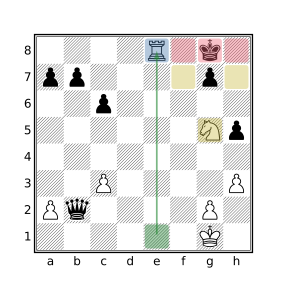
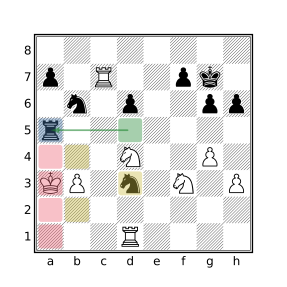
The mated king is on the edge of the board, attacked by an opposing rook. It is trapped on the edge by a friendly piece standing directly in front of it and by an opposing knight that attacks the remaining escape squares which must be empty.
Query
mate
flipcolor rotate90 {
    kh1-8 attackedby Rh1-8
    N & left 3 k
    a & left 1 k
    _ & northwest 1 k
    _ & southwest 1 k
}
Examples
Variations
Stricter variations may additionally require:
- The friendly piece standing in front of the king to be a pawn: add
p & left 1 k- The king must be on its own second rank: add
kh7
Broader variations may allow:
- The attacking piece to be either a rook or a queen:
addkh1-8 attackedby [RQ]h1-8
Anderssen’s Mate
Our Definition
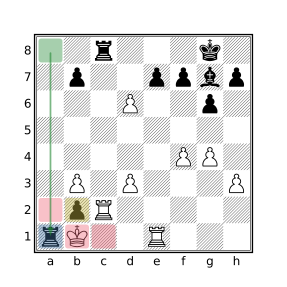
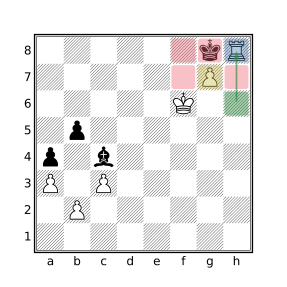
The mated king is attacked on its own back rank by an adjacent opposing rook on the same rank which is in turn supported by a pawn.
Query
mate
flipcolor {
    P attacks (Ra-h8 attackedby ka-h8)
}
Examples
Variations
Stricter variations may require:
- The pawn that supports the rook to also be attacked by the king
(P attacks (Ra-h8 attackedby ka-h8)) attackedby k
Broader variations may allow:
- The mating piece to be either a rook or a queen
P attacks ([RQ]a-h8 attackedby ka-h8)
Arabian Mate
Our Definition
The mated king resides in a corner where it is attacked by an opposing adjacent rook. A knight both defends the rook and attacks the escape square diagonally adjacent to the mating rook.
Query
mate
flipcolor flip {
    kh8 Nf6 Rh7
}
Examples
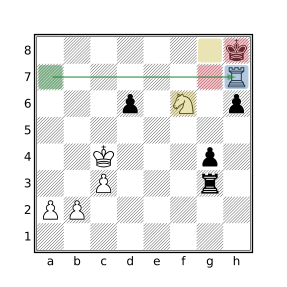
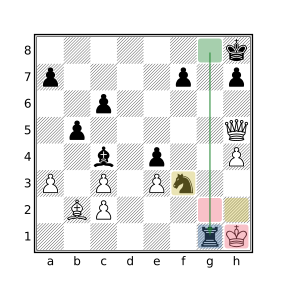
Backrank Mate
Our Definition
The mated king is attacked on its own back rank by a non-adjacent opposing rook or queen on the same rank and the squares on the 7th rank that are reachable by the king are all occupied by friendly pieces.
Query
mate
flipcolor {
    ([QR]a-h8 attacks ka-h8) & ~(. attackedby k)
    [_A]a-h7 attackedby k == []
}
Examples
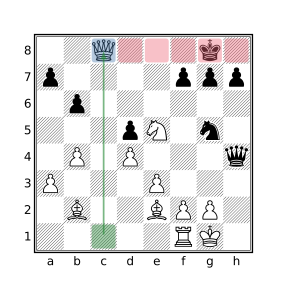
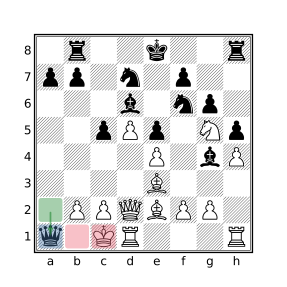
Balestra Mate
Our Definition
The mated king is attacked by a bishop and all of the possible escape squares are attacked by an opposing queen a knight’s move away. Additionally, none of the squares attacked by the queen are also attacked by the bishop and all of the squares surrounding the king that are attacked by the queen are empty.
Query
mate
flipcolor {
    $attacking_bishop =? B attacks k
    $supporting_queen =? (flip northeast 1 up 1 k) & Q
    . attackedby $attacking_bishop & . attackedby $supporting_queen == []
    (. attackedby k) attackedby Q & [Aa] == []
}
Examples
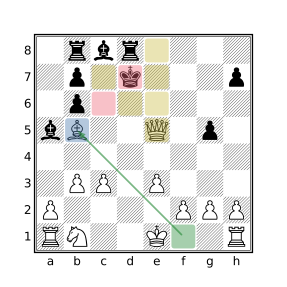
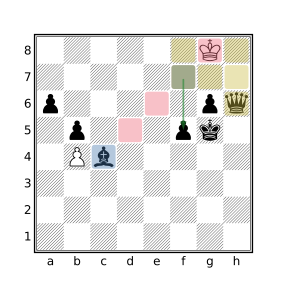
Variations
Stricter variations may require:
- That all of the squares surrounding the king be empty (which implies the king is on the edge of the board): add
(. attackedby k) == (_ attackedby k)
Bishop & Knight Mate
Our Definition
The mated side has no pieces besides the king while the mating side has only a bishop and a knight.
Query
mate
flipcolor {
    a == k
    A == 3
    B == 1
    N == 1
}
Examples
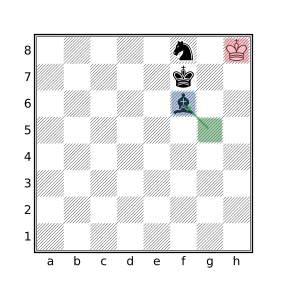
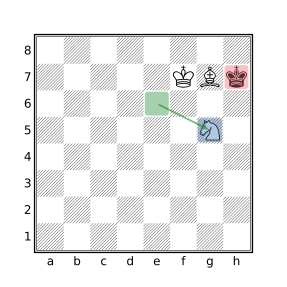
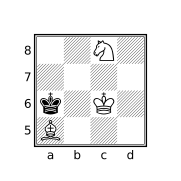
Notes
A bishop and knight can force mate against a lone king in 33 moves or less from any position (except when the stronger side allows the opposing king to attack a piece while threatening stalemate, see diagram) with perfect play, but the required techniques are notoriously difficult to master. The challenge of administering this checkmate is demonstrated by the fact that only about 35% of grandmaster bishop and knight games end in mate and over 15% of such games end in a draw. Among all games played on lichess, only about 11% of bishop and knight endgames end with mate, over 65% of such games end in a draw.
Blackburne’s Mate
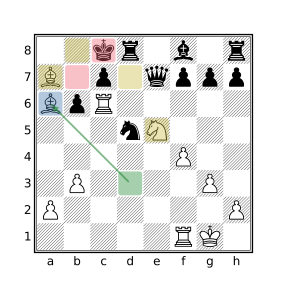
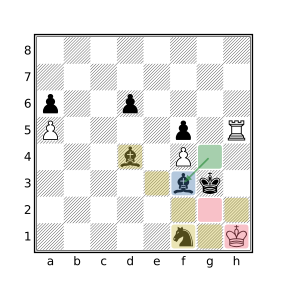
Our Definition
The mated king is attacked by an opposing bishop. All of the squares surrounding the king are either occupied by friendly pieces or empty squares attacked by an opposing bishop or knight. It is a necessary characteristic of this mate that two opposing bishops and one knight participate in the attack.
Query
mate
flipcolor {
    B attacks k
    A attackedby k == []
    _ attackedby k == _ attackedby k attackedby [BN]
    B attacks (_ attackedby k) == 2
    N attacks (_ attackedby k) == 1
    (_ attackedby k) attackedby B & (_ attackedby k) attackedby N == []
}
Examples
Blind Swine Mate
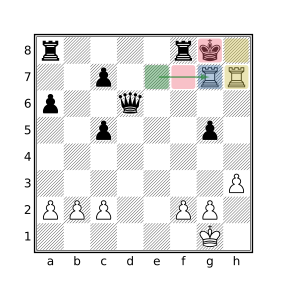
Our Definition
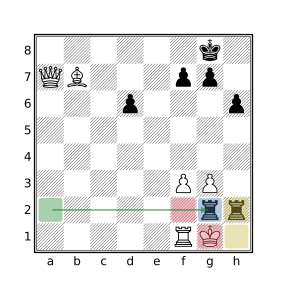
The king, on his own first rank, is attacked by two opposing adjacent rooks on the king’s second rank. One of the rooks checks the king while the other works with the checking rook to block escape squares while at the same time defending the checking rook.
Query
mate
flipcolor {
    horizontal 1 Ra-h7 attacks ka-h8 & Ra-h7
    R attacks (_ attackedby k) == 2
}
Examples
Variations
Stricter variations may require:
- No pieces besides the rooks attack the mated king’s escape squares: add
A attacks (_ attackedby k) == Ra-h7
Broader variations may allow:
- The two rooks to be non-adjacent:
replacehorizontal 1 Ra-h7 attacks ka-h8 & Ra-h7
withRa-h7 attacks ka-h8 attackedby Ra-h7
Boden’s Mate
Our Definition
The mated king is attacked by an opposing bishop. All of the potential escape squares for the king are either attacked by one of two opposing bishops or occupied by friendly pieces. The rays formed by the lines of attack of the bishops intersect.
Query
mate
flipcolor {
    $king_squares = _ attackedby k | k
    $king_squares attacked by B == $king_squares
    B attacks $king_squares == 2
    not k attacks A
    fliphorizontal {
        ray maindiagonal (B k)
        ray offdiagonal (B $king_squares)
    }
}
Examples
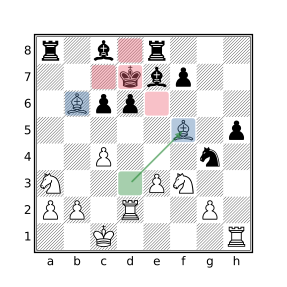
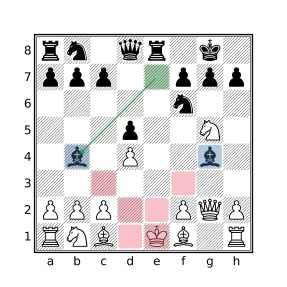
Variations
Broader variations may allow:
- The squares not attacked by the bishops may be occupied by enemy pieces:
remove not k attacks A- The attacking bishops may be attacked by the mated king: replace
not k attacks Awithnot k attacks (A & ~B)
Corner Mate
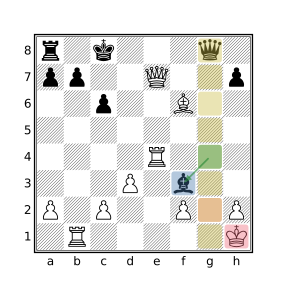
Our Definition
The king is mated in a corner square, hemmed in by a friendly pawn directly in front of the king. A rook or queen controls the adjacent file preventing escape. A minor piece delivers the mating attack. Both potential escape squares on the file adjacent to the king must be empty.
Query
mate
flipcolor {
    flipvertical {
        kh8
        ph7
        _g8
        g7-8 attackedby [RQ]g1-7 == 2
        k attackedby [BN]
    }
}
Examples
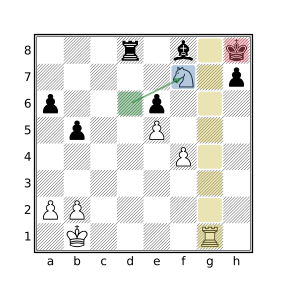
Variations
Broader variations may allow:
- The square horizontally adjacent to the king to be occupied:
remove_g8
Cozio’s (Dovetail) Mate
Our Definition
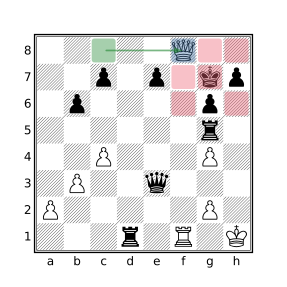
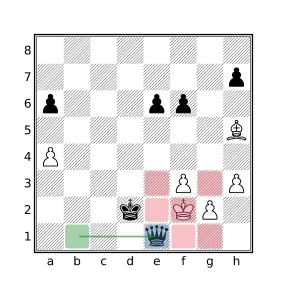
The mated king is attacked by a diagonally adjacent opposing queen which cuts off all escape squares except for the two that are a knight’s move away from the queen which are instead occupied by friendly pieces that cannot capture the queen.
Query
mate
flipcolor rotate90 {
    (southeast 1 k) & Q
    (up 1 k) & a
    (left 1 k) & a
    _ attackedby k == 5
}
Examples
Variations
Stricter variations may require:
- The empty squares surrounding the king not be attacked by any opposing pieces besides the queen: add
A attacks (_ attackedby k) == 1
Broader variations may allow:
- The pieces residing a knight’s move from the queen to be (defended) opposing pieces: replace both instances of
awith[Aa].
Damiano’s Mate
Our Definition
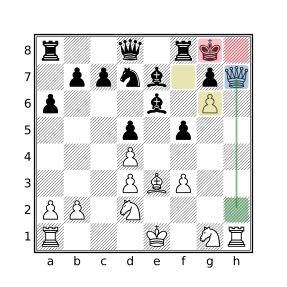
The mated king and rook are in their short-castled positions with a friendly pawn directly in front, itself blocked by an opposing advanced pawn. Mate is delivered by the opposing queen, the advanced pawn both defending the queen and cutting off escape by the king in the other direction. This position is often reached after a rook sacrifice to get the queen into position.
Query
mate
flipcolor {
    {kg8 rf8}
    $friendly_pawn =? down 1 k & p
    $opposing_pawn =? down 1 $friendly_pawn & P
    Q attacks k attackedby $opposing_pawn
    _ attackedby $opposing_pawn
}
Examples
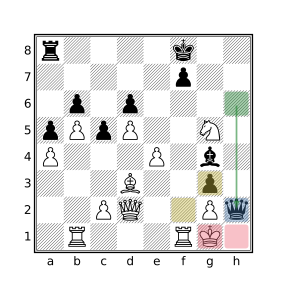
Variations
Broader variations may allow:
- The square attacked by the supporting pawn, opposite the queen, to be occupied: remove
_ attackedby $opposing_pawn.
Epaulette Mate
Our Definition
The king is attacked by a queen two or more squares in front of it and flanked on parallel sides by friendly pieces preventing sideways escape. The three squares in front of the king are either all empty or contain friendly pieces directly in front of the flanking pieces to form a so-called “double epaulette”. This configuration implies that the king either resides on the side of the board or the squares behind it are cut off, typically by an opposing rook.
Query
mate
flipcolor rotate90 {
    A attacks k == ray down (k _ Q) == 1
    (horizontal 1 k) & a == 2
    {southeast 1 k & _  southwest 1 k & _} or
    {southeast 1 k & a  southwest 1 k & a}
}
Examples
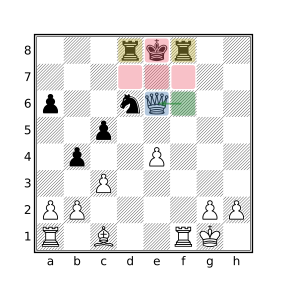
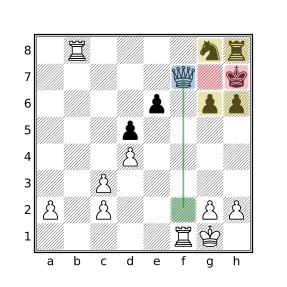
Variations
Stricter variations may additionally require:
- The mated king to be on the edge of the board: add
ka-h8.- That the flanking configuration be horizontal: remove
rotate90.- Flanking pieces to be rooks: replace
(horizontal 1 k) & a == 2
with(horizontal 1 k) & r == 2
Guéridon (Swallow Tail’s) Mate
Our Definition
The mated king is attacked by an orthogonally adjacent opposing queen which cuts off all escape squares except for the two that are a knight’s move away from the queen which are instead occupied by friendly pieces that cannot capture the queen. This is very similar to the Cozio (Dovetail) Mate where the queen is diagonally adjacent to the mated king instead of orthogonally adjacent.
Query
mate
flipcolor rotate90 {
    (down 1 k) & Q
    (northeast 1 k) & a
    (northwest 1 k) & a
    _ attackedby k == 5
}
Examples
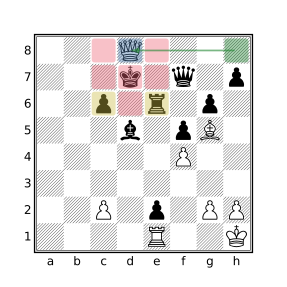
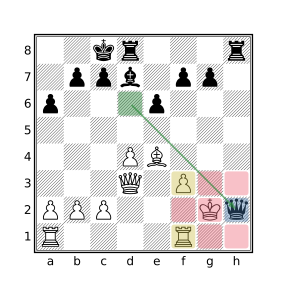
Variations
Stricter variations may require:
- The empty squares surrounding the king not be attacked by any opposing pieces besides the queen: add
A attacks (_ attackedby k) == 1
Broader variations may allow:
- The pieces residing a knight’s move from the queen to be (defended) opposing pieces: replace both instances of
awith[Aa].
Greco’s Mate
Our Definition
The mated king resides in one of the three squares comprising a triangular region in one of the corners of the board. A rook or queen delivers mate from a distance on the edge of the board while a diagonally adjacent friendly pawn and an opposing bishop cut off the remaining escape squares. No other pieces participate in the attack.
Query
mate
flipcolor rotate90 {
    {kg-h7-8 pg7}
    k attackedby [QR]
    _ attackedby k attackedby B
    A attacks (_ attackedby k) == 2
    a attackedby k == 1
    not A attackedby k
}
Examples
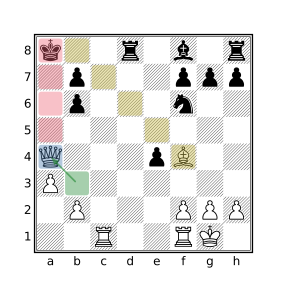
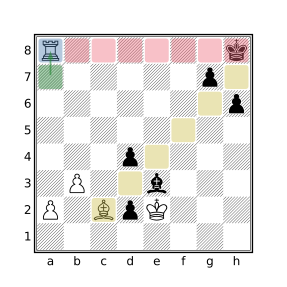
Variations
Stricter variations may require:
- That the king be mated on his own side of the board: replace
rotate90withflipvertical.- The mated king to be in a corner square: replace
kg-h7-8withkh8.
Hook Mate
Our Definition
The mated king is attacked by an opposing adjacent rook which is defended by a knight that is also adjacent to the king, the knight being defended by a pawn. These three pieces work together to solely cover all squares around the gap between the rook and knight which is occupied by an opposing piece incapable of capturing the mating rook.
Query
mate
flipcolor {
    k attacks (N attacks (R attacks k) attackedby P)
    k attacks (R attacks k)
    _ attackedby k == 5
    A attacks (k | . attackedby k) == 3
}
Examples
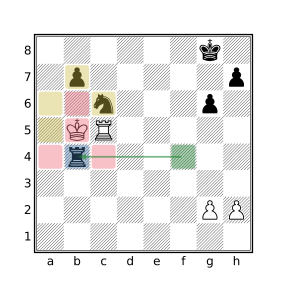
Variations
Broader variations may allow:
- The part of the pawn to be played by a bishop: change
attackedby Ptoattackedby [PB]
Kill Box Mate
Our Definition
The king is mated by an orthogonally adjacent rook that resides in the corner of a 3 by 3 square box with a queen in the opposite corner of the box. The queen both defends the rook and cuts off all escape squares not covered by the rook.
Query
mate
flipcolor rotate90 {
    northwest 2 Q & up 1 k & R
    right 1 k & _
}
Examples
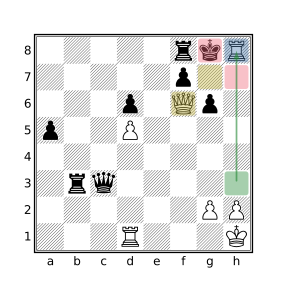
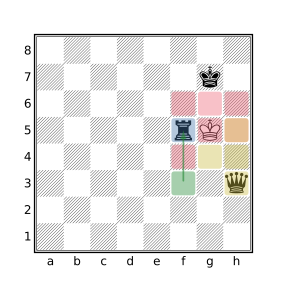
King & Two Bishops Mate
Our Definition
The mated side has no pieces besides the king while the mating side has only two bishops. The mate necessarily occurs on the edge of the board.
Query
mate
flipcolor {
    [Aa] == 4
    B == 2
}
Examples
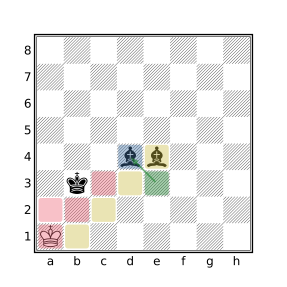
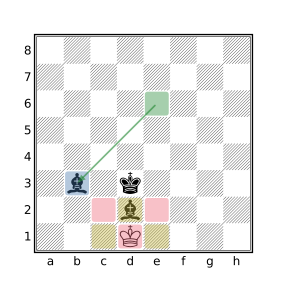
Légal’s Mate
Our Definition
An opposing knight and bishop are positioned around the mated king such that all of the orthogonally adjacent squares are attacked by these pieces, the bishop covers two of the squares and the knight the other two, including the square occupied by the bishop. A third piece, either another knight or another bishop, delivers the mate. The squares diagonally adjacent to the king are either attacked by the third piece or occupied by friendly pieces.
Query
mate
flipcolor rotate90 {
    right 1 k & B
    down 2 k & N
    k attackedby [NB]
    A attacks (k | [A_] attackedby k) == 3
}
Examples
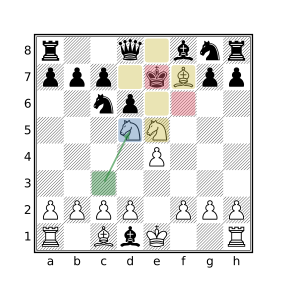
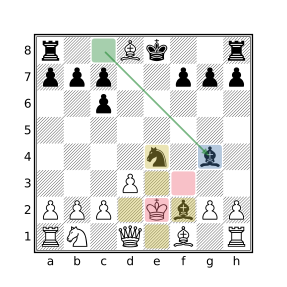
Variations
Stricter variations may require:
- That the piece attacking the king be a knight:
replacek attackedby [NB]withk attackedby N.
Max Lange’s Mate
Our Definition
The king is attacked by a diagonally adjacent opposing queen on separate edges of the board around the corner square. An opposing bishop both defends the queen and attacks the escape square not covered by the queen due to the presence of a piece between the bishop and king. No other pieces directly participate in the attack.
Query
mate
flipcolor flip {
    {Qg8 Bf7 kh7 [Nbnp]g7}
    A attacks (_ attackedby k) == [g8,f7]
}
Examples
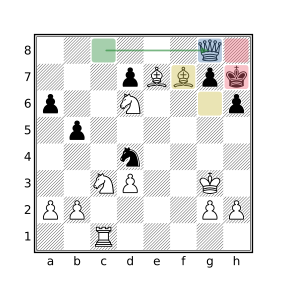
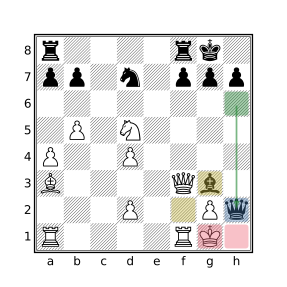
Variations
Stricter variations may require:
- The mated king to reside on its side of the board on the
aorhfile:
replaceflipwithflipvertical.- The mated king to reside on the
h7square (h2for the white king):
removeflip.
Broader variations may allow:
- Other pieces to participate in the attack:
removeA attacks (_ attackedby k) == [g8,f7].
Mayet’s Mate
Our Definition
The king is mated on the edge of the board by an adjacent opposing rook which solely attacks all of the king’s escape squares. The mating rook is defended by a bishop that does not otherwise participate in the attack.
Query
mate
flipcolor rotate90 {
    $rook = Ra-h8 attackedby ka-h8
    A attacks (_ attackedby k) == $rook
    B attacks $rook
}
Examples
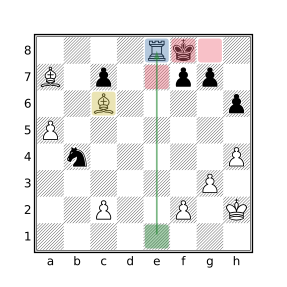
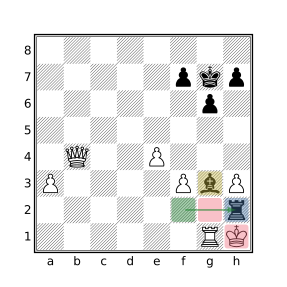
Variations
Stricter variations may require:
- That the king be mated on his own back rank: remove
rotate90.- At least two empty squares around king (which implies king cannot be mated in the corner): add
_ attackedby k > 1.- The bishop defends the rook from a distance:
addbetween($rook B attacks $rook) > 0.
Morphy’s Mate
Our Definition
The king is mated in the corner by an opposing bishop while a rook solely guards the other empty escape square on the adjacent file. A friendly adjacent piece prevents the king from escaping to the next rank.
Query
mate
flipcolor rotate90 {
    kh8 ah7 _g8
    A attacks g8 == Rg1-6
    B attacks k
}
Examples
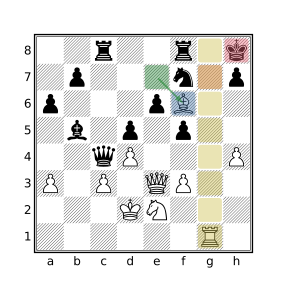
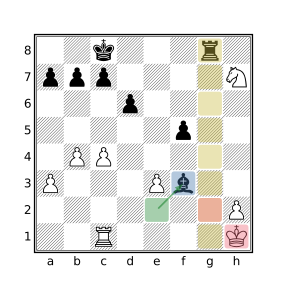
Variations
Stricter variations may require:
- The king to be mated on its own back rank:
replacerotate90withflipvertical.- The friendly obstructing piece to be a pawn: replace
ah7withph7
Broader variations may allow:
- A queen to cut off the king from the adjacent file:
replaceRg1-6 attacks g8with[RQ]g1-6 attacks g8.
Opera Mate
Our Definition
The king is mated on the edge of the board by an adjacent opposing rook which solely attacks all of the king’s escape squares except one. A bishop both defends the rook and attacks the remaining escape square. This mating pattern is distinguished from Mayet’s mate by the fact that the defending bishop attacks one of the escape squares.
Query
mate
flipcolor rotate90 {
    $rook = Ra-h8 attackedby ka-h8
    $bishop = B attacks $rook
    A attacks (_ attackedby k) == $rook | $bishop
    _ attackedby k attackedby $bishop == 1
}
Examples
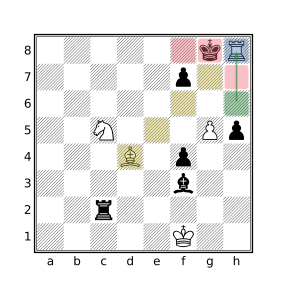
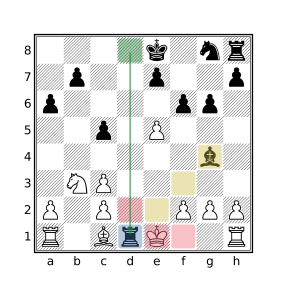
Variations
Stricter variations may require:
- That the king be mated on his own back rank: remove
rotate90.
Pillsbury’s Mate
Our Definition
The king is mated on the edge of the board next to a corner square, by an opposing rook with escape to the empty corner square cut off by a bishop and all other squares surrounding the king occupied by friendly pieces. It differs from Morphy’s mate in that the king is mated in the square next to the corner instead of in the corner square.
Query
mate
flipcolor rotate90 {
    ah7 af7 af8
    Rg1-6 attacks kg8
    B attacks h8
}
Examples
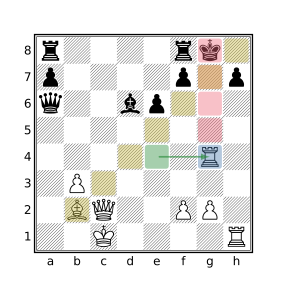
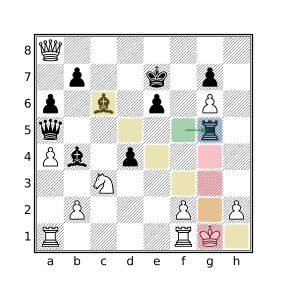
Variations
Stricter variations may require:
- The king to be mated on its own back rank:
replacerotate90withflipvertical.
Broader variations may allow:
- A queen to cut off squares of the long diagonal:
replaceB attacks h8with[BQ] attacks h8
Réti’s Mate
Our Definition
The mated king is surrounded by 4 friendly pieces. Mate is delivered by an opposing bishop that both attacks the king and guards one of the empty squares on the other side of the king. The remaining two potential escape squares are covered by a rook or queen which also defends the bishop at a distance (of at least two squares).
Query
mate
flipcolor rotate90 {
    $bishop =? B & northeast 1 k
    $supporter =? ray down ($bishop _ _ [RQ])
    $guarded =? _ & southwest 1 k
    a attackedby k == 4
    A attacks ((_ attackedby k) & ~$guarded) == 1
}
Examples
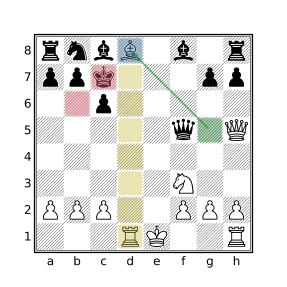
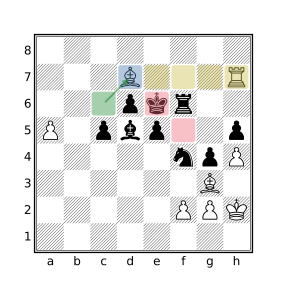
Smothered Mate
Our Definition
The mated king is attacked by a knight and is completely surrounded by friendly pieces.
Query
mate
flipcolor {
    k attackedby N
    . attackedby k & [A_] == []
}
Examples
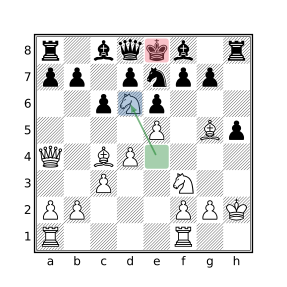
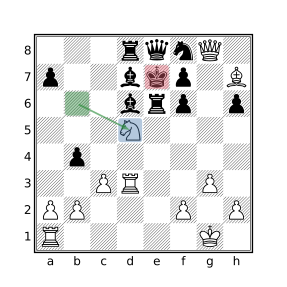
Stamma’s Mate
Our Definition
The mated king is trapped in a corner of the board by one of its own pawns and the opposing king while attacked by an opposing knight.
Query
mate
flipcolor flipvertical {
    ka1 pa2
    Kc1-2
    k attackedby N
}
Examples
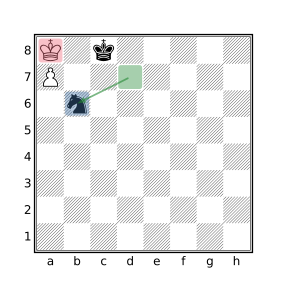
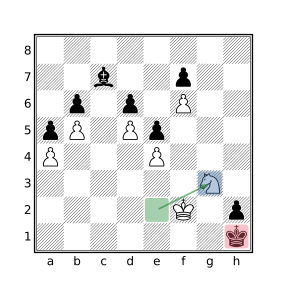
Variations
Stricter variations may require:
- No other pieces on the board for the mated and/or mating side:
addflipcolor { wtm A == 2 }for mated side,
flipcolor { wtm a == 2 }for the mating side,
or[Aa] == 4for both sides.
Suffocation Mate
Our Definition
The king is checked by an opposing knight. All of the empty squares surrounding the king (of which there must at least be one, otherwise it would instead be a smothered mate) reside along a single diagonal which is attacked by a bishop or a queen.
Query
mate
flipcolor {
N attacks k
$escape_squares = _ attackedby k
$attacker = [BQ] attacks $escape_squares
A attacks $escape_squares == 1
rotate90 { northeast $attacker & $escape_squares == $escape_squares }
$escape_squares attackedby $attacker == $escape_squares
}
Examples
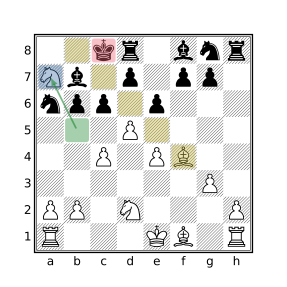
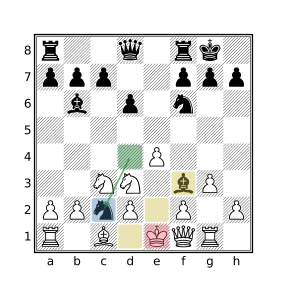
Triangle Mate
Our Definition
The king is mated by a diagonally adjacent queen that resides in the corner of a 3 by 3 square box with a rook an adjacent corner. The rook both defends the queen and cuts off all escape squares not covered by the queen except for the one square on the middle of the edge opposite the edge with the rook and queen. The uncovered square is occupied by a friendly piece.
Query
mate
flipcolor rotate90 {
    a & up 1 k
    flipvertical {
        R & southwest 1 k
        Q & southeast 1 k
    }
}
Examples
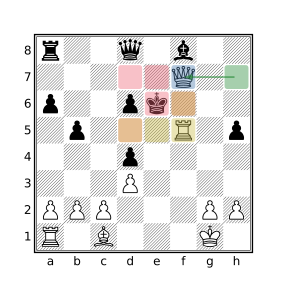
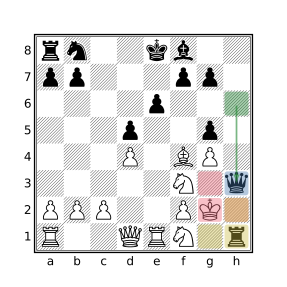
Variations
Stricter variations may require:
- That the remaining squares around the king be empty:
add_ attackedby k == 5.
Vuković’s Mate
Our Definition
The king is mated on the edge of the board by an opposing adjacent rook which is defended by a pawn or king. A knight covers escape squares on the edge of the board.
Query
mate
flipcolor rotate90 {
    N & down 2 ka-h8
    $rook =? R & down 1 ka-h8
    (~[KPk]) attacks $rook == []
}
Examples
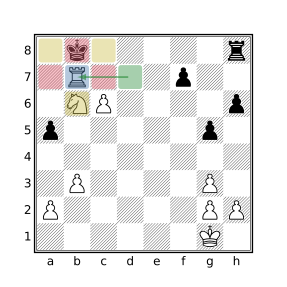
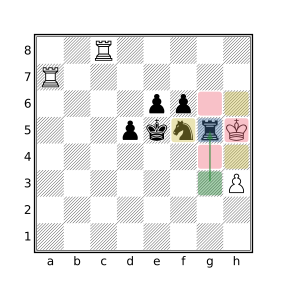
Variations
Stricter variations may require:
- The squares flanking the king to be empty:
addhorizontal 1 k & [Aa] == []- The king to not reside in a corner square:
replace both instances ofka-h8withkb-g8
Broader variations may allow:
- The checking rook to be defended by any piece:
remove(~[KPk]) attacks $rook == []